
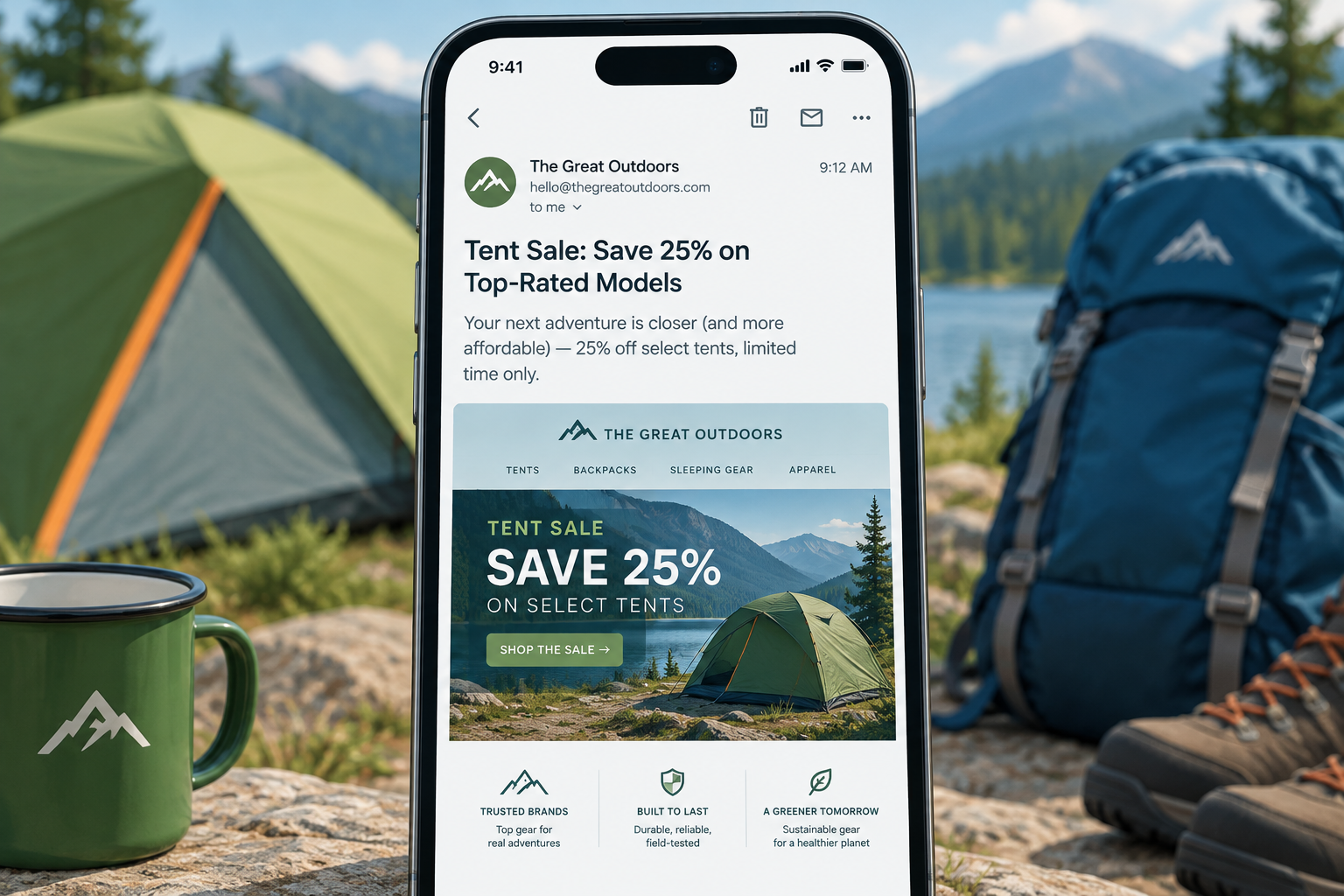
Putting a sales offer at the very top of an email, in the preheader next to the “view in browser” link, is now normal practice and usually a good idea. Most inboxes show this text as the preview line beside the subject, so a clear offer there (“20% off tents through Sunday”) can earn the open. When this post was written, the space held a whitelisting request and a browser link. Today it matters because of Gmail’s Promotions tab and deal annotations, Apple Mail Privacy Protection making open rates unreliable, and the 2024 Gmail and Yahoo bulk sender rules, which reward relevant mail and punish spam complaints.
What outdoor retailers were doing with the top of their emails
A sign-up to several outdoor retail email programs showed many brands using the same format. They put a sales offer at the top of the email, in the strip that usually held the whitelist message and the web browser viewing link. Those two items stayed, and the sales call to action was added beside them.
The original take was skeptical. Maybe the tactic worked and that was why the brands used it. Or maybe the brands didn’t know how to write effective emails and squeezed in extra text hoping for more sales. The argument against it was that the offer crowded out the two messages that already belonged in that strip and looked out of place. It did catch the eye, but mostly because the copy seemed misplaced, and it never prompted a click. The post ended by asking where marketers got these layouts, since no template standard called for them.
Why that top strip matters more now than it did then
The answer to that old question is that the inbox made the decision for marketers. The first text in an email’s HTML is what most clients show as preview text, so this strip has become the second subject line. A sales offer there isn’t out of place. Leaving it as “Having trouble viewing this email? Click here” wastes the most visible copy in the message.
Preview text replaced the whitelist message
The whitelist request (“add us to your address book to make sure our emails reach you”) was standard in the late 2000s. It made sense at a time when desktop clients like Outlook 2007 blocked images by default and webmail filters were cruder. Today it’s mostly history. Gmail has proxied images and shown them by default since late 2013. Inbox placement now depends on authentication, complaint rates and engagement, not on whether a subscriber saved your address.
A “view in browser” link is still useful for heavily designed emails, so most templates keep it. Many brands now put it after the preview text, or move it to the footer, so the inbox preview shows the offer and not the link.
How long preview text should be
The space you get depends on the client and on how long your subject line is. Litmus allows up to 200 characters of preview text in its builder and flags anything over 90 characters as a best-practice limit. Mobile apps show the most. Desktop clients often cut it off after a few words. Put the offer in the first 30 or 40 characters and let the rest add detail.
| Old top-of-email element | Status in 2026 | What to put there instead |
|---|---|---|
| “Add us to your address book” whitelist line | Largely obsolete | Offer or benefit line used as preview text |
| “View in web browser” link | Still useful, lower priority | Keep it, after the preview text or in the footer |
| Sales call to action | Standard practice | Short, specific, matching the subject line |
| Hidden preheader padding | Common technique | Fill unused preview space so body copy doesn’t leak in |
What a good outdoor retail preheader looks like
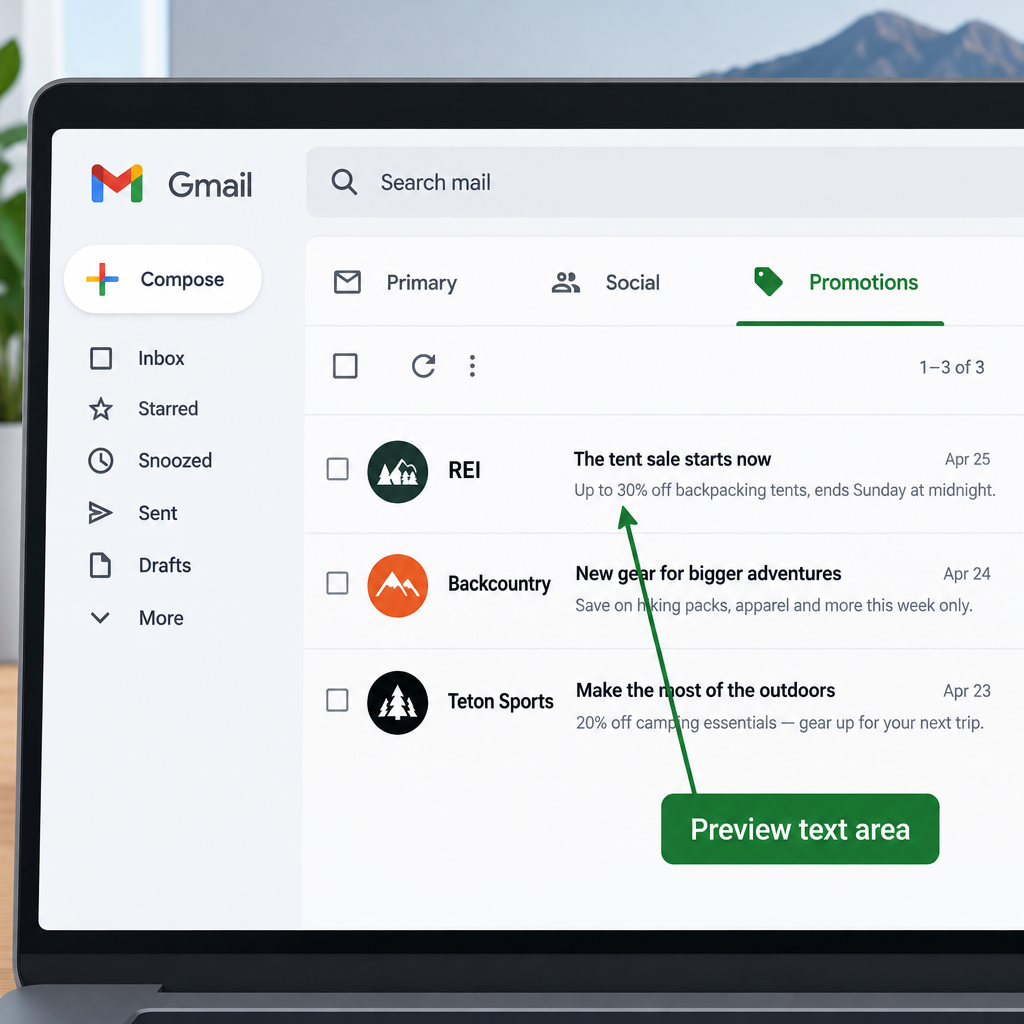
A good one adds to the subject line. Don’t repeat it. A worked example:
- Subject: “The tent sale starts now”
- Preview text: “Up to 30% off backpacking tents, ends Sunday at midnight”
- Then the browser link, in small type
The subject gets attention and the preview text gives the reason to open. If the offer is in the preheader, the hero image and the first button in the body need to show the same offer. When those don’t match, an offer at the top really does look misplaced, which was the original complaint.
What changed for retail email since this post
Three changes affect how you judge a top-of-email offer today.
Gmail tabs and deal annotations. Since 2013, Gmail has sorted most retail mail into the Promotions tab. Google now offers Promotions tab annotations, so senders can show a deal badge and discount code next to the subject line. That puts the offer where the old outdoor brands were trying to put it, in a format Gmail supports officially.
Open rates stopped being a clean test. Apple’s Mail Privacy Protection, launched with iOS 15 in 2021, preloads images through Apple’s proxy servers for users who turn it on. Those preloads register as opens. If you want to know whether a preheader offer works, compare clicks, conversions and revenue per email. Opens alone won’t tell you.
Sender rules reward relevant mail. From February 2024, Gmail and Yahoo require anyone sending more than 5,000 messages a day to their users to authenticate with SPF, DKIM and DMARC. Bulk senders must also support one-click unsubscribe and keep spam complaint rates low. Google says to stay under 0.3% in Postmaster Tools and aim for under 0.1%. Microsoft added similar rules for Outlook.com, Hotmail.com and Live.com on May 5, 2025. A clear, honest offer in the preview text doesn’t break any of these rules. A misleading one that gets people to open and then report spam does.
A minimal DMARC record that meets the baseline looks like this:
_dmarc.example.com. TXT "v=DMARC1; p=none; rua=mailto:[email protected]"
Mobile and dark mode reading
Most retail email is now read on phones, where the preview text and the first screen of the email decide whether anyone scrolls. Keep the preheader offer short enough to read at a glance. Make sure your header logo and any offer graphics still show up when dark mode inverts or darkens the background. Logos with transparent backgrounds and dark text can disappear on dark backgrounds.
The verdict on the old question
The outdoor brands were early, not wrong. Putting the offer at the top only looked odd because the rest of the email didn’t back it up. Today the better move is to treat the preview text as part of the subject line, test it against clicks and sales, and keep the browser link as a fallback. The whitelist line can go.
FAQ
Should the preheader repeat the subject line?
No. The preview text sits right beside the subject in most inboxes, so repeating it wastes space. Use the preheader to add a detail the subject leaves out, such as the discount, the deadline or the product category.
Is the “view in browser” link still needed?
It’s still useful for image-heavy or interactive emails that don’t display well in every client. It no longer needs the first spot at the top. Many senders put it after the preview text or in the footer.
Do I still need to ask subscribers to whitelist my address?
It’s rarely worth the space. Gmail, Yahoo and Outlook.com decide inbox placement mostly from authentication, complaint rates and engagement. Address book saves count for much less than they once did. A welcome email that sets expectations does more good.
How do I test whether a sales offer in the preheader works?
Split-test two versions of the preview text and judge them on clicks, conversions and revenue per recipient. Apple Mail Privacy Protection inflates opens for many subscribers, so an open-rate win alone can mislead you.
Can a preheader offer hurt deliverability?
The offer itself won’t. Misleading preview text can, if people open, feel tricked and mark the email as spam. Gmail and Yahoo watch complaint rates closely for bulk senders. Make sure what the preheader promises is the deal the email delivers.
What are Gmail deal annotations?
They’re optional markup that lets a sender add a deal badge, discount code or product images to an email in Gmail’s Promotions tab. Retailers use them to show the offer before the email is opened. Gmail decides whether the annotation actually appears.
Sources
- Google: Email sender guidelines
- Google for Developers: Annotate emails in the Promotions tab
- Yahoo Sender Hub: Sender best practices
- Microsoft Tech Community: Outlook’s new requirements for high-volume senders
- FTC: CAN-SPAM Act compliance guide for business
- Litmus Help: Edit your email’s subject line and preview text
- Postmark Support: Open tracking and Apple Mail