
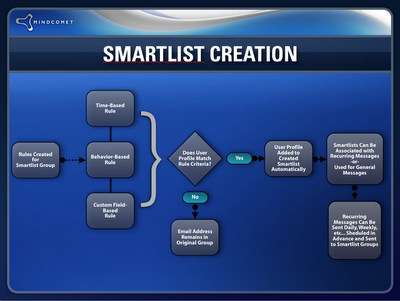
A dynamic subscriber segment is a saved set of rules, such as “joined in the last 7 days” or “clicked the pricing link.” Your email platform updates who is in it, so each send or automation reaches the people who match at that moment. In November 2026 every major ESP has them: Mailchimp calls them segments, and Klaviyo’s segments update in close to real time. The biggest change since segments were new is that opens no longer mean much. Apple Mail Privacy Protection preloads tracking pixels, and the Gmail, Yahoo and Microsoft bulk sender rules put a cap on spam complaints. So the best segments today are built on clicks, purchases and signup data, and they are also used to stop mailing people who have gone quiet.
To send the most targeted messages to your list, use dynamic subscriber segments. They make targeting easier. Some platforms brand them with their own names, such as SmartLists. Every version works the same way: you set rules for who gets included or excluded.
What dynamic segments can be based on
A dynamic segment can use time, behavior or the data you store about each subscriber. The three classic building blocks are:
- Subscription date, for example everyone who joined in the last 30 days or exactly 4 days ago.
- Opens or clicks, for example people who clicked a certain link, or who have not engaged lately.
- Custom field data, for example country, plan type, birthday, or anything else you collect at signup or sync from your store or CRM.
Modern platforms add more rule types. Common ones are purchase history, website or app events, tags, preference center choices and predicted values. Your plan can limit how detailed the rules get. Mailchimp lets a regular segment combine up to 5 conditions. Its advanced segments, which allow complex nested rules, need the Standard plan or higher.

Why open-based rules need care now
Rules based on opens were reliable when this approach first spread. They aren’t anymore. Apple Mail Privacy Protection fetches images and tracking pixels when a message arrives, so the platform records an “open” even if nobody reads the email. Gmail has also served images through its own proxy for years, which hides much of the reader’s device and location data. Use clicks, replies, purchases and site visits as your main engagement signals. If your ESP can separate machine opens from real ones, filter the machine opens out before you use opens in a rule.
Segment examples you can build today
You might want to email subscribers who haven’t engaged with you in the last month. You might want to send a different follow-up to people who clicked a specific link. You might want to welcome everyone who joined your list four days ago. Here is how those ideas look as rules today:
| Goal | Rule | Note for 2026 |
|---|---|---|
| Win back quiet subscribers | No clicks in the last 90 days AND subscribed more than 90 days ago | Don’t use opens alone, because Apple’s machine opens make inactive people look active |
| Follow up on interest | Clicked a specific link in a given campaign | Clicks are still one of the most reliable signals you have |
| Time-based welcome | Signup date is exactly 4 days ago | Works well as the trigger for an automated welcome series |
| Protect deliverability | No engagement in 6 to 12 months | Send one reconfirmation email, then suppress anyone who doesn’t respond |
The last row matters more than it used to. Yahoo’s Sender Hub suggests sending a reconfirmation email to inactive subscribers instead of mailing them forever. Gmail’s guidelines say to keep the spam rate reported in Postmaster Tools below 0.3%, and to aim lower. Mailing people who lost interest long ago is one of the quickest ways to break that limit.
How segments work as saved search queries
Think of a dynamic segment as a saved search query. The rules stay the same while the people in the segment change. Pair the segment with an automation, which older platforms called a recurring message feature, and your emails go out on their own based on rules you set ahead of time.
The automation is now called a flow, a journey or an automation, depending on the platform. Many platforms can start one when a contact enters a segment. Membership doesn’t always update instantly, so check your platform’s documentation. Klaviyo’s help center says most segments update in close to real time. It also says that if you force a manual refresh of a segment, the people it adds won’t enter flows triggered by that segment.
The benefits of dynamic segments
The main benefit is that you can reach specific groups on your list without extra manual work. You can send many targeted messages automatically, each to the right segment, without exporting spreadsheets or rebuilding lists before every campaign.
There is a deliverability benefit as well. Gmail and Yahoo have enforced bulk sender rules since February 2024. Microsoft added similar rules for Outlook.com on May 5, 2025, for domains sending more than 5,000 emails a day. These rules require SPF, DKIM and DMARC, and Gmail and Yahoo also require one-click unsubscribe for marketing mail. Segments don’t replace any of those requirements. What they do is keep complaint rates down by sending each message to people who are likely to want it.
FAQ
What is the difference between a list and a segment?
A list, or audience, is the full set of contacts you have permission to email. A segment is a filtered view of that list based on rules. Most ESPs suggest keeping one main audience and slicing it with segments and tags. Separate lists can lead to duplicate contacts, and someone who unsubscribes from one list may keep getting mail from another.
Do dynamic segments update automatically?
Yes, that is what makes them dynamic. How fast depends on the platform. Klaviyo says most of its segments update in close to real time. Other tools recalculate a segment when a campaign is sent. Check your ESP’s help center before you rely on a segment for time-sensitive messages.
Should I still segment by opens?
Only with care. Apple Mail Privacy Protection records opens that nobody made, so a rule like “opened in the last 30 days” will keep many inactive subscribers on your list. Base engagement rules on clicks, purchases or site activity, and only use opens if your platform filters out machine opens.
How do segments help with the Gmail and Yahoo sender rules?
The rules set hard requirements: authentication, one-click unsubscribe for marketing mail, and a spam rate below 0.3% in Gmail’s Postmaster Tools. Segments help with the spam rate. When you stop mailing long-inactive contacts and send relevant messages to engaged ones, fewer people press “Report spam.”
Does segmenting change my CAN-SPAM obligations?
No. Every commercial email still needs accurate header information, an honest subject line, a valid physical postal address and a working opt-out, and you must honor opt-outs within 10 business days. Each violating email can draw a civil penalty of up to $53,088 under the FTC’s current inflation adjustment. If someone opts out, they must be excluded from every segment.
Sources
- Google Gmail Help: Email sender guidelines and Email sender guidelines FAQ (support.google.com)
- Yahoo Sender Hub: Sender Best Practices (senders.yahooinc.com)
- Microsoft Outlook Postmaster: Policies, Practices, and Guidelines (postmaster.live.com)
- Federal Trade Commission: CAN-SPAM Act, A Compliance Guide for Business (ftc.gov)
- Mailchimp Help Center: Create and Send to a Segment (mailchimp.com)
- Klaviyo Help Center: Understanding how segments update (help.klaviyo.com)