
Send your welcome email as soon as someone signs up, or as soon as they confirm a double opt-in. It should do three things: thank the subscriber, tell them what they will get and how often, and give them one clear next step. The big change since this post first ran is the inbox itself. Gmail and Yahoo have required SPF, DKIM, DMARC, one-click unsubscribe and low spam rates from bulk senders since February 2024, and Apple Mail Privacy Protection now inflates open rates, so a welcome email is now judged on clicks and conversions instead of opens.
Why welcome messages matter
Welcome messages are a key part of your email marketing strategy. When people join your list through your website, take the time to welcome them to the family.
Welcome emails are automated flows, and automated flows do much better than one-off campaigns. Klaviyo’s 2025 benchmarks put the average conversion rate for automated flows at 1.42%. The average for campaigns is 0.08%. A welcome email is often the first flow a new list sets up, and it tends to earn more than anything else you send.
When to send your welcome email
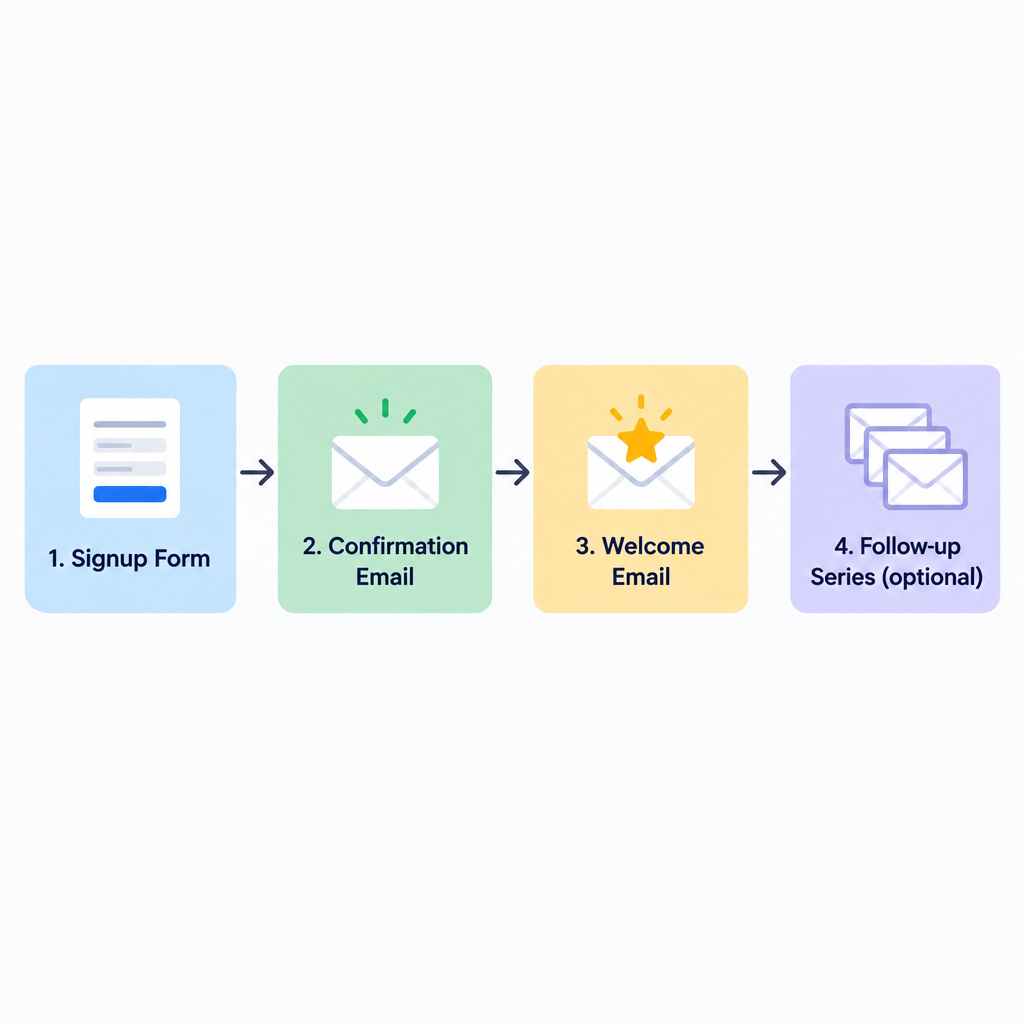
Send it right away. An older version of this advice said that with a double opt-in you should wait a day or two before sending the welcome message, so that new subscribers don’t get several emails within minutes. That advice is out of date. Today the confirmation email and the welcome email do different jobs:
- Confirmation email. This goes out the moment someone submits your form. It contains one button that confirms the address. It should not try to sell anything.
- Welcome email. This goes out the moment the subscriber clicks that button. Most email platforms can trigger it automatically. Mailchimp, for example, offers a “Final Welcome Email” that it sends only to signups confirmed through double opt-in.
- Follow-up emails (optional). If you have more to say, spread it over a short welcome series of two to four emails across the next week or two. Don’t pack everything into the first email.
Waiting is a problem because people forget signing up. Someone who doesn’t recognise your name two days later is more likely to hit “Report spam”, and a high spam rate now has real consequences with Gmail and Yahoo.
If you use single opt-in, the welcome email also works as a quiet check on the address. If it bounces or never gets a click, that’s an early sign the address was mistyped or fake.
Make the most of your first email
Your first emails have the best chance of being opened, so use that moment to introduce your brand. Your welcome message tells new subscribers that you noticed them and that you value the time they took to sign up.
That chance depends on the email actually reaching the inbox. Gmail has sorted mail into tabs since 2013, and branded welcome emails often go to the Promotions tab. A plain, personal tone, a recognisable sender name and a short subject line all help your email stand out there. A simple “Welcome to [brand]” usually works better than a subject line full of offers.
What a welcome email should do
Your welcome message can do several jobs at once:
- Make subscribers feel special
Welcome messages make subscribers feel part of an exclusive community. Think about including a surprise offer, such as a discount or free shipping. If your signup form promised a code, put it near the top of the email so people don’t have to scroll to find it.
- Set expectations
Tell subscribers how often they will hear from you. Remind them why signing up was a good idea and what they can expect in future emails. Clear expectations at the start lead to fewer unsubscribes and spam complaints later, because people know what is coming.
- Collect more data
Ask subscribers to tell you a little more about themselves. You can ask for things you left out of the signup form, such as their birthday, their interests, their location or their preferred email frequency, so you can segment your list better later. A short preference link or a one-question poll works better than a long form. Only ask for what you will really use, and say why you are asking. Data protection laws such as the EU’s GDPR expect you to keep the data you collect to a minimum.
Rules your welcome email has to follow
A welcome email is a commercial message, so the same rules apply to it as to every other marketing email you send.
| Requirement | Who sets it | What it means for your welcome email |
|---|---|---|
| SPF and DKIM authentication | Google, Yahoo, Microsoft | Your sending domain must pass both, set up through your email platform’s domain settings |
DMARC record, at least p=none |
Google and Yahoo (bulk senders, since February 2024) | The From domain must align with SPF or DKIM |
| One-click unsubscribe | Google and Yahoo (bulk senders) | Include the List-Unsubscribe headers and a visible unsubscribe link, and act on requests within two days |
| Spam rate under 0.3% | Google and Yahoo | Google recommends staying below 0.1%, as shown in Postmaster Tools |
| Similar authentication rules | Microsoft (Outlook.com, Hotmail, Live) | Enforced since 5 May 2025 for senders of more than 5,000 emails a day |
| Physical postal address and honest From and subject lines | FTC, under CAN-SPAM | Applies to every commercial email, whatever your volume |
Google defines a bulk sender as anyone who sends close to 5,000 or more messages a day to personal Gmail accounts. Since November 2025 it has moved from warnings to stricter enforcement against mail that doesn’t comply. Yahoo publishes no volume threshold, so the safe approach is to treat its requirements as applying to you.
CAN-SPAM penalties are steep. The maximum civil penalty is $53,088 per violating email. In September 2026 the FTC confirmed that 2026 would bring no inflation adjustment, so the 2025 figure still stands.
How to measure your welcome email
Judge your welcome email on clicks, conversions and revenue per recipient. Open rates are no longer reliable. Apple Mail Privacy Protection, launched with iOS 15 in September 2021, preloads images for many Apple Mail users, and that counts as an “open” even if nobody reads the email. Gmail has also cached images through its own proxy since 2013. A welcome email reporting a 60% open rate may have been read by far fewer people.
Here are three numbers worth tracking:
- Click rate on the main call to action. This shows whether people want what you offered.
- Conversion rate or placed-order rate within a set window, such as seven days after the welcome email.
- Spam complaints and unsubscribes from the welcome email. A spike here usually means the signup promise and the email don’t match.
Also check how the email looks on a phone and in dark mode before turning it on. Most welcome emails are read on mobile, and a logo with a transparent background can disappear on a dark background.
The welcome is the start
Your subscribers asked to hear from you. Use that by making new subscribers feel welcome from the start, then keep the promise your first email made. The best next step is to look at what your current welcome email asks the reader to do. If it doesn’t ask them to do one clear thing, rewrite the call to action before you change anything else.
FAQ
How soon should a welcome email be sent after signup?
Send it straight away. With double opt-in, that means the moment the subscriber clicks the confirmation link. Interest is highest in the first few minutes, and waiting a day or two makes it more likely people forget signing up and mark your email as spam.
Should a welcome email include a discount?
Only if your signup form promised one, or if discounts suit your brand. If the form promised a code, put it near the top of the email. If you don’t want to train subscribers to wait for offers, a useful guide, a bestseller list or free shipping on the first order can work as well.
How many emails should a welcome series have?
Most brands use two to four emails over one to two weeks. The first one thanks the subscriber and delivers what was promised. Later ones introduce products, your story or your best content. Stop the series as soon as someone makes a purchase or converts, so they don’t get offers they no longer need.
Is double opt-in still worth it?
For most lists, yes. It confirms that the address is real and belongs to the person who signed up, which keeps bounces and spam traps out of your list and supports your consent records under laws like GDPR. The cost is that some people never confirm, so your list grows more slowly but stays cleaner.
Does a welcome email need an unsubscribe link?
Yes. Under CAN-SPAM, a welcome email that promotes your business is a commercial message and needs a working opt-out and your postal address. Gmail and Yahoo also expect bulk senders to support one-click unsubscribe in the message headers.
Why is my welcome email open rate so high?
Apple Mail Privacy Protection and image proxies count automatic image loads as opens, so welcome emails often report inflated open rates. Use clicks, conversions and revenue per recipient to judge performance.
Sources
- Google: Email sender guidelines
- Google: Email sender guidelines FAQ
- Yahoo Sender Hub: Best practices
- FTC: CAN-SPAM Act, A Compliance Guide for Business
- Federal Register: FTC civil penalty inflation adjustments notice, 2026
- Mailchimp: About Double Opt-in
- Klaviyo: Email marketing benchmarks