
As of November 2026, every new Amazon SES account starts in a sandbox. In the sandbox you can send 200 messages per 24 hours, at one message per second, and only to verified addresses. To send more, you request production access in the SES console. AWS then sets your quota based on the use case you describe, and it can raise that quota automatically as long as your bounce and complaint rates stay low. Several things have changed since this post first ran. The fixed ramp-up schedule is gone. Gmail and Yahoo have enforced SPF, DKIM, DMARC and spam-rate rules for bulk senders since February 2024. And on 21 July 2026, new SES accounts moved to a default Essentials pricing plan of $0.16 per 1,000 emails.
Why SES Works Well for Transactional Email
Amazon’s Simple Email Service is still one of the cheapest and most flexible ways to send transactional messages such as receipts, password resets, account alerts and shipping notices. Its biggest strength hasn’t changed. It’s an API and SMTP relay that fits behind almost any stack, so you can keep your marketing ESP for newsletters and send system mail through SES.
Cost has changed, though. The flat $0.10 per 1,000 emails rate still exists, but AWS now calls it à la carte pricing. Since 21 July 2026, new accounts start on the Essentials plan. AWS’s pricing page lists these plans:
| Plan | Monthly fee (per account, per Region) | Price per 1,000 emails | Main additions |
|---|---|---|---|
| À la carte | None | $0.10 | Sending only; add-ons billed separately |
| Essentials (default for new accounts) | None | $0.16 up to 10M, $0.14 for 10M to 100M, $0.11 above 100M | Deliverability insights (Virtual Deliverability Manager) |
| Pro | $105 | $0.22 for the first 10M | Inbox placement testing, managed dedicated IPs, email validations |
| Enterprise | $500 | $0.23 for the first 10M | Global endpoints, tenants, more validations |
The SES-specific free tier ended for new customers on 21 July 2026. New AWS customers may still get general AWS Free Tier credits that can be put toward SES. For a pure transactional sender that doesn’t need the dashboards, switching to à la carte is often the cheaper choice. You can switch at any time.
The Original Ramp-Up Schedule, Now History
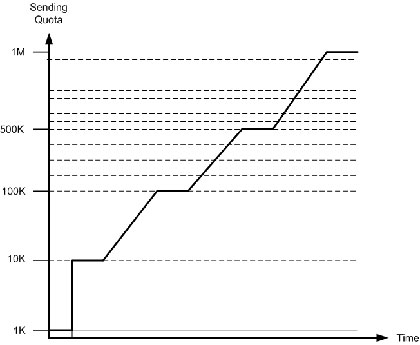
When your account first goes live, the number of messages you’re allowed to send each day is the limit to plan around. When this post was written, shortly after SES launched in 2011, the ramp-up was automatic and on a fixed schedule:
- A newly approved account could send 1,000 messages per day.
- After three days, the limit rose to 10,000 per day.
- Within about two weeks, an account could reach 1 million messages per day.
- The sending rate rose alongside the daily quota, from one email per second up to 90 per second.
The diagram below shows those original sending limits:

That schedule no longer exists. The current process works like this:
- Sandbox. Every new account starts here, separately in each AWS Region. You can send 200 messages per 24 hours at one message per second, and only to and from verified email addresses or domains.
- Production access request. In the SES console, open the Account dashboard and choose Request production access. AWS asks for your mail type (transactional or marketing), your website URL, how you collect addresses, how you handle bounces and complaints, and how recipients opt out.
- Your granted quota. AWS sets the daily quota and maximum send rate based on what you describe. There is no standard starting figure, and quotas vary by AWS Region and account.
- Automatic increases. SES might raise your quotas without a request if you send real production mail, keep bounces and complaints low, and regularly approach your daily maximum without going over it.
- Manual increases. If you need more, request it in the AWS Service Quotas console under Amazon Simple Email Service. AWS aims to answer sending quota and rate requests within 24 hours.
One detail catches many teams out: quotas count recipients, not messages. A single email sent to 10 people uses 10 of your daily allowance.
Why Amazon Ramps You Up Slowly
The reason is deliverability. Amazon still wants new senders to grow their volume gradually. If a brand-new account suddenly sent tens of thousands of messages a day, many of them would likely land in spam or be rejected.
The original post said the IP address had to be “established” and “whitelisted” first. The idea is still right, but the details have changed:
- Shared IPs. Most SES accounts send through Amazon’s shared IP pools, which are already warmed up. On shared IPs, reputation is shared among the senders using the pool, though your own domain, your authentication and how recipients react to your mail also matter.
- Dedicated IPs. Standard dedicated IPs cost $24.95 per IP per month and need warming before they carry full volume. SES offers automatic warm-up for standard dedicated IPs. Managed dedicated IPs are included in the Pro plan or cost $15 per month per account plus usage charges on à la carte, and they scale up on their own based on your sending volume.
- Allowlisting. The term “whitelisting” is out of date, and Gmail’s sender guidelines don’t describe any allowlist status granted to bulk senders. They judge you on authentication, complaint rates and engagement.
SES also watches your reputation. A bounce rate of 5% or more, or a complaint rate of 0.1% or more, automatically puts your account under review. If your bounce rate is still above 10% when the review ends, AWS may pause your sending.
Authentication You Need Before Launch
Since February 2024, Gmail and Yahoo have required every sender to authenticate with SPF or DKIM. Bulk senders, meaning roughly 5,000 or more messages a day to Gmail addresses, must also publish DMARC, align their From domain, and keep their spam rate below 0.3% in Google Postmaster Tools. Marketing mail also needs one-click unsubscribe. Transactional mail is exempt from that rule. Microsoft applied similar SPF, DKIM and DMARC requirements to high-volume senders to Outlook.com addresses from May 2025.
In SES, Easy DKIM gives you three CNAME records to publish for your domain:
token1._domainkey.example.com. CNAME token1.dkim.amazonses.com.
token2._domainkey.example.com. CNAME token2.dkim.amazonses.com.
token3._domainkey.example.com. CNAME token3.dkim.amazonses.com.
For SPF alignment, set up a custom MAIL FROM subdomain. Then publish an MX record that points to your Region’s feedback endpoint, plus an SPF record on that subdomain:
mail.example.com. MX 10 feedback-smtp.us-east-1.amazonses.com.
mail.example.com. TXT "v=spf1 include:amazonses.com ~all"
Then add a DMARC record on your main domain. Start at p=none so you can read the reports, then tighten the policy once all your legitimate mail passes:
_dmarc.example.com. TXT "v=DMARC1; p=none; rua=mailto:[email protected]"
Planning a Launch on SES
If you’re launching a site or app that will send through Amazon SES, treat the quota as part of your launch plan:
- Request production access a week or two before launch, not on launch day. That leaves time for follow-up questions from AWS.
- Ask for a quota that matches your realistic volume at launch, and explain how you arrived at that number.
- Send bounce and complaint notifications to Amazon SNS or an event destination, and suppress bad addresses automatically.
- Keep test traffic away from fake addresses. Use the SES mailbox simulator instead, so test bounces don’t hurt your reputation.
- If you send transactional and marketing mail from the same account, use separate configuration sets or subdomains. That way a marketing complaint spike can’t affect password resets.
Check out their Developer Guide for more information. The SES Developer Guide covers sandbox limits, production access requests, quota increases and reputation metrics in full.
FAQ
How long does it take to get out of the Amazon SES sandbox?
Most production access requests get an answer within about 24 hours, which matches AWS’s stated target for quota requests. AWS may ask follow-up questions or turn down a request that doesn’t explain how you collect addresses and handle bounces and complaints. Remember that sandbox status is set per Region, so you need approval in every Region you send from.
What sending quota will SES give my account?
There’s no fixed figure. AWS sets your daily quota and send rate based on the use case in your request, and quotas vary by AWS Region and account. If you keep sending clean production mail near your limit, SES can raise the quota automatically. You can also request more in the Service Quotas console.
Does the Gmail and Yahoo one-click unsubscribe rule apply to transactional email?
No. One-click unsubscribe is required for marketing and promotional mail from bulk senders. Receipts, password resets and account alerts are exempt. Those messages still need SPF, DKIM and, at bulk volume, DMARC, and they count toward the spam rate Gmail measures for your domain.
Do I need a dedicated IP for transactional email on SES?
Usually not. Amazon’s shared IP pools are already warmed up, and below a few hundred thousand messages a month, a dedicated IP rarely sends enough volume to build a stable reputation. Dedicated IPs make sense for steady high volume, or when you want your reputation fully separate from other senders.
What happens if my bounce or complaint rate gets too high?
SES automatically puts your account under review if your bounce rate reaches 5% or your complaint rate reaches 0.1%. If the problem isn’t fixed during the review, AWS can pause your sending. For bounces, AWS says this can happen when the rate stays above 10%. You can ask AWS to reconsider by replying to the support case it opens for you.
Is Amazon SES still cheaper than other transactional email services?
On à la carte pricing at $0.10 per 1,000 emails, SES is still among the lowest-cost options at scale. The default Essentials plan at $0.16 per 1,000 narrows that gap, but it bundles deliverability insights you would otherwise pay for separately. SES expects you to handle bounce processing, suppression and monitoring yourself. Managed services charge more partly because they do that work for you.
Sources
- Amazon SES Developer Guide: Request production access
- Amazon SES Developer Guide: Managing your sending limits
- Amazon SES Developer Guide: Increasing your sending quotas
- Amazon SES Developer Guide: Reputation metrics
- Amazon SES pricing
- Amazon SES Developer Guide: Pricing plans
- Google: Email sender guidelines
- Yahoo Sender Hub: Sender best practices
- FTC: CAN-SPAM Act compliance guide for business