
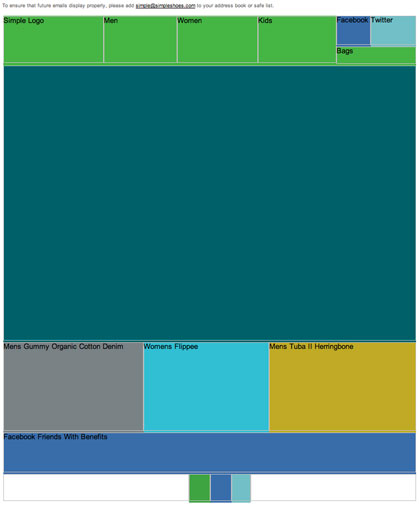
Background colors don’t get more people to open your email. What they do is keep it readable and on-brand when images are blocked, and that gives the reader a reason to load images or click. Since this post was first written, the inbox has changed. Gmail has loaded images by default through its proxy since December 2013, Apple Mail Privacy Protection inflates open counts, and the 2024 Gmail and Yahoo bulk sender rules (SPF, DKIM, DMARC, one-click unsubscribe, a spam rate under 0.3%) matter more for reaching the inbox than any design choice. Background colors still help in two places: classic Outlook, which blocks images by default, and dark mode.
Take a look at this example from Simple Shoes.
 The background colors alone, not the alt text, were enough to get images turned on. Alt text still matters, though. This email put alt text on the main call to action, and it read: “Collect: Our Friends Over At Good Magazine Took Over Our Blog And Left Us With Some Really Great Stories. Check Out What They Have To Say About Water Waste, Music And Earth Day.” That was too long for most email clients to show. The lesson is to keep alt text short.
Even so, this email did what most emails failed to do. It stayed readable and caught the eye in email clients that blocked images by default.
How the email looked across email clients
The email arrived in a Gmail inbox. When it was checked in the other major clients, it looked the same in all of them except ONE. Can you guess which one didn’t display it correctly?

Outlook 2007
Outlook 2007 was the one.
 You can’t win them all.
Outlook 2007 is history now, but the reason it broke still matters. Microsoft switched Outlook 2007 from an Internet Explorer engine to Microsoft Word for rendering HTML email. Classic Outlook for Windows still uses Word as its rendering engine. New Outlook for Windows is built on WebView2, a browser engine, and a Microsoft 365 subscription can come with either new Outlook or classic Outlook. Microsoft has said it will support classic Outlook for Windows until at least 2029, so for now you have to design for both.
Test with images off
Not every brand can use color this freely, but most can at least try. Always test your email with images turned off.
Image-loading behavior varies by client and user settings. Gmail, Apple Mail and Yahoo Mail generally load images automatically. The main exception is Microsoft. Its support pages say classic Outlook blocks automatic picture downloads from the internet by default, and Outlook for Mac doesn’t download internet images by default either. Many corporate Outlook users never change that setting. Gmail users can also switch on “Ask before displaying external images”, and Gmail won’t show images automatically for messages it considers suspicious.
So a design that holds up with images off is still worth the effort, mainly for B2B lists heavy on Outlook users.
What changed for open rates
The original idea behind this post was simple: an open only counted when images loaded, because opens are tracked by a tiny invisible image. If a colorful, readable email got someone to click “download pictures”, the open got counted. Three changes have weakened that link.
| Change | When | Effect on opens |
|---|---|---|
| Gmail serves all images through Google’s proxy and shows them by default | December 2013 | Gmail opens get counted without any action from the reader |
| Apple Mail Privacy Protection preloads images through Apple’s servers | iOS 15 and macOS Monterey, 2021 | Many emails get counted as opened whether or not anyone read them |
| Gmail and Yahoo bulk sender requirements | February 2024 | Inbox placement depends on authentication and complaint rates, so mail sent to spam never gets a chance to be opened |
Because of Apple’s preloading, open rate is now a rough signal at best. Clicks, conversions and replies tell you much more about whether a design works. Opens are still useful for comparing like with like, such as one month against the last, or variant A against variant B on the same list.
How to code background colors that hold up today
The most reliable method is to put the color on a table that wraps the whole email, set it twice, and use six-digit hex codes. Litmus found that the bgcolor attribute was unreliable in Outlook when it was given three-digit hex codes. Litmus recommends a 100% width wrapper table as the approach with the widest support.
<table role="presentation" width="100%" cellpadding="0" cellspacing="0" border="0"
 bgcolor="#F4E9D8" style="background-color:#F4E9D8;">
 <tr>
 <td align="center" style="padding:24px;">
 <!, 600px content table goes here, >
 </td>
 </tr>
</table>
Follow these steps for a design that still works when images are off:
- Put brand colors on the table cells with both
bgcolorand inlinebackground-color, using full six-digit hex codes. - Build headlines and calls to action as live HTML text and buttons, not as text baked into images.
- Keep alt text short, around a few words, so clients don’t cut it off.
- Give the
imgtag inline font, size and color styles so the alt text matches the design in clients that style it. - Avoid CSS background images for important content. They need VML workarounds in classic Outlook, and when they fail, the color underneath is all the reader sees.
- Preview with images off in classic Outlook, the new Outlook, Gmail and Apple Mail, in both light and dark mode.
Dark mode
Dark mode is the newest test for background colors. Some clients leave your colors alone, some invert only light backgrounds, and some invert everything, and Outlook behaves differently across its versions. Pure white and pure black backgrounds tend to trigger the harshest inversions, so a slightly off-white or off-black often survives better. Logos with transparent backgrounds can disappear against a dark background, so add a light outline or a solid backing color.
FAQ
Do background colors actually increase open rates?
Not directly. People decide to open based on the sender name, subject line and preheader, all of which they see before any background color. Color helps after the open: it keeps image-blocked emails readable, which can lead to images being loaded and to clicks.
Which email clients still block images by default?
Classic Outlook for Windows and Outlook for Mac block internet images by default, according to Microsoft’s support pages. Gmail, Apple Mail and Yahoo Mail generally load images automatically, although Gmail users can choose to be asked first. Gmail also holds back images on messages it flags as suspicious.
Is open rate still a reliable metric?
Only as a relative signal. Apple Mail Privacy Protection preloads images, so many opens are recorded with no human involved. Use clicks, conversions and revenue per send to judge campaigns, and use opens only to compare results within the same audience.
Should I use bgcolor or CSS background-color?
Use both on the same table cell, with six-digit hex codes. The attribute covers older and stricter clients, and the inline style covers modern ones. Use the CSS background shorthand only for colors, since support drops when you add images or gradients to it.
How do I stop dark mode from wrecking my colors?
You can’t fully control it, because each client applies its own inversion rules. Use off-white and off-black instead of pure values, test logos on dark backgrounds, and add prefers-color-scheme styles for the clients that support them. Then preview in each major client’s dark mode before you send.
Does design matter if my email lands in spam?
No, so fix delivery first. Google’s bulk sender requirements took effect in February 2024 and include SPF, DKIM and DMARC, one-click unsubscribe for marketing and subscribed messages, and a spam rate below 0.3%. Yahoo announced its requirements in October 2023 and began enforcing them in 2024, calling for SPF and DKIM, DMARC for bulk senders, one-click unsubscribe, and a spam complaint rate below 0.3%. Google recommends staying under 0.1%. Under CAN-SPAM, your commercial email also needs a working opt-out and a valid physical postal address.
Sources
- Google Gmail Help: Email sender guidelines
- Google Gmail Help: Turn images on or off in Gmail
- Official Gmail Blog: Images now showing (December 2013)
- Yahoo Sender Hub: Sender best practices and requirements
- Microsoft Support: Block or unblock automatic picture downloads in classic Outlook email messages
- Microsoft Support: Automatically download pictures from the Internet in Outlook for Mac
- Microsoft Tech Community: New Outlook for Windows, a guide to product availability
- Twilio SendGrid Docs: Understanding Apple Mail Privacy Protection and open events
- Litmus: The best way to code HTML email background colors and gradients
- Federal Trade Commission: CAN-SPAM Act, a compliance guide for business