
In November 2026, the most convincing fake Apple emails still copy Apple’s design almost perfectly. That means you can’t judge them by how they look. Check the sender’s domain, the reply-to address and where the links go. A message that uses Apple’s styling but replies to a free mailbox, or links to a domain Apple doesn’t own, is phishing, however polished it looks. One thing has changed since this post was written: Gmail and Yahoo started requiring bulk senders to use SPF, DKIM and DMARC in February 2024, and Outlook.com followed on 5 May 2025. Because of that, scammers rely more on lookalike domains and free addresses than on forging a protected brand domain outright.
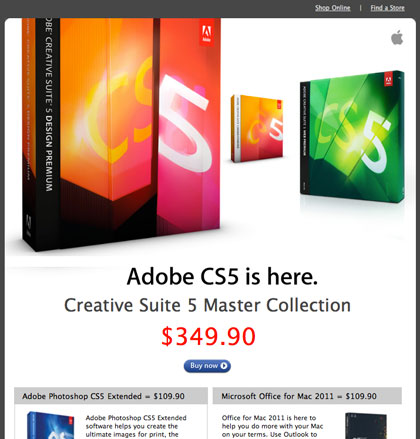
This email claiming to come “from” Apple is spam. More precisely, it’s phishing.

It’s one of the best-looking spam emails out there. It looks real enough that you could easily click “Not spam” before taking a closer look. Three things gave it away:
- The subject line. It was far too long, with a share code tacked onto the end.
- The reply-to address. It was a string of random characters at Hotmail, the free webmail service Microsoft has since rebranded as Outlook.com.
- The links. Every one of them pointed to a Polish domain, not to apple.com.
Apart from those details, the email is engaging and convincing. It gets Apple’s look and feel down pat, right down to the correct Cupertino mailing address in the footer. At the time, that address was 1 Infinite Loop. Apple’s official corporate address has been One Apple Park Way, Cupertino, CA 95014 since 2017. So an old Infinite Loop footer is now one more small sign that a template was copied from an old Apple email. Make no mistake, though: this is spam.
If a message like this gets past the filters at the major mailbox providers and into people’s inboxes, it will fool plenty of them into clicking. Spam keeps evolving and getting more sophisticated. The original prediction was that mailbox providers would be “battling uphill for years to come,” and that turned out to be right. The answer was sender authentication. Gmail and Yahoo now expect anyone sending in bulk to authenticate with SPF, DKIM and DMARC, offer one-click unsubscribe and keep complaint rates low. Microsoft applies similar rules to domains that send more than 5,000 messages a day to Outlook.com addresses.
How to spot a fake brand email today
You can’t spot a phishing email by its design. Look at the parts a scammer can’t easily fake. The checks below are the same ones that exposed the email above, plus a few that didn’t exist when it was sent.
| What to check | Sign of a real brand email | Red flag |
|---|---|---|
| From domain | The brand’s own domain or a subdomain of it | A lookalike spelling, or a free mailbox such as Gmail or Outlook.com |
| Reply-to | Same domain as the sender, or no reply-to at all | A random address at an unrelated domain |
| Links | Hovering shows the brand’s own domain | Link shorteners, foreign domains, IP addresses |
| The ask | Information, or a request to sign in through the app or website | Urgent demands to “verify,” pay or unlock your account through a link |
| Brand logo in Gmail | A logo next to the sender name, sometimes with a blue verified checkmark (BIMI with a Verified Mark Certificate) | A generic initial, or the logo only inside the email body |
| Subject line | Short and specific | Overlong, with codes, ticket numbers or “final notice” pressure |
The Federal Trade Commission lists the same warning signs in its consumer guidance: pressure to act fast, threats that an account will be suspended, claims of an overdue invoice and links to lookalike websites. Apple’s own support advice is simple. Don’t click links in a suspicious message. Go to Apple’s website or the Settings app yourself and check your account there.
Where to report a fake Apple email
Send the suspicious message to [email protected], then delete it. To keep the original headers intact, attach the email to a new message instead of forwarding it inline. Spam that reaches an iCloud.com, me.com or mac.com inbox can go to [email protected]. You can also report phishing to the FTC at ReportFraud.ftc.gov.
FAQ
Why do fake Apple emails look so real?
Copying the design is easy. Scammers save the HTML from a genuine Apple message and swap in their own links. Logos, fonts and the footer address come along unchanged, which is why the design tells you almost nothing. The sending domain, the reply-to address and the link destinations are much harder to fake.
Can a scammer send email from the real apple.com domain?
When a domain publishes a strict DMARC policy, mail that fails SPF and DKIM alignment gets quarantined or rejected by Gmail, Yahoo and Outlook.com. That’s why most fakes now use lookalike domains, display-name tricks or free webmail accounts. Even so, a sender name that just says “Apple” means nothing until you’ve checked the actual address behind it.
What do the Gmail and Yahoo bulk sender rules mean for legitimate marketers?
Since February 2024, bulk senders to Gmail and Yahoo have had to authenticate with SPF, DKIM and DMARC (at least p=none, aligned with the From domain). Marketing mail must also include a one-click List-Unsubscribe header and honor unsubscribe requests within two days. Google asks you to keep the spam rate in Postmaster Tools below 0.3% and to aim for under 0.1%. Microsoft began enforcing similar authentication rules for high-volume Outlook.com senders on 5 May 2025.
Should I click “Not spam” if an email looks official?
No, not until you’ve checked the sender domain and hovered over the links. Clicking “Not spam” teaches your mailbox provider to trust that sender. With phishing, that means more of the same scam reaching you and possibly other people. If the email turns out to be fake, report it as phishing instead.
How can a real brand prove its emails are genuine?
Set up SPF, DKIM and a DMARC policy at enforcement, then add BIMI. In Gmail, a Verified Mark Certificate shows the brand logo with a blue checkmark, and a Common Mark Certificate shows the logo without the checkmark. Apple Mail displays BIMI logos when the receiving mail provider has verified the sender’s BIMI compliance, including an evidence document such as a VMC. None of this guarantees inbox placement, but together it makes spoofing your exact domain much harder.
Sources
- Google: Email sender guidelines
- Yahoo Sender Hub: FAQs
- Microsoft Tech Community: Strengthening email security, Outlook’s new requirements for high-volume senders
- Apple Support: Recognize and avoid phishing messages, phony support calls, and other scams
- FTC: Phishing scams and how to spot them
- FTC Consumer Advice: Protect yourself from phishing scams