
Why background images went out of favor
For years the standard advice in email design was to remove background images entirely. The reason was support. In 2007 Microsoft switched Outlook 2007 to Microsoft Word’s rendering engine, and Word ignored CSS background images. At the time Gmail also stripped many background styles. Designers who used a background photo saw it disappear for a big share of their list, so most stopped trying.
That advice was sound in 2010. It is not the full picture today. Classic Outlook for Windows still uses the Word engine, and Microsoft’s product availability guide for the new Outlook says classic Outlook will be supported through at least 2029. So the Outlook problem is still with us, but it has a known workaround. The new Outlook for Windows renders with a Chromium-based engine (WebView2), and that engine handles CSS backgrounds.
A photo background that changed the thinking
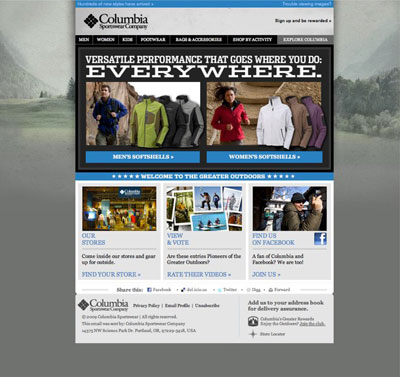
What made the case for background images was a Columbia Sportswear email shown on Dylan Boyd’s Email Wars blog, an email design showcase from that era. The email used a full photo of a forest landscape behind the whole body of the message.
That was unusual. Most email backgrounds back then were a gradient or a small repeating tile. Photo-realistic backgrounds in the body of an email were rare, and this one showed how much depth a single big image could add to a campaign.

How to make background images show in Outlook
The fix came from Campaign Monitor. In December 2010 the geniuses at CampaignMonitor discovered a method of getting background images to display in the body of an email, including in Outlook 2007. It combined the HTML background attribute on a table cell, CSS background-image for clients that support it, and VML (Vector Markup Language) inside conditional comments that only Outlook reads.
Campaign Monitor later turned the method into a free generator, Bulletproof Background Images at backgrounds.cm. It is still the usual starting point. The pattern looks like this:
<html xmlns="http://www.w3.org/1999/xhtml" xmlns:v="urn:schemas-microsoft-com:vml" xmlns:o="urn:schemas-microsoft-com:office:office">
...
<td background="https://example.com/forest.jpg" bgcolor="#2f4f2f" width="600" height="400" valign="top"
 style="background-image:url('https://example.com/forest.jpg'); background-size:cover; background-position:center;">
 <!, [if gte mso 9]>
 <v:rect xmlns:v="urn:schemas-microsoft-com:vml" fill="true" stroke="false" style="width:600px;height:400px;">
 <v:fill type="frame" src="https://example.com/forest.jpg" color="#2f4f2f" />
 <v:textbox inset="0,0,0,0">
 <![endif], >
 <div>
 Live HTML text and your call-to-action button go here.
 </div>
 <!, [if gte mso 9]>
 </v:textbox>
 </v:rect>
 <![endif], >
</td>
The parts that matter:
- VML namespace. Declare
xmlns:vin the<html>tag so VML-capable versions of Outlook render the markup. - Hosted image. Use an absolute URL to a hosted image. Embedded or base64 images bloat the file and do not work reliably.
- Fallback color. Set
bgcolorand the VMLcolorto a color close to the photo’s main tone. Anyone whose client blocks the image still gets readable text. - Fixed size for Outlook. Classic Outlook needs explicit widths and heights in the VML. It also ignores media queries, so the responsive CSS only has to work in the other clients.
- Live text on top. Keep the headline, copy and button as real HTML over the image, not baked into the picture.
Current support by email client
Support varies more than the original post could have predicted. This table summarizes the situation as of November 2026.
| Email client | CSS background image | What you need to do |
|---|---|---|
| Apple Mail (macOS, iOS) | Supported | Standard CSS works |
| Gmail (web and apps) | Listed as supported, with past stripping episodes | Use inline styles plus the background attribute, and test |
| Gmail app with non-Google accounts | Supported after a later update | Do not rely on the table background attribute alone |
| Classic Outlook for Windows (2007 to 2021, Microsoft 365) | Not supported in CSS | Add VML in conditional comments |
| New Outlook for Windows | Supported (browser engine) | Standard CSS works |
| Outlook.com | Supported in current versions | Standard CSS works; test cell backgrounds |
The Gmail row needs care. In 2023, developers reported that Gmail was removing whole style attributes or <style> blocks that contained background-image: url(...). Google later rolled the change back. Gmail still lists background-image in its CSS support reference, but the episode shows why the HTML background attribute and a solid fallback color are worth keeping.
Should your campaigns use big background images
Yes, for most B2C campaigns it is worth testing. A sweeping photo behind a product launch, a travel offer or a seasonal sale can do something a header banner cannot. Brands with strong photography, like the outdoor apparel example above, have the most to gain.
The trade-offs are real, though:
- Dark mode. Gmail on iOS and classic Outlook for Windows apply full color inversion in dark mode, and Outlook’s mobile apps partially recolor emails. A photo usually survives, but text colors and fallback colors can shift. Use light text on a dark photo with a dark fallback color, so the design reads the same in both modes.
- Mobile. Most opens now happen on phones. Use
background-size: coverand keep the focal point near the center so a narrow screen does not crop out the subject. - Weight. VML and the extra markup add to your HTML size. Gmail clips messages at roughly 102KB of HTML, and a clipped email can hide your footer and unsubscribe link.
- Image blocking. Some readers and corporate clients still block images. If the message only makes sense with the photo showing, it will fail for them.
- Text-to-image balance. An email that is mostly one image with little live text gives spam filters and screen readers very little to work with.
A background image does not change your deliverability basics. Since February 2024, Gmail and Yahoo have required bulk senders (Gmail sets the line at 5,000 or more messages a day to its users) to authenticate with SPF, DKIM and DMARC, support one-click unsubscribe through the List-Unsubscribe and List-Unsubscribe-Post headers, and keep spam complaint rates below 0.3%. A beautiful design will not save an email that fails those checks.
What to measure when you test
Run a straight A/B test: the same email with and without the background image. Judge it on clicks and conversions, not opens. Apple Mail Privacy Protection preloads images and inflates open rates, so opens tell you very little about how a design performed. Also preview both versions in classic Outlook, Gmail on iOS in dark mode and a narrow phone view before you send.
Photo-realistic backgrounds are still uncommon in email, which is exactly why they stand out. If your brand has the photography for it, one well-built test campaign will show whether your audience responds.
FAQ
Do background images work in Gmail?
Mostly, yes. Google’s Gmail CSS reference lists background-image as a supported property. Gmail did briefly strip styles that contained background image URLs in 2023 before rolling that back. Use inline styles, add the HTML background attribute on the table cell and always set a fallback color.
Why does my background image not show in Outlook?
Classic Outlook for Windows renders email with Microsoft Word’s engine, which ignores CSS background images. You need VML wrapped in <!, [if gte mso 9]> conditional comments, plus the VML namespace in your <html> tag. The new Outlook for Windows uses a browser engine and shows CSS backgrounds without VML.
Is Campaign Monitor’s backgrounds.cm tool still useful?
Yes. It still produces the combination of a table cell background attribute, CSS and VML that most bulletproof background code builds on. Treat its output as a starting point and test it with your own ESP’s template, because some editors rewrite or strip conditional comments.
Will a background image hurt my deliverability?
Not by itself. Inbox placement depends mostly on authentication (SPF, DKIM, DMARC), complaint rates, list quality and sending reputation. Problems start when the image replaces your text, or when heavy markup pushes the HTML past Gmail’s roughly 102KB clipping point.
How do background images behave in dark mode?
It depends on the client. Apple Mail generally leaves designs alone if you set a background color. Gmail on iOS and classic Outlook for Windows can fully invert colors, while Outlook’s mobile apps partially recolor them. Dark photos with light live text and a dark fallback color hold up best.
What size should an email background image be?
Match the width of your email container, usually 600 to 640 pixels, and export at twice that width for sharp display on high-resolution screens. Compress the file so it loads quickly on mobile data, and set the VML width and height to the display size, not the file size.
Sources
- Google: Gmail CSS support
- Google: Email sender guidelines
- Yahoo Sender Hub: FAQs
- Campaign Monitor: Bulletproof background images
- Campaign Monitor: Applying a background image to HTML email
- Can I Email: CSS background
- Microsoft Tech Community: New Outlook for Windows, a guide to product availability
- Litmus: Dark mode guide for email
- FTC: CAN-SPAM Act compliance guide for business