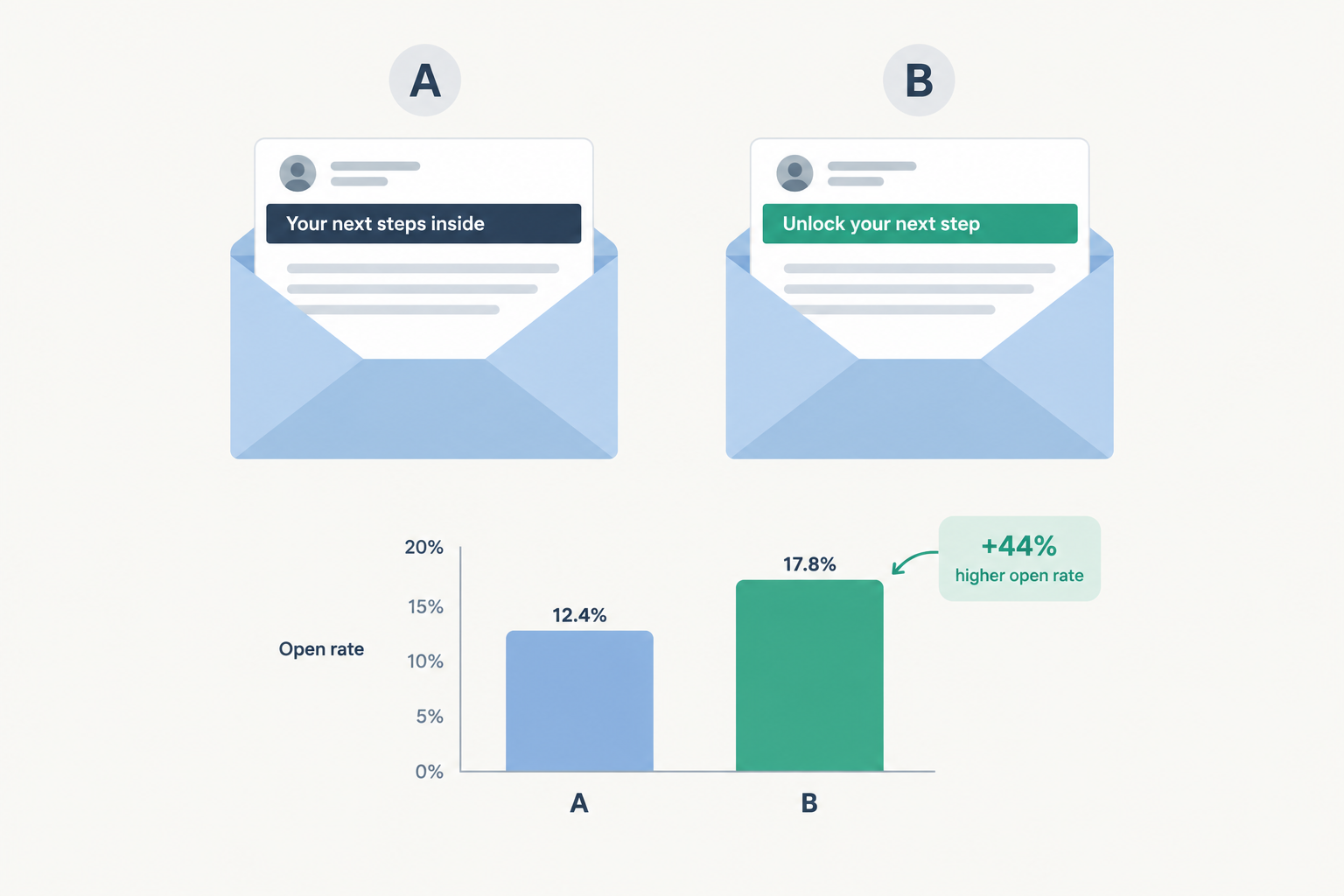
A/B testing means sending two versions of an email to separate, random groups of your list and measuring which one performs better. This guide covers how to choose what to test, how many subscribers you need, how to read the results without fooling yourself, and how to keep a test from damaging your deliverability.
What is A/B testing?
An A/B test is a controlled experiment. You take one element of an email, create two versions of it, and send each version to a randomly chosen group of subscribers. Everything else stays the same. Because the only difference between the groups is the element you changed, any reliable difference in results comes from that change.
The terminology varies. A/B split testing, an ab split test, a b testing, a & b testing, and the occasional “a to b test” all describe the same method. A/B tests can compare more than two versions (A/B/C or A/B/n tests), but the principle is unchanged: one variable, random groups, one metric that decides the winner.
Email is one of the easiest places to run experiments. You control the audience, the send happens all at once, and results usually arrive within a day. Websites need traffic to build up over weeks. A campaign to 20,000 subscribers can produce a usable answer before lunch the following day.
If you’re new to the channel, our guide to what email marketing is and how it actually works covers the basics. This article assumes you already send campaigns and want to improve them with evidence instead of guesswork.
A/B testing vs multivariate testing
A multivariate test changes several elements at once and tests every combination. If you test two subject lines and two hero images, you get four versions. Add two call-to-action buttons and you have eight.
Multivariate tests show how elements interact, but each combination gets a smaller share of the list. Most email lists can’t support that. A list of 10,000 split eight ways gives each version only 1,250 people, which is rarely enough to detect anything except a very large difference. Run A/B tests until your list is in the hundreds of thousands. After that, multivariate testing becomes practical.
A/B testing terminology 101
You’ll see these terms in your email service provider’s reports and in any testing tool. Learn them once and the reports become much easier to read.
- Control (A): The current version, or the one you’d send if you weren’t testing.
- Variant (B): The version with the single change you’re testing.
- Hypothesis: A specific, falsifiable prediction. “A subject line with the discount amount will lift click rate because subscribers scan for value” is a hypothesis. “Let’s try a new subject line” isn’t.
- Primary metric: The one number that decides the winner. Choose it before you send.
- Guardrail metric: A number you watch to make sure the winner isn’t causing harm somewhere else, such as unsubscribes or spam complaints.
- Sample size: How many recipients each version needs before a difference can be trusted.
- Minimum detectable effect (MDE): The smallest lift you want the test to be able to detect. Smaller lifts need far larger samples.
- Statistical significance: How confident you can be that the difference isn’t random chance. Marketers usually work at 95% confidence, which corresponds to a p-value below 0.05.
- Statistical power: The probability that your test detects a real effect of the size you specified. Eighty percent is the usual standard.
- Holdout group: A slice of the audience that receives nothing, or the old experience, so you can measure the total impact of a program.
- Test-then-send: A setup where your ESP sends variants to a small sample, waits, and then sends the winning version to everyone else.
Why open rate stopped being a reliable winner
This is the most common mistake in email testing, so it gets its own section before the how-to.
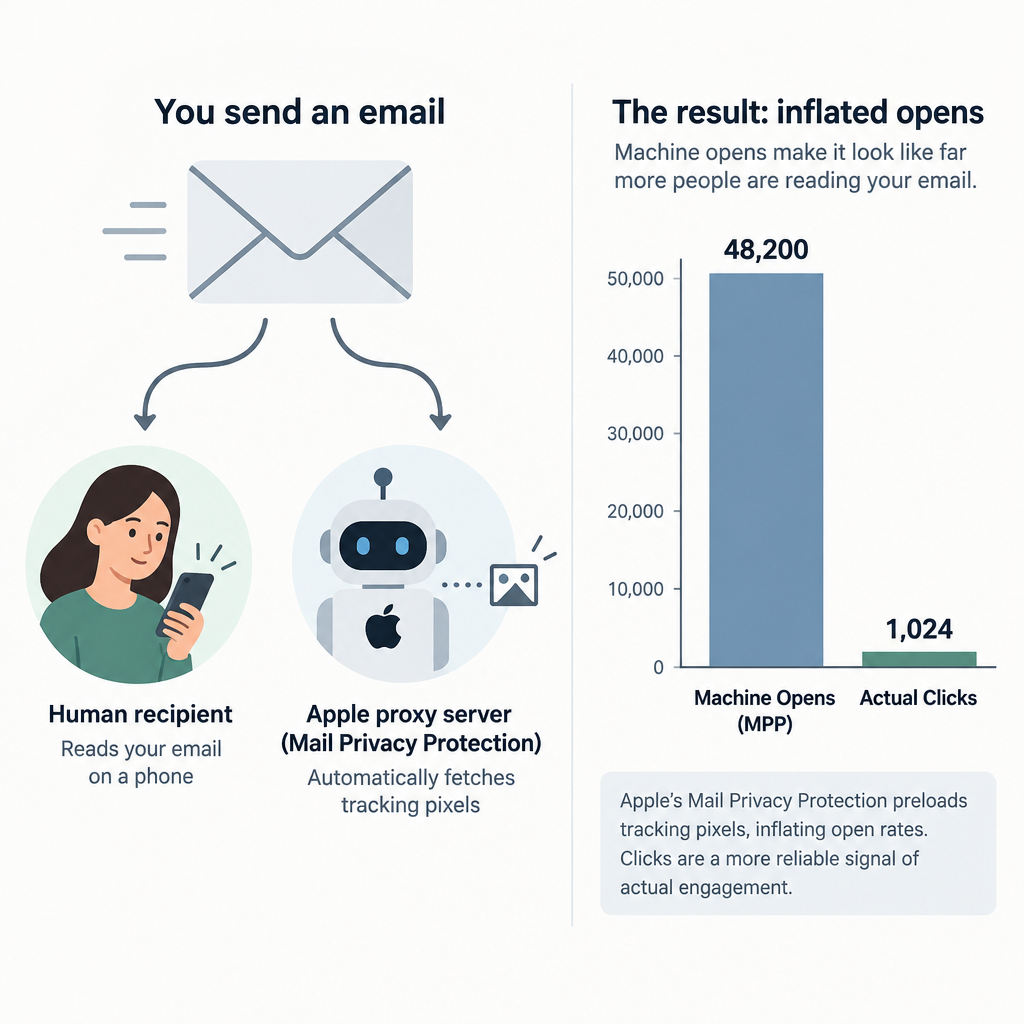
In September 2021, Apple released Mail Privacy Protection (MPP) with iOS 15. When MPP is enabled, Apple Mail preloads remote content, including tracking pixels, through proxy servers. Your ESP records an “open” whether or not the person actually read the email. Apple Mail is a large share of opens on many consumer lists, so a significant portion of your open data is now generated by machines.
This creates two problems for A/B tests:
- Opens are inflated and noisy. The real difference between two subject lines is mixed with automated opens that have nothing to do with the subject line.
- Body content can’t influence the pixel fire. If your test changes anything inside the email, open rate is the wrong metric because it’s recorded before anyone sees the content.
Subject line tests can still be judged on opens, but only with caution. Some ESPs let you exclude Apple’s machine opens from reports, which helps. A better approach is to judge subject line tests on clicks or conversions, which are much harder to fake, and to treat opens as a secondary signal.
Inbox tip
Judge subject line tests on click rate, not open rate. A subject line that draws curiosity opens but no clicks hasn’t helped your business.
A/B testing metrics to measure
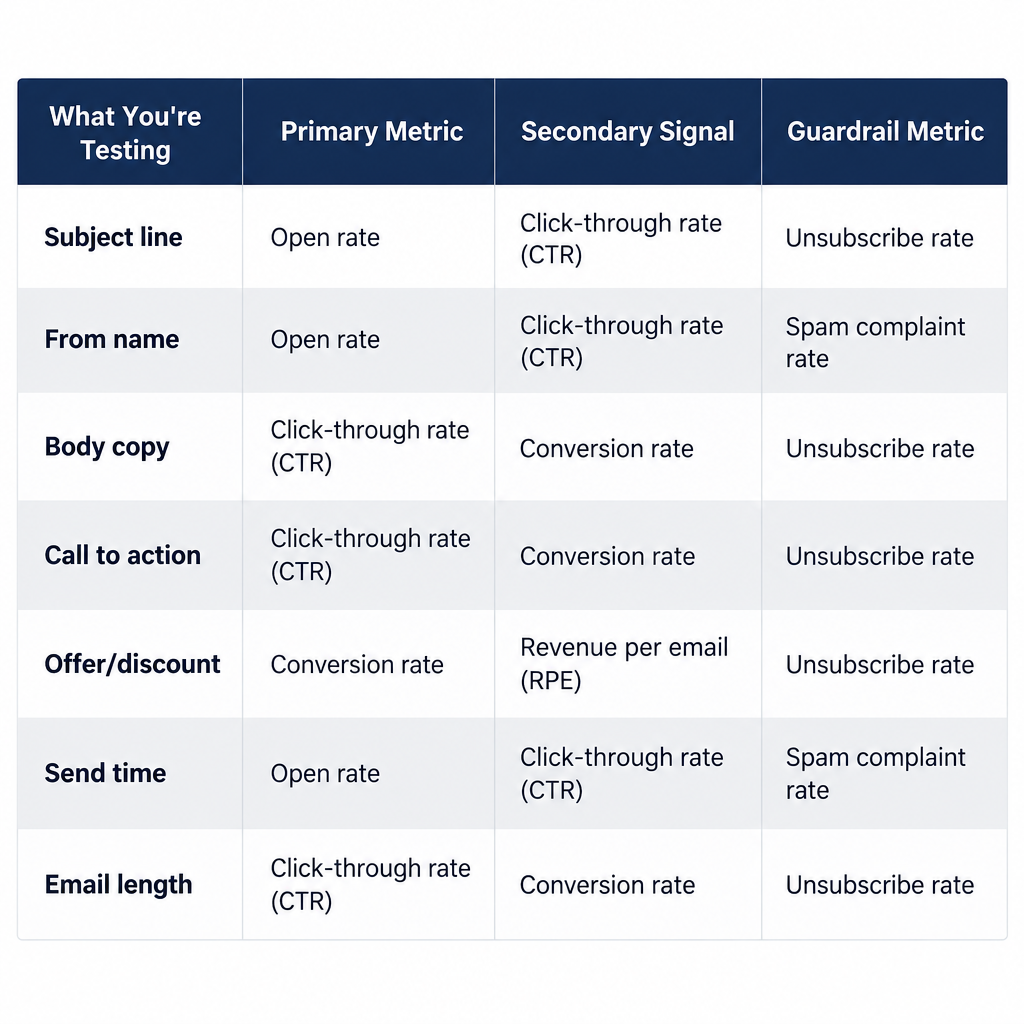
Choose the metric that sits closest to the outcome the change could affect. This table pairs common email tests with the metric that should decide them and the guardrail to watch.
| What you’re testing | Primary metric | Secondary signal | Guardrail metric |
|---|---|---|---|
| Subject line / preheader | Click rate (per recipient) | Open rate (MPP-adjusted) | Spam complaint rate |
| From name | Click rate | Open rate | Unsubscribe rate |
| Body copy or layout | Click-to-open rate or click rate | Clicks per link | Unsubscribe rate |
| Call to action | Click rate on the CTA | Conversion rate | None usually needed |
| Offer or discount | Revenue per recipient | Conversion rate | Margin per order |
| Send time / day | Click rate | Conversions within 48 hours | Complaint rate |
| Email length or frequency | Revenue per recipient over weeks | Click rate | Unsubscribes, complaints |
Revenue per recipient is the strongest metric for anything commercial. It accounts for both how many people bought and how much they spent, and it uses the full send as the denominator, so a version that gets fewer clicks but larger orders can still win.
What you need before your first A/B test
Set up these prerequisites before you send a test. Without them, results will be unreliable.
- An ESP with a built-in A/B feature. Nearly every mainstream email service provider has one, though it’s often limited to paid plans. If you’re unsure what your platform handles for you, our explainer on what an ESP does in email marketing covers it.
- A list large enough for the effect you want to detect. The sample size table later in this guide shows the numbers. As a rough minimum, you want at least a few thousand recipients per variant for click-based tests.
- Click and conversion tracking. UTM parameters on links and a connected store or analytics setup, so you can measure revenue as well as clicks.
- An authenticated sending domain. Both variants must send from the same properly authenticated domain email address with SPF, DKIM and DMARC in place. Otherwise, a deliverability difference can be mistaken for a creative difference.
- A written hypothesis and a single primary metric. Write them down before you build anything.
- A test log. A spreadsheet works fine. The archive section below includes a template.
How to prioritize A/B test hypotheses
Most teams have more ideas than send volume. Every test uses part of your list, so prioritizing matters as much as running the test well.
The ICE framework, popularized by growth marketer Sean Ellis, is a simple way to rank ideas. Score each hypothesis from 1 to 10 on three questions:
- Impact: If this wins, how much will it move the primary metric?
- Confidence: How much evidence do you already have that it will work, from past tests, customer research or competitor patterns?
- Ease: How quickly can you build and send it?
Average the three scores and test the highest-ranking ideas first. The PIE framework (Potential, Importance, Ease), developed at the optimization agency WiderFunnel, works the same way with slightly different questions. Choose one and use it consistently so scores are comparable over time.
Two rules improve any scoring method. First, give high priority to emails that go out repeatedly, such as welcome emails, abandoned cart flows and weekly newsletters. A winner there pays off on every future send, while a winner on a one-off promotion is used once. Second, give high priority to bigger changes. A completely different offer is more likely to produce a detectable difference than a slightly different button color.
What to test first in email
Here are some example hypotheses, roughly ordered by how much they tend to matter:
- The offer itself. Free shipping vs 15% off. A bundle vs a single product. This usually matters more than any wording change.
- Subject line approach. Benefit-led (“Your skin, 3 weeks from now”) vs curiosity (“We changed the formula”) vs plain (“New: Vitamin C serum”).
- From name. Brand name vs a person at the brand (“Maya at Brightleaf”).
- Primary call to action. One button vs several links. “Shop the sale” vs “See what’s 30% off.”
- Email length. A short email that sends readers to a landing page vs a longer email that does the selling itself.
- Personalization. Product recommendations based on browsing vs bestsellers.
- Send time and day. Useful, but usually lower impact than most people expect.
- Design details. Image-heavy vs mostly text, button color, layout. Test these last.
How to set up A/B tests in email: step by step
Setup steps
- Write a hypothesis and choose one primary metric.
- Calculate the sample size you need.
- Build the control and one variant.
- Choose a split method: full split or test-then-send.
- Set the winner criterion and wait time.
- Send, then leave it alone.
- Analyze, record and roll out the winner.
Step 1: Write a hypothesis and choose one metric
Use this format: “If we change [element] from [A] to [B], then [primary metric] will increase, because [reason].” The “because” is important. It makes you state what you think you’ll learn about your customers, so a losing test still teaches you something.
Then choose one primary metric from the table above. If you check five metrics after the send and choose whichever one looks good, you’re very likely to find a false winner.
Step 2: Calculate the sample size
Most email tests fail at this step. Decide the smallest lift you’d act on, check your baseline rate, and use the table in the next section or an online calculator such as Evan Miller’s free sample size tool. If your list can’t reach the required size in one send, either test a bigger change or run the same test across several sends and combine the results.
Step 3: Build the control and one variant
Duplicate the email, then change only the element named in your hypothesis. Preview both versions on mobile and desktop, then send test copies to yourself. A broken merge tag in one variant will invalidate the test. If one goes out anyway, our guide on handling a typo email after it’s sent explains how to deal with it.
Step 4: Choose your split method
You have two main options:
- Full 50/50 split. Half the list gets A, half gets B. This gives maximum statistical power, and it’s the only valid option for send-time tests, since the time is the thing you’re testing. You learn the most, but the losing version reaches half your list.
- Test-then-send. A sample (for example 10% to A and 10% to B) receives the test, the ESP waits a set time, then sends the winner to the remaining 80%. More people see the better version, but the test sample is smaller, so only large differences reach significance.
For learning, use a full split. For maximizing a single campaign’s results with a large list, use test-then-send.
Step 5: Set the winner criterion and wait time
In your ESP, choose the winning metric (clicks or revenue where available) and the wait period before the remainder sends. Short waits favor people who check email immediately, who aren’t representative of the whole list. Wait at least four hours. For click and revenue metrics, waiting closer to 24 hours is safer if the campaign isn’t time-sensitive.
Step 6: Send and leave it alone
Don’t stop the test early because one version is ahead after an hour. Early leads often disappear. Checking results repeatedly and stopping the moment you see significance greatly inflates your false-positive rate. This problem is called “peeking,” and it’s a well-documented issue in experimentation.
Step 7: Analyze, record and roll out
Read the results using the process in the analysis section below. Record them in your test log, then apply what you learned. If the winning email is a recurring template, update the template.
How big does each group need to be?
The table below gives approximate recipients needed per variant. It uses the standard two-proportion formula at 95% confidence and 80% power. “Relative lift” means the improvement as a percentage of the baseline, so a 20% lift on a 2% click rate means going from 2.0% to 2.4%.
| Baseline rate | 10% relative lift | 20% relative lift | 50% relative lift |
|---|---|---|---|
| 0.5% (purchase rate per recipient) | ~327,600 | ~85,800 | ~15,600 |
| 2% (typical click rate) | ~80,600 | ~21,100 | ~3,800 |
| 5% (strong click rate) | ~31,200 | ~8,100 | ~1,500 |
| 30% (open rate, MPP caveats apply) | ~3,800 | ~960 | ~160 |
Figures calculated by Email Marketing Voodoo using n ≈ 7.84 × [p₁(1−p₁) + p₂(1−p₂)] ÷ (p₁ − p₂)², rounded.
Two things stand out. First, purchase-rate tests need very large samples unless the change is dramatic. Second, the reason open-rate tests used to seem easy is that open rates are high, so even small lists produced “significant” results. MPP has made many of those results unreliable.
If you have 5,000 subscribers and a 2% click rate, a full 50/50 split gives you about 2,500 per variant. That’s enough to detect roughly a 50% lift and nothing smaller. So test bold changes. Two subject lines that differ by a single word won’t produce a readable result.
A/B testing features in popular email platforms
Every major ESP includes A/B testing, but they differ in what you can test and on which plans. This is how the main platforms handle it as of early 2025. Plans and limits change, so check your provider’s current pricing page before upgrading for this feature.
| Platform | What you can test | How the winner is picked | Plan notes |
|---|---|---|---|
| Mailchimp | Subject line, from name, content, send time (up to 3 versions) | Opens, clicks, revenue, or manual | A/B on paid plans; multivariate (up to 8 combinations) on Premium |
| Klaviyo | Subject line, preview text, content, send time; split tests inside flows | Open or click rate for campaigns; manual review in flows | Available on campaign and flow tools |
| Kit (formerly ConvertKit) | Subject lines on broadcasts | Highest open rate; sample receives test, winner goes to the remaining 70% after 4 hours | Subject line testing only |
| HubSpot | Subject line, content, sender | Chosen metric after a set test period | Marketing Hub Professional and above |
| Brevo | Subject line, content | Open or click rate | Higher-tier plans; not on entry plans |
If your platform only judges winners on opens (Kit, for example), use the automatic winner for subject-line tests only. Then check click data in the report yourself before treating the result as a lesson.
How to analyze A/B test results
Here’s a worked example. You test two subject lines with a full split of 20,000 subscribers.
- Version A: 10,000 recipients, 230 clicks (2.3%)
- Version B: 10,000 recipients, 250 clicks (2.5%)
B looks about 9% better. A two-proportion z-test gives a z-score of about 0.92 and a p-value around 0.36. You can’t call a winner. A difference this size will appear by chance fairly often with these sample sizes. The correct conclusion is “no detectable difference,” and you should record it that way.
Now suppose B had received 290 clicks (2.9%). The z-score rises to about 2.67, with a p-value around 0.008. That’s well past the 95% threshold, so you can be reasonably confident B is better.
Use this checklist for every analysis:
- Check the primary metric first. Is the difference significant at the level you set in advance? Most ESP reports show this. If yours doesn’t, any free significance calculator will do it with four numbers.
- Look at the confidence interval, not only the winner. A result of “B is better by somewhere between 0.5% and 40%” tells you much more than “B won.”
- Check guardrails. If B won on clicks but doubled unsubscribes or complaints, it didn’t win.
- Check that the split was valid. Both groups should have similar sizes and similar delivery rates. If B had a much higher bounce or block rate, you’ve found a deliverability problem, not a creative one.
- Segment cautiously. It’s fine to check whether the result held for new vs long-time subscribers. Treat segment-level “wins” as new hypotheses to test, not conclusions. Slice the data enough ways and something will look significant by chance.
- Write down why you think it won or lost. This becomes useful across dozens of tests.
Keep your A/B tests from hurting deliverability
Most testing guides skip this, but it matters. A test that wins on clicks can still damage your sender reputation if it attracts spam complaints. Mailbox providers now enforce strict limits.
| Mailbox provider | Rules in effect from | Applies to | Requirements relevant to testing |
|---|---|---|---|
| Gmail | February 2024 (one-click unsubscribe enforced from June 2024) | Senders of 5,000+ messages a day to personal Gmail accounts | SPF and DKIM, DMARC policy, alignment, one-click unsubscribe, spam rate under 0.3% |
| Yahoo | February 2024 | Bulk senders | SPF and DKIM, DMARC policy, one-click unsubscribe, low complaint rate |
| Microsoft (Outlook.com, Hotmail, Live) | May 5, 2025 | Senders of 5,000+ messages a day | SPF, DKIM, DMARC at minimum p=none aligned with SPF or DKIM; noncompliant mail rejected |
Google’s guidance also asks senders to keep spam rates below 0.1% and never reach 0.3%. An aggressive subject line variant can raise complaints for that send. If that variant is then sent to the rest of the list as the “winner,” it affects your entire domain’s reputation.
Deliverability risk
A misleading or clickbait subject line can win the test and still push your complaint rate toward Gmail’s 0.3% limit. Always check complaints before rolling out a winner.
Both variants should send from the same authenticated domain so the creative is the only variable. At minimum, your DMARC record should look something like this:
_dmarc.example.com. TXT "v=DMARC1; p=none; rua=mailto:[email protected]"
Also avoid testing two different sending domains or IPs against each other as if it were a content test. Inbox placement varies by domain, so you’d be comparing filter outcomes, not creative. If you want to understand why one variant might land in spam when the other doesn’t, our guide to how email spam filters work and why messages get caught covers the filtering signals involved.
Testing automated flows and using holdout groups
Campaign tests are useful, but automated emails are where results compound. A welcome series or abandoned cart flow can run for years and reach every new customer, so one winner there can outperform dozens of campaign wins.
Flow tests work differently from campaign tests:
- They run continuously. Instead of one send, recipients are split as they enter the flow. Set a fixed duration or sample size in advance and stop when you reach it.
- They can test structure, not only content. Two emails vs three. A one-hour delay vs a 24-hour delay. A discount in the first reminder vs the last.
- They should use revenue per recipient. A cart reminder that gets fewer clicks but recovers more orders is the winner.
A holdout group answers a bigger question: does this program work at all? Send nothing to a random 5 to 10% of eligible subscribers and compare their purchase rate with everyone who received the flow. Many teams find their post-purchase or win-back flows aren’t producing much additional revenue. Others confirm their welcome series is worth expanding. Either way, you’ll know whether the program is adding value or only taking credit for sales that would have happened anyway.
How to improve A/B test results
If your tests keep ending with “no significant difference,” the cause is almost always one of these:
- The changes are too small. Changing “Shop now” to “Shop today” won’t produce a measurable difference on a 10,000-person list. Test different ideas, not different wording.
- The metric is too far from the change. A subject line affects opens and clicks first. Judging it on purchases dilutes the effect with every other factor between the inbox and the checkout.
- The sample is too small. Combine sends. If you run a newsletter every week, test the same hypothesis across four sends and pool the results.
- You’re testing the wrong audience. Tests sent to many inactive subscribers mostly measure inactivity. Remove unengaged addresses before testing, or test only on people who’ve engaged in the last 90 days.
- No customer insight behind the ideas. The best hypotheses come from reply emails, support tickets, reviews and survey responses. “Customers keep asking whether it fits” leads to a much better test than “let’s try an emoji.”
A simple rule makes testing more productive: every test should be able to change a decision. Before sending, ask what you’ll do differently if B wins, and what you’ll do if it loses. If both answers are “nothing,” choose a different test.
Common A/B testing mistakes and how to fix them
| Problem | What’s happening | Fix |
|---|---|---|
| Winner declared after an hour | Early responders aren’t representative | Wait at least 4 hours; 24 for revenue |
| “Significant” result that never repeats | Peeking, too many metrics, or too many segments | Pre-register one metric; don’t stop early |
| Variants have very different delivery rates | Content triggered filtering, or sending infrastructure differed | Check bounces and blocks per variant; send both from the same domain and IP |
| Open rate winner loses on clicks | MPP inflating opens or curiosity bait | Judge on clicks or revenue |
| Two changes made at once | You can’t tell which change caused the result | One variable per A/B test |
| Send-time test run as test-then-send | The winning time has already passed for the remainder | Use a full split for timing tests |
| Same “winner” fading over weeks | Novelty effect | Re-test important winners a month later |
| Results never shared | Lessons stay with one person | Keep a shared test log |
The novelty effect is often overlooked. A new design or tone can win because it’s different, not because it’s better. Subscribers notice the change, and the lift fades as it becomes familiar. Before you change all templates based on a single win, re-test the result.
How to archive past A/B tests
A test that isn’t recorded will probably be repeated in six months by someone who thinks it’s a new idea. A shared spreadsheet is enough. Use columns like these:
| Field | Example entry |
|---|---|
| Test ID and date | T-014, 12 March |
| Email / flow | Weekly newsletter |
| Hypothesis | Naming the discount in the subject lifts clicks because readers scan for value |
| Variable | Subject line |
| Audience and split | Engaged 90 days, 50/50, 9,800 per variant |
| Primary metric | Click rate |
| Result | A 2.1%, B 2.6%, p = 0.02 |
| Guardrails | Unsubscribes flat, complaints flat |
| Decision | Adopt; re-test in Q3 |
| Lesson | Explicit value beats curiosity for this list |
After about twenty entries, review the lesson column. Patterns will appear, such as “our list prefers plain subject lines” or “urgency backfires with repeat buyers.” These patterns are more valuable than any individual result, and they let you plan future tests around your own data instead of generic best practices.
How to do A/B testing: tools and resources
For email, the ESP’s built-in tester handles the split, the send and the winner selection. You’ll also want:
- A sample size and significance calculator. Evan Miller’s free online tools are widely used and reliable.
- Analytics with UTM tracking, so clicks can be followed through to conversions on your site.
- A store integration that reports revenue per campaign and per variant, if you sell online.
- A shared test log as described above.
If your testing expands from email to landing pages, you’ll need dedicated experimentation software. Google Optimize, which was popular for free website testing, was shut down by Google on September 30, 2023, so teams that relied on it have moved to tools such as Optimizely, VWO and AB Tasty. Larger product teams often run server-side experiments, where the variant is chosen on the server before the page loads. This avoids the flicker and ad-blocker issues that browser-based tests can have. For email marketers, the main lesson from website testing is the discipline it requires: decide sample size in advance, use one primary metric, and don’t stop tests early.
For further reading, Trustworthy Online Controlled Experiments by Ron Kohavi, Diane Tang and Ya Xu (Cambridge University Press, 2020) is widely regarded as the standard book on experimentation. It covers the statistical problems that catch most marketers.
A/B testing statistics worth knowing
These are among the most useful published figures on experimentation:
- Most ideas don’t win. In their 2009 paper on online experimentation at Microsoft, Ron Kohavi and colleagues reported that only about one-third of tested ideas improved the metrics they were designed to improve. Expect a similar or lower rate in your own tests.
- Small changes can still produce large wins. In a 2017 Harvard Business Review article, Kohavi and Stefan Thomke described a Bing test where a minor change to how ad headlines were displayed increased revenue by 12%, worth over $100 million a year in the US. An engineer had shelved the idea for months because nobody thought it was important.
- Political campaigns depend on email tests. Bloomberg Businessweek’s reporting on Barack Obama’s 2012 campaign described a team that tested many subject line variations on small segments before each large fundraising email, and found that the winning subject lines raised far more than the weakest ones. Plain, personal subject lines often beat polished ones.
Kohavi’s figure is the most useful for setting expectations. If two out of three tests lose or show no difference, your testing program is normal. The value comes from the occasional large win and from never shipping the losing ideas.
What results to expect
If you test steadily for a quarter, a realistic outcome looks like this. You’ll run 8 to 12 tests. Two to four will produce a clear winner. Most of the rest will be inconclusive, and one might reveal that a change you were about to make everywhere would have hurt performance. Your recurring emails will have improved subject line conventions and better calls to action, and your test log will contain a few lessons specific to your audience.
The gains add up over time. A 15% click lift in a welcome email and a 10% revenue lift in an abandoned cart flow keep paying off on every send after you implement them. Teams that test consistently, record their results, and focus on high-volume emails get far more from A/B testing than teams that occasionally test a subject line.
FAQ
What do you mean by AB testing?
AB testing (also written A/B testing or a/b split testing) is a method of comparing two versions of something by showing each version to a random group and measuring which performs better on a chosen metric. In email, that usually means two versions of a subject line, offer or design sent to separate random segments of your list. The random split is what makes it a test. Without it, you’re comparing different audiences, not different versions.
Is AB testing dead?
No. The open-rate shortcut is what stopped working. Apple’s Mail Privacy Protection made open-based results unreliable for a large share of subscribers, so the quick subject-line tests many marketers used no longer prove much. A/B testing on clicks, conversions and revenue per recipient works as well as it ever did. Some ESPs now add AI-generated variants and automatic optimization, but those features are still built on the same controlled comparison.
Who uses AB testing?
Almost every organization that sends email or runs a website at scale. Ecommerce brands test offers and cart reminders, publishers test headlines and newsletter formats, SaaS companies test onboarding emails, and nonprofits and political campaigns test fundraising appeals. Large tech companies such as Microsoft, Google, Amazon and Netflix run thousands of experiments a year. A small business with a few thousand subscribers can use the same method with bigger, bolder changes.
What is AB testing in healthcare?
In healthcare, the same principle shows up in two ways. Clinical research uses randomized controlled trials, which work the same way as an A/B test: random assignment, a control, and a pre-specified outcome. Health systems also A/B test patient communications such as appointment reminders, screening invitations and vaccination nudges. A 2021 megastudy published in PNAS tested 19 different text-message reminders to encourage flu vaccination and found that the wording affected uptake. Healthcare senders must also keep patient data within privacy rules such as HIPAA in the US, which limits which tools and personalization they can use.
How long should an email A/B test run?
Run it until you reach the sample size you calculated in advance, not until the result looks good. For a single campaign that means the whole send, with at least four hours before choosing a winner and closer to 24 hours for clicks and revenue. For automated flows, set a fixed recipient count or a minimum of two to four weeks so that weekday and weekend behavior are both included.
Can I A/B test with a small list?
Yes, but only for large differences. With 2,000 subscribers and a 2% click rate, you can reliably detect only very large lifts. Test meaningfully different approaches, such as a different offer, a different format, or a personal sender vs brand sender, and combine results across several sends of the same test before drawing conclusions.