Email marketing is the practice of sending commercial or relationship-building emails to people who have given you permission to contact them. It works by collecting opt-in addresses, sending campaigns and automated messages through an email service provider, and measuring what recipients do next. Below you’ll find the definition, the mechanics behind every send, the rules from Gmail, Yahoo and Microsoft, and the habits that keep your emails out of spam.
Email Marketing Definition: What It Actually Means
The plain email marketing definition: using email to promote your products, services or content to a list of people who asked to hear from you. That last part matters most. Without permission, it’s spam, and the law and mailbox providers both treat it that way.
You’ll see a few email marketing definitions floating around. They emphasize different things, and each one is useful:
- Direct marketing definition. Email is a direct channel. You send a message straight to one person’s inbox, with no algorithm deciding whether your followers see it.
- Owned media definition. Your list belongs to you. A social platform can change its reach overnight. Your subscriber list moves with you from one email platform to the next.
- Permission marketing definition. Coined by Seth Godin in his 1999 book Permission Marketing, this view frames email as a privilege the subscriber grants and can revoke with one click.
- Lifecycle definition. Email follows the customer journey: a welcome after signup, a reminder after an abandoned cart, a receipt after purchase, a win-back after months of silence.
To explain email marketing in one sentence to a colleague: you earn someone’s address, then you keep earning their attention with emails worth opening. The selling happens because of the relationship, not instead of it.
What email marketing is not
It isn’t sending one-to-one emails from your Outlook account to prospects. That’s sales outreach, and it runs on different rules and tools. It isn’t buying a list of 50,000 “targeted” addresses either. Purchased lists contain spam traps, dead addresses and people who never agreed to hear from you. Using one is the fastest way to wreck a sending domain.
It also isn’t the same as an internal newsletter sent to staff. That uses similar tools but has no marketing consent issues and very different goals.
How Email Marketing Works, Step by Step
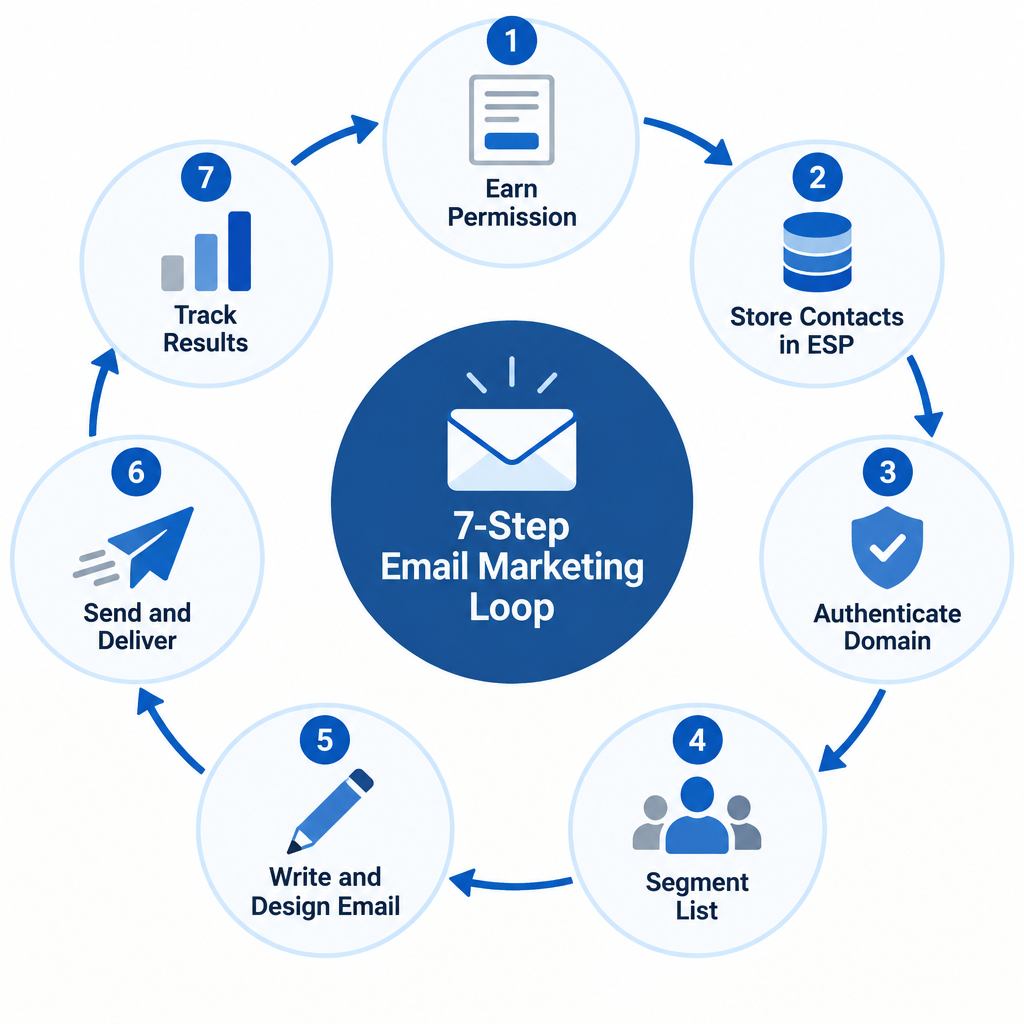
Every functioning email program, from a one-person Etsy shop to a retailer sending millions of messages a week, follows the same seven steps. The scale changes. The sequence doesn’t.
The 7-step email marketing loop
- Earn permission with a clear opt-in form.
- Store contacts in an email service provider.
- Authenticate your sending domain.
- Segment your list by behavior or interest.
- Write and design the email.
- Send, and let mailbox providers judge it.
- Track results and feed them into the next send.
Step 1: Earn permission
Your list starts with a signup form. It might be on your homepage, a checkout page, a pop-up offering 10% off, or a gated guide. The form needs to say what people will receive and roughly how often.
Many senders use double opt-in: after signing up, the subscriber clicks a confirmation link in a follow-up email. You’ll lose a slice of signups to unclicked confirmations. In exchange, you get proof of consent, fewer typo addresses and almost no spam traps. For a brand-new domain, double opt-in is the safer choice.
Step 2: Store contacts in an email service provider
An email service provider (ESP) such as Mailchimp, Klaviyo, Brevo, Kit or MailerLite stores your contacts, builds your emails, sends them through high-volume mail servers and reports on results. You can’t run email marketing from Gmail or Outlook. Those accounts have daily sending caps, no unsubscribe handling and no list management.
The ESP also stores information about each contact: signup date, source, purchase history, location and custom fields like “dog owner” or “wholesale buyer.” That data powers everything personalized you’ll send later.
Step 3: Authenticate your domain
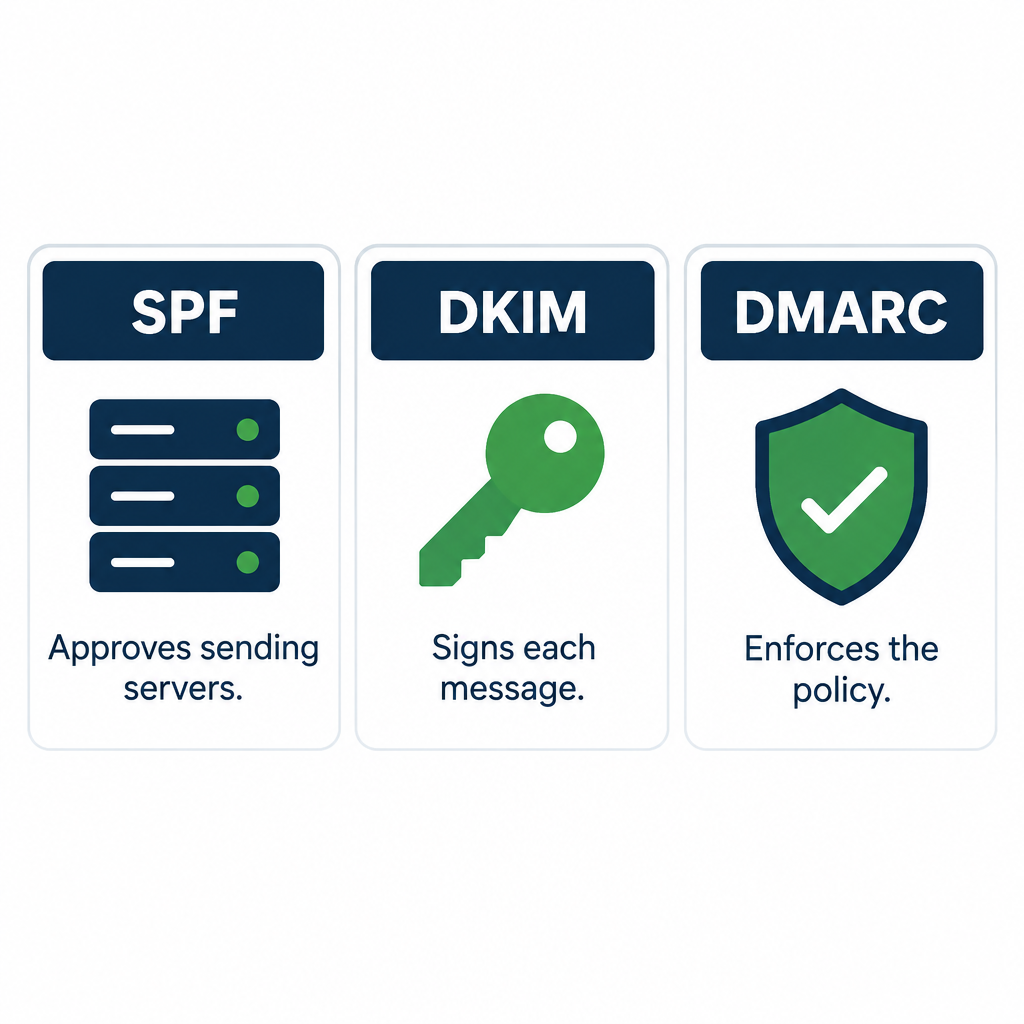
Before your first campaign, you add DNS records that prove your ESP is allowed to send on behalf of your domain. The three essentials are SPF, DKIM and DMARC. Since February 2024, Gmail and Yahoo have required them for bulk senders, and Microsoft followed for Outlook.com in May 2025. The exact records are covered in the deliverability section below.
You also want to send from your own domain ([email protected]), not a free address like [email protected]. Free-mail addresses fail DMARC when sent through an ESP, so mailbox providers will junk or reject them.
Step 4: Segment your list
Segmentation means splitting your list into groups so each person gets relevant emails. Common segments include:
- New subscribers who haven’t bought yet
- Customers who bought in the last 90 days
- People who clicked a specific product category
- Subscribers who haven’t opened or clicked in six months
- Location, for time zones and local offers
A pet store sending one dog-food promotion to its entire list will annoy every cat owner on it. Splitting by past purchases fixes that in about ten minutes of setup.
Step 5: Write and design the email
A marketing email has five parts readers notice: the from name, the subject line, the preheader (the preview text after the subject), the body and the call to action. Design follows from the goal. A product launch might use a hero image and a single “Shop now” button. A founder’s update might be plain text that looks like a personal note.
Step 6: Send and pass the mailbox provider’s judgment
Clicking send hands your message to the ESP’s servers, which then deliver it to Gmail, Outlook, Yahoo, Apple iCloud and corporate mail servers. Each receiving system decides whether your email lands in the inbox, a promotions tab or spam. That decision is the part most beginners never think about, so it gets its own section next.
Step 7: Track results
Your ESP reports deliveries, bounces, opens, clicks, unsubscribes, spam complaints and, if connected to your store, revenue. You use those numbers to decide what to send next, who to send it to, and who to stop emailing. Then the loop starts again.
What Happens After You Click Send
Understanding this path explains most deliverability problems you’ll ever face.
- Queueing. Your ESP splits your campaign into individual messages, one per recipient, and personalizes each (name, product recommendations, unsubscribe link).
- Connection. The ESP’s mail server opens an SMTP connection to the recipient’s mail server. Gmail’s servers see the sending IP address first and check its reputation.
- Authentication checks. The receiving server looks up your SPF record, verifies the DKIM signature and applies your DMARC policy. If the message fails DMARC and your policy says reject, it never arrives.
- Filtering. The mailbox provider weighs domain reputation, IP reputation, past engagement from this specific user, complaint rates and the content itself. How those filters decide is a topic in its own right, and our explainer on e-mail spam filtering walks through the signals in detail.
- Placement. If accepted, the message goes to the inbox, a tab such as Gmail’s Promotions, or the spam folder.
- Event reporting. Every bounce, open and click flows back to your ESP. Many platforms then push those events to your other tools in real time through webhooks, which is how your CRM knows someone clicked within seconds. If that term is new, a quick webhook definition will make your ESP’s integration settings far less confusing.
Opens are tracked with a tiny invisible image in the email. When the image loads, the ESP logs an open. Clicks are tracked by routing each link through the ESP’s redirect domain before sending the reader to your page.
Both methods have limits, and you’ll see why in the metrics section.
Why Email Marketing Is Worth Your Time
Email is old. It’s also where your customers check in every single day. The Radicati Group, a technology market research firm, publishes the most widely cited figures on email usage.
| Metric | 2023 | 2027 (forecast) | Source |
|---|---|---|---|
| Worldwide email users | 4.37 billion | 4.89 billion | Radicati Group, Email Statistics Report 2023–2027 |
| Emails sent and received per day | 347.3 billion | 408.2 billion | Radicati Group, Email Statistics Report 2023–2027 |
That’s more than half the planet with an inbox, and the number is still growing.
The main email marketing benefits
You own the audience. If a social network cuts organic reach, your followers vanish behind a paywall. Your email list stays yours. Export it, move platforms, keep sending.
It’s cheap to run. Many ESPs offer free plans for small lists, and paid plans for a few thousand contacts often cost less than a modest ad budget for a single week. Litmus, an email testing company, has put average email ROI at roughly $36 for every $1 spent. Treat that as an industry-wide average, not a promise for your business.
It drives sales directly. A well-timed abandoned-cart email reaches someone who already wanted the product. Few channels let you reach a warm buyer within an hour of hesitation.
It builds loyalty. Regular, useful emails keep you in mind between purchases. A coffee roaster that sends brewing tips and early access to limited lots is building loyalty that discounts alone can’t buy.
It’s measurable. You can track exactly how many people clicked, which link they chose and how much revenue followed. That makes testing easy and decisions concrete.
It’s personal at scale. One template can greet 40,000 people by name, show each of them products related to their last order and arrive at 9 a.m. in their own time zone.
9 Types of Emails You Can Send
People searching for “emails for email marketing” usually want to know what to actually send. These nine types cover nearly every program. Most businesses start with the first three and add the rest over time.
| Email type | When it’s sent | Main goal | Automated or manual |
|---|---|---|---|
| Welcome email | Right after signup | Set expectations, deliver the promised offer | Automated |
| Newsletter | Weekly or monthly | Keep subscribers engaged with useful content | Manual |
| Promotional campaign | Sales, launches, seasonal events | Drive sales | Manual |
| Abandoned cart | 1–24 hours after a cart is left | Recover the sale | Automated |
| Transactional | After a purchase, signup or password reset | Confirm an action | Automated |
| Post-purchase follow-up | Days after delivery | Reviews, how-to tips, cross-sells | Automated |
| Re-engagement (win-back) | After months of inactivity | Revive or remove inactive subscribers | Automated |
| Announcement | New product, feature or policy | Inform | Manual |
| Survey or feedback request | After an interaction or periodically | Learn what customers want | Either |
The welcome email
This is usually the most-opened email you’ll ever send, because the subscriber just asked for it. Deliver whatever you promised on the signup form immediately: the discount code, the guide, the first lesson. Then tell them what’s coming and how often.
A welcome series of three to five emails over two weeks works better than a single message for most businesses. Use it to tell your story, show bestsellers and answer common objections.
Newsletters
A newsletter is a regular send built around content: tips, news, stories, curated links. It works when it gives readers something they’d miss if it stopped arriving. It fails when it’s a sales flyer with a “newsletter” label.
Promotional campaigns
These are your sales emails: Black Friday offers, product launches, limited stock alerts. Send them to segments that care. A 20% off code for running shoes should go to people who have browsed or bought running gear.
Abandoned cart emails
A shopper adds items, then leaves. An automated email arrives an hour later with the items pictured and a link back to the cart. Many stores add a second reminder at 24 hours, sometimes with free shipping. This is one of the highest-earning automations in ecommerce because the intent is already there.
Transactional emails
Order confirmations, shipping notices, receipts and password resets are transactional. They aren’t marketing under CAN-SPAM as long as their primary purpose is the transaction. Keep promotions inside them minimal, or you risk changing their legal status.
They also get read by machines. Google says Chrome’s autofill can now pull flight and order details from Gmail, which is a strong reason to keep order numbers, dates and addresses in clean, readable text rather than burying them in images.
Re-engagement emails
Subscribers who haven’t opened or clicked in six months drag down your engagement signals. Send them a short series asking if they still want your emails. Anyone who doesn’t respond gets removed. Smaller, engaged lists outperform larger, sleepy ones in the inbox every time.
Email Marketing vs. Marketing Automation
These terms overlap, and people often use them interchangeably. They aren’t the same thing.
Email marketing is the channel: everything you send to subscribers by email, including one-off campaigns you write and schedule by hand.
Marketing automation is the method: software that triggers actions based on rules and behavior. Those actions can include emails, but also SMS messages, CRM updates, lead scoring and ad audience syncing.
Where they meet is the automated email flow. A trigger (signup, purchase, cart abandonment, birthday, inactivity) starts a sequence of emails with delays and conditions between them. “If the customer bought within three days, skip the second reminder” is a typical rule.
Most modern ESPs include basic automation. Dedicated automation platforms such as HubSpot or ActiveCampaign go further with multi-channel journeys and sales-team handoffs. For a small business starting out, the automation built into a standard email platform is plenty. You can graduate later.
A practical split for a new program:
- Automate anything triggered by a person’s own action: welcome, abandoned cart, post-purchase, win-back.
- Send manually anything tied to your calendar: newsletters, sales, launches, announcements.
Set up the automations once, and they earn while you sleep. Spend your weekly writing time on campaigns.
Gmail, Yahoo and Microsoft Sender Rules
In October 2023, Google and Yahoo announced joint requirements for bulk senders, with enforcement starting in February 2024. Microsoft announced matching rules for Outlook.com, Hotmail and Live addresses in April 2025, effective May 5, 2025. If you send marketing email in any real volume, these rules apply to you.
| Requirement | Gmail | Yahoo | Microsoft (Outlook.com, Hotmail, Live) |
|---|---|---|---|
| Who it applies to | Senders of about 5,000+ messages a day to personal Gmail accounts | Bulk senders (no fixed public number) | Senders of 5,000+ messages a day to consumer Outlook domains |
| SPF and DKIM | Required | Required | Required |
| DMARC | Required, minimum p=none, aligned with SPF or DKIM | Required, minimum p=none | Required, minimum p=none, aligned with SPF or DKIM |
| One-click unsubscribe | Required for marketing mail (from June 1, 2024) | Required | Functional unsubscribe link expected |
| Honor unsubscribes | Within 2 days | Within 2 days | Expected promptly |
| Spam complaint rate | Stay below 0.3%, aim for under 0.1% | Stay below 0.3% | Low complaint rates expected |
| Enforcement start | February 2024 | February 2024 | May 5, 2025 |
Google also says that once you’re classified as a bulk sender, you stay classified, even if your volume later drops.
The DNS records you need
These go into your domain’s DNS settings, usually at your registrar or DNS host. Your ESP will give you the exact values. Here’s what each looks like.
SPF lists the servers allowed to send for your domain. You get one SPF record per domain, so combine all senders into it:
Type: TXT
Host: @
Value: v=spf1 include:_spf.google.com include:spf.your-esp.example ~all
DKIM adds a cryptographic signature to each message. Many ESPs give you a CNAME record that points to a key they manage. Others give you a TXT record like this:
Type: TXT
Host: selector1._domainkey
Value: v=DKIM1; k=rsa; p=MIIBIjANBgkqhkiG9w0BAQEFAAOCAQ8AMIIBCgKCAQEA...
DMARC tells receivers what to do when a message fails authentication and where to send reports. Start at p=none to monitor, then tighten to quarantine and reject once your reports show everything legitimate passes:
Type: TXT
Host: _dmarc
Value: v=DMARC1; p=none; rua=mailto:[email protected]; adkim=r; aspf=r
One-click unsubscribe is handled by two email headers. Your ESP adds them automatically, but it’s worth confirming they’re present in a test message’s raw source:
List-Unsubscribe: <https://example.com/unsubscribe?id=123>, <mailto:[email protected]>
List-Unsubscribe-Post: List-Unsubscribe=One-Click
BIMI is optional. It displays your logo next to your emails in supporting inboxes, including Gmail and Apple Mail. It requires DMARC at p=quarantine or p=reject, and Gmail also needs a Verified Mark Certificate or Common Mark Certificate. Treat it as a later upgrade, not a launch requirement.
Deliverability risk
A spam complaint rate above 0.3% in Google Postmaster Tools puts you at real risk of Gmail filtering or rejecting your mail. Purchased lists and surprise sends to old contacts are the usual cause.
The Laws Behind Email Marketing
Spam laws differ by country, and they follow your recipients, not your office. A US store emailing customers in Germany needs to respect GDPR. Here are the three you’re most likely to meet.
| Law | Region | Consent model | Key requirements | Maximum penalty |
|---|---|---|---|---|
| CAN-SPAM Act | United States | Opt-out (consent not required beforehand) | Honest headers and subject lines, identify ads, include a physical postal address, working opt-out honored within 10 business days | Over $50,000 per violating email (inflation-adjusted annually) |
| GDPR (with ePrivacy rules) | EU and UK (UK GDPR plus PECR) | Opt-in; consent must be freely given, specific, informed and unambiguous | No pre-ticked boxes, record of consent, easy withdrawal | Up to €20 million or 4% of global annual turnover, whichever is higher |
| CASL | Canada | Opt-in (express or implied consent) | Identify sender, include contact info and unsubscribe, process unsubscribes within 10 business days | Up to CAD $10 million per violation for organizations |
A few practical notes:
- CAN-SPAM covers B2B email too. There’s no business-to-business exemption.
- Implied consent under CASL expires. An existing business relationship from a purchase generally counts for two years.
- The UK’s soft opt-in lets you email existing customers about similar products, as long as you offered an opt-out when you collected their address and in every email since.
- Business cards aren’t blanket consent. Under GDPR and CASL, a card handed over at a trade show doesn’t automatically mean someone agreed to your newsletter.
The safe default for any business with international customers: get clear opt-in consent, record when and where it was given, and make unsubscribing a single click.
Choosing the Right Email Marketing Tool
Your ESP choice shapes how easily you can do everything else. Price matters, but it’s rarely the deciding factor for long.
What to look for
- Pricing model. Most platforms charge by contact count. Some charge by emails sent. If you send rarely to a large list, a send-based plan can be cheaper.
- Ecommerce integration. Shopify, WooCommerce or BigCommerce stores need purchase data flowing into the ESP for abandoned cart and product recommendation emails.
- Automation depth. Check for visual flow builders, conditional splits and behavior-based triggers.
- Deliverability support. Look for guided domain authentication, dedicated IP options at higher volume and responsive support.
- Templates and editor. A drag-and-drop editor with mobile preview saves hours each month.
- Reporting. Revenue attribution, click maps and segment-level reporting beat basic open counts.
- Data portability. Make sure you can export your full contact list, including custom fields and consent data.
Free plans to start on
Several well-known ESPs offer free tiers. At the time of writing, Mailchimp’s free plan covers up to 250 contacts with 500 emails per month and a daily cap of 250, Brevo’s free plan allows 300 emails per day, and Kit’s free Newsletter plan supports up to 10,000 subscribers. Free plans change often, so check the current limits on each provider’s pricing page before you commit.
For a side-by-side look at features, costs and who each tool suits, our roundup of small business email platforms compares the main options in detail.
Inbox tip
Pick an ESP that makes domain authentication part of onboarding. Platforms that walk you through SPF, DKIM and DMARC on day one save you from the most common first-campaign spam problem.
Writing Emails People Actually Open
Design and copy decide whether a delivered email gets read, ignored or reported. Good emails share a handful of habits.
From name and subject line
Your from name should be recognizable instantly. Use your brand name, or “First name at Brand” if you want a personal feel. Keep it consistent so subscribers learn to trust it.
Subject lines work best when they’re specific. “New: the waterproof version of our best-selling jacket” beats “You won’t believe this!” The first tells people what’s inside. The second reads like spam and often gets treated like it.
A few subject line rules worth following:
- Front-load the important words, because mobile clients cut subjects short.
- Avoid ALL CAPS, rows of exclamation marks and fake “RE:” or “FWD:” prefixes. The fake reply trick also breaks CAN-SPAM’s rule against deceptive subject lines.
- Use the preheader to add a second piece of information, not to repeat the subject.
Body copy
Write like a person talking to one customer. Short paragraphs, one main idea, one primary call to action. If you want readers to shop the sale, don’t also ask them to read a blog post, follow you on Instagram and fill out a survey.
Personalization goes far beyond adding a first name. Product recommendations based on browsing, content matched to a subscriber’s stated interests and local event invitations all feel personalized because they’re relevant.
Design
- Design for mobile first. Most opens happen on phones. Use a single-column layout, 14–16px body text and buttons big enough for a thumb.
- Don’t send image-only emails. Some clients block images by default, and filters dislike emails with almost no live text. Keep a healthy balance of text to images.
- Add alt text to every image so the message makes sense when images don’t load and works with screen readers.
- Include a plain-text version. Most ESPs generate one automatically. Check that it reads sensibly.
Plain-text-style emails from a founder or support lead often outperform heavy designs for relationship messages. Close those with a proper sign-off. A clean, human signature makes them feel personal, and you can borrow ideas from our email signature examples.
Proofreading and test sends
Send a test to yourself on desktop and mobile before every campaign. Click every link. Check the personalization fallback, because “Hi {FNAME}” in a live campaign is embarrassing. If a mistake does slip through, a calm correction usually beats silence, and our guide on handling a typo email covers when a follow-up is worth sending.
Metrics to Track (and Which Ones to Trust)
Your ESP will show you dozens of numbers. These are the ones that matter, with reference points.
| Metric | What it tells you | Reference point | Source |
|---|---|---|---|
| Open rate | Subject line and sender appeal (unreliable since 2021) | 21.33% average across industries | Mailchimp benchmarks, pre-2021 data |
| Click rate | Content relevance and call-to-action strength | 2.62% average across industries | Mailchimp benchmarks, pre-2021 data |
| Unsubscribe rate | Frequency or relevance problems | 0.26% average | Mailchimp benchmarks, pre-2021 data |
| Hard bounce rate | List quality (invalid addresses) | 0.40% average | Mailchimp benchmarks, pre-2021 data |
| Spam complaint rate | Whether people want your mail | Under 0.1% target, 0.3% maximum | Google bulk sender guidelines |
Why open rates lie now
In September 2021, Apple launched Mail Privacy Protection with iOS 15. When it’s turned on, Apple Mail preloads email content, including the tracking pixel, on Apple’s servers. Your ESP logs an “open” whether or not the person ever looked at the message.
The result: open rates jumped across the industry, and they no longer reliably reflect reading. The Mailchimp averages above predate that change, which makes them a useful baseline for how opens used to look but a poor target for today’s inflated numbers.
What to do about it:
- Judge campaigns by clicks, conversions and revenue, not opens.
- Don’t use opens alone to define “engaged” subscribers. Combine them with clicks and purchases.
- Be cautious with open-based A/B subject line tests, since Apple users skew the results.
Revenue per recipient
For ecommerce, revenue per recipient (total campaign revenue divided by emails delivered) is the single most useful number. It lets you compare a 5,000-person segment send with a 50,000-person blast fairly. A smaller, better-targeted campaign often earns more per email.
Inbox health signals
Set up Google Postmaster Tools for your domain. It shows your spam complaint rate, domain reputation and authentication pass rates for Gmail traffic. Microsoft offers Smart Network Data Services (SNDS) for IP-level data. Check both weekly once you’re sending regularly.
How Subscribers Treat Your Emails Once They Land
This angle rarely shows up in beginner guides, yet it drives inbox placement more than any subject line trick.
Mailbox providers watch what each user does with your messages. Opening, replying, moving an email from Promotions to Primary and adding you to contacts all count as positive signals. Deleting without reading, marking as spam and ignoring you for months count against you.
Inbox cleaning matters here. Plenty of people periodically wipe out thousands of unread promotions at once, and guides showing how to bulk delete Gmail emails are popular for a reason. If your messages are the ones getting cleared in bulk without ever being opened, Gmail notices the pattern over time.
You can counter this in a few ways:
- Ask for a reply in your welcome email. A question like “What’s the one thing you want help with?” earns replies, and replies are a strong positive signal.
- Send less to people who engage less. Many ESPs let you create a “sunset” segment that receives only your best campaigns.
- Make unsubscribing painless. Someone who can’t find the unsubscribe link will hit “Report spam” instead. A clean unsubscribe protects your reputation.
- Keep transactional and marketing streams separate. Many senders use a subdomain like mail.yourbrand.com for marketing, so a rough campaign doesn’t slow down order confirmations.
Before You Click Send: 10 Things to Check
Run through this list before every campaign. It takes five minutes and prevents most of the problems we see.
- Authentication passes. SPF, DKIM and DMARC all show “pass” in a test message’s headers.
- The audience is right. You’ve selected the correct segment and excluded unsubscribes, bounces and suppressed contacts.
- Consent is real. Everyone on the list opted in or has a legitimate relationship under the law that applies.
- The subject line is honest. It matches what’s inside.
- The preheader is set. Otherwise, clients show the first line of body text, often “View in browser.”
- Links work. Every one, including the logo and footer.
- Personalization has fallbacks. “Hi there” instead of a blank or a raw merge tag.
- The footer is complete. Physical postal address, unsubscribe link and a line explaining why they’re receiving the email.
- It looks right on mobile. Check on an actual phone, not just the editor preview.
- Send time fits the audience. Schedule by recipient time zone if your ESP supports it.
5 Email Marketing Practices You Should Never Forget
Strip email marketing down to its essentials, and these five practices remain.
1. Never buy, rent or scrape a list. Purchased lists contain spam traps and people who never consented. They break GDPR and CASL outright, and they’ll destroy your domain reputation within a few sends. Build your list slowly and legally.
2. Warm up a new domain gradually. Mailbox providers distrust sudden volume from unknown senders. Start by emailing your most engaged subscribers, then increase volume over several weeks.
3. Clean your list regularly. Remove hard bounces immediately (your ESP should do this automatically). Run a re-engagement series every few months, and remove people who don’t respond.
4. Keep a consistent schedule. Subscribers who expect your newsletter every Tuesday open it. Subscribers who hear from you twice in March and then nothing until November forget who you are and hit spam.
5. Give more than you ask. For every sales email, send something useful: a tip, a story, early access, a how-to. People stay subscribed to senders who make their inbox better.
Common Beginner Mistakes
A few errors show up again and again with new senders:
- Sending from a free Gmail or Yahoo address. It fails DMARC through any ESP. Use your own domain.
- Importing an old contact list into a new ESP and blasting it. Addresses from three years ago include dead accounts and people who’ve forgotten you. Expect bounces and complaints.
- Hiding the unsubscribe link. Tiny grey text on a grey background pushes people to the spam button instead.
- Only sending promotions. A list that hears “SALE” every week stops listening.
- Ignoring automation. A welcome series and abandoned cart flow take an afternoon to set up and keep working for years.
- Chasing open rates. Since Apple’s privacy change, opens mislead. Clicks and revenue tell the truth.
FAQ
Is email marketing still effective?
Yes. Email reaches more than four billion users worldwide, according to Radicati Group figures, and it remains one of the highest-ROI channels marketers use. It works best for businesses that send relevant, permission-based emails rather than mass blasts.
How much does email marketing cost?
You can start free. Several major ESPs have free plans for small lists, though limits change, so check current pricing. Paid plans scale with the number of contacts, so a list of a few thousand subscribers typically costs tens of dollars a month, not hundreds.
What’s the difference between email marketing and spam?
Permission. Email marketing goes to people who opted in, clearly identifies the sender and lets recipients unsubscribe easily. Spam is unsolicited bulk email, often with misleading headers or subject lines. Mailbox providers and spam laws treat the two very differently.
How often should I send marketing emails?
Most small businesses do well with one newsletter or campaign a week, plus automated emails triggered by customer actions. Watch your unsubscribe and complaint rates. If they climb after you increase frequency, scale back or let subscribers choose how often they hear from you.
Do I need my own domain for email marketing?
Yes. Gmail, Yahoo and Microsoft require bulk senders to authenticate with SPF, DKIM and DMARC, which you can only set up on a domain you control. Sending marketing email from a free webmail address through an ESP will fail authentication.
Can I email people who gave me their business card?
In the US, CAN-SPAM allows it as long as you include an opt-out and follow the other rules. In the EU, UK and Canada, a business card alone generally isn’t enough consent for marketing emails. The safest approach is to send one personal follow-up and invite them to subscribe.