
Domain email gives you an address like [email protected] instead of [email protected]. This guide covers what you need, which host to pick, the DNS records to add, and how to confirm that your mail lands in the inbox and not the spam folder.
What a Domain Email Address Actually Is
An email address has two parts on either side of the @ symbol. The part before is the mailbox name. The part after is the domain.
With a free account, the domain belongs to Google, Microsoft or Yahoo. With a custom domain email address, the domain belongs to you. That one difference changes who controls your identity online.
Domain names and email are separate products, and many people miss this. Your domain registrar (Namecheap, Cloudflare, Porkbun, GoDaddy) rents you the name. An email host (Google Workspace, Microsoft 365, Zoho Mail) runs the mailboxes. DNS records connect the two.
Some registrars bundle basic email for a domain. That’s convenient, but the bundled mailboxes are often limited. Most businesses are better served by keeping the domain and the mail host separate.
Why a Custom Email Domain Is Worth Paying For
A free Gmail address costs nothing. A custom email domain costs a few dollars a month. The trade is easy to justify once you see what you get.
- Trust. A quote from [email protected] looks legitimate. The same quote from [email protected] looks like a scam.
- Ownership. If you leave your mail host, your addresses come with you. You point the domain at a new provider and keep every address.
- Team addresses. You can create info@, support@ and billing@ and route them to the right people without sharing passwords.
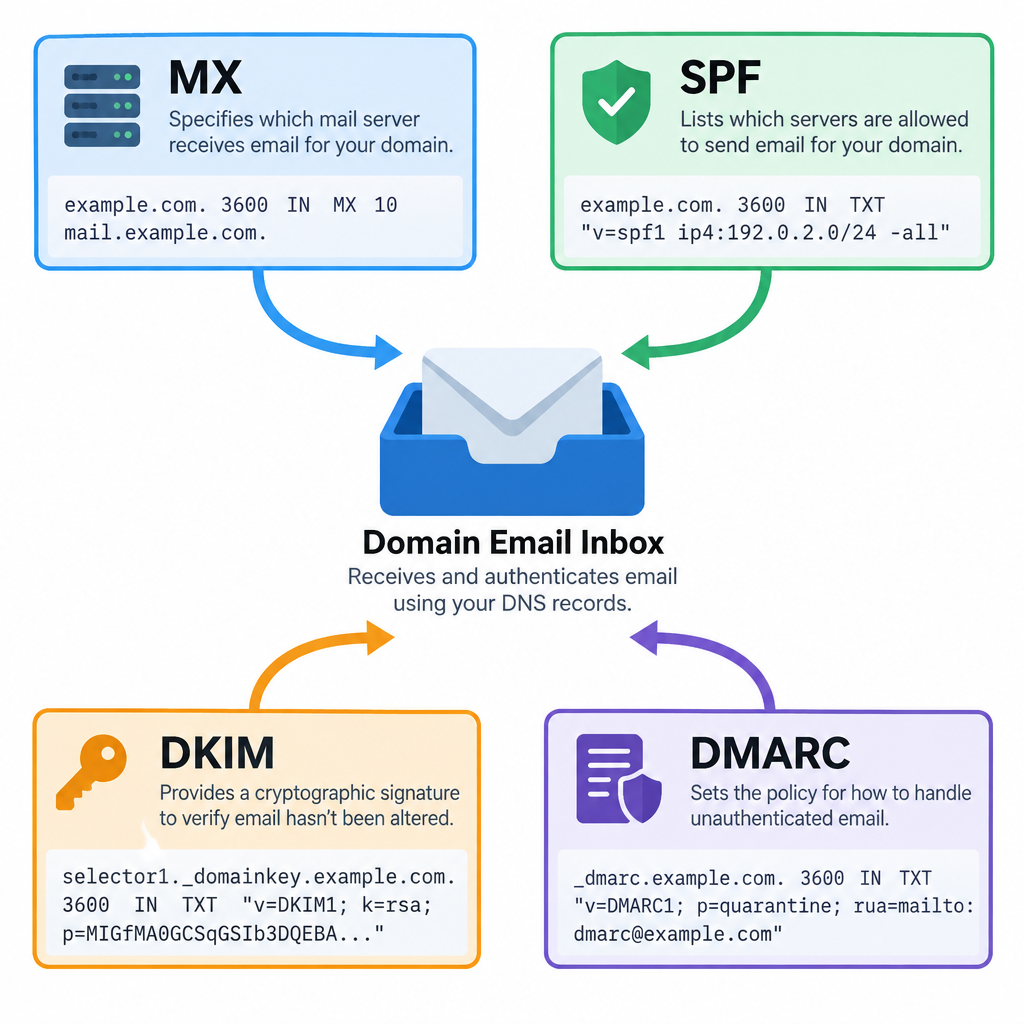
- Deliverability control. You can publish SPF, DKIM and DMARC for your own domain. With a free address, you can’t authenticate anything.
- Marketing. Every serious email marketing platform now expects you to send from a domain you can authenticate. Free webmail addresses fail DMARC when sent through third-party tools.
Branding matters too. Every email you send repeats your domain name to the person reading it.
What You Need Before You Start
Gather these before you touch any settings. Setup goes much faster with everything in one place.
- A registered domain. A .com usually runs around $10 to $20 a year. Pick a short name that’s easy to spell aloud.
- Login access to your DNS. This is usually at your registrar. If someone else set up your website, ask them who hosts your DNS.
- A chosen email host and plan. See the comparison below.
- A list of addresses. Decide which addresses need full mailboxes and which can be aliases.
- About an hour. DNS changes often apply in minutes but can take up to 48 hours.
- Your old mail, if migrating. Note the IMAP settings of your current provider so you can import messages.
Deliverability risk
Never delete your existing MX records until your new mailboxes are created. Mail sent in the gap will bounce.
Choosing Where Your Domain Mail Lives
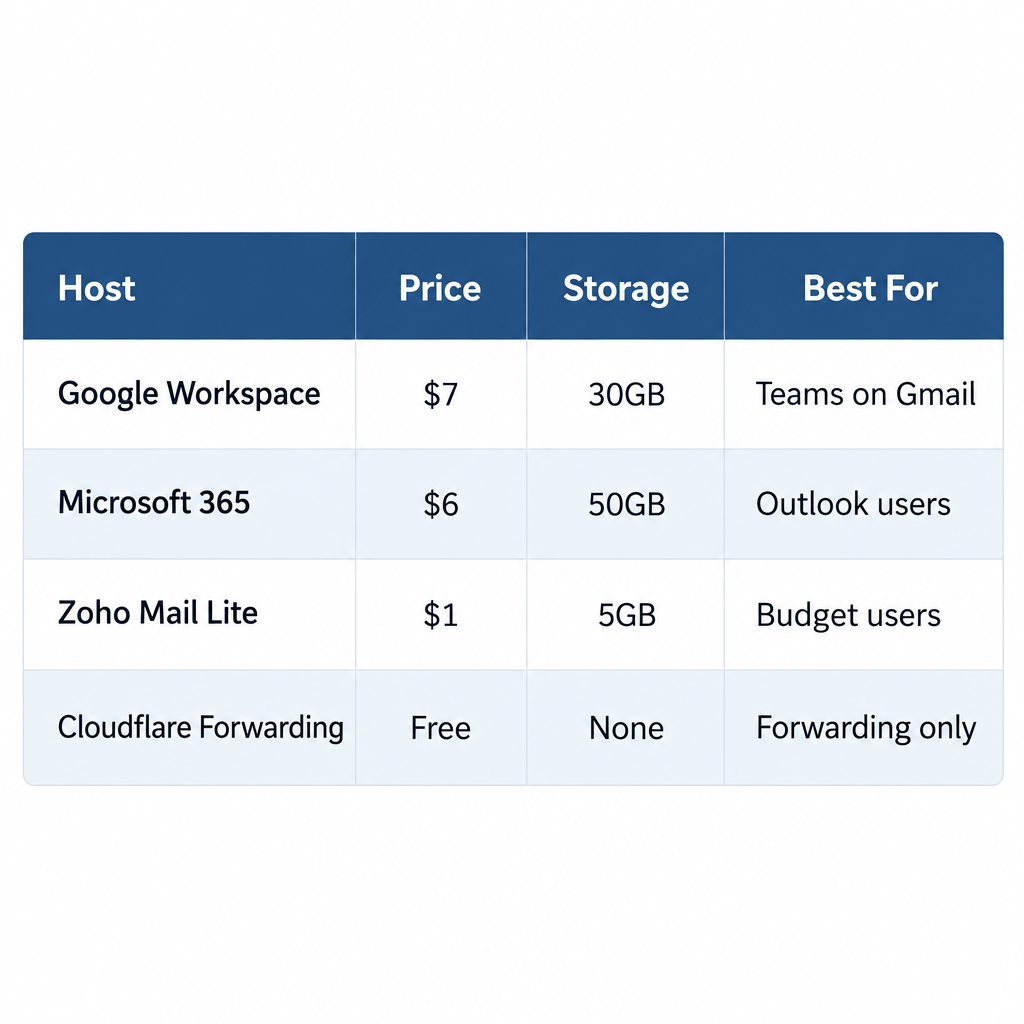
The host you pick decides your monthly cost, storage and support. Prices below are per user per month on annual billing, as listed in 2025. Providers change pricing often, so confirm on their pricing page before you buy.
| Host | Entry plan | Price (2025) | Storage | Good fit |
|---|---|---|---|---|
| Google Workspace | Business Starter | $7 | 30 GB pooled per user | Teams already on Gmail |
| Microsoft 365 | Business Basic | $6 | 50 GB mailbox | Offices using Outlook and Teams |
| Zoho Mail | Forever Free | $0 (up to 5 users) | 5 GB per user | Tiny teams on zero budget |
| Zoho Mail | Mail Lite | $1 | 5 GB per user | Cheap paid mailboxes with IMAP |
| Forwarding (Cloudflare Email Routing) | Free | $0 | None (forwards only) | Receiving mail at your domain |
Zoho’s free plan is web and app only, without IMAP or POP. If you want Outlook or Apple Mail on the desktop, you need a paid tier.
My default advice is simple. If your team lives in Gmail, buy Google Workspace. If it lives in Outlook and Excel, buy Microsoft 365. If you’re one person on a tight budget, Zoho Mail Lite is hard to beat.
Mailboxes vs aliases
You don’t need a paid mailbox for every address. An alias is an extra address that delivers into an existing mailbox.
On Google Workspace, one user can hold up to 30 aliases at no extra cost. A sole trader can have hello@, invoices@ and press@ all landing in one inbox. Use Google Groups when several people need to see the same address, like support@.
How to Set Up Domain Email in 6 Steps
The steps below use Google Workspace as the example. Microsoft 365 and Zoho follow the same pattern with different record values.
Setup steps
- Sign up for your email host and enter your domain.
- Verify that you own the domain with a TXT record.
- Create your users, aliases and groups.
- Replace your MX records to route incoming mail.
- Add SPF, DKIM and DMARC records.
- Send test emails and check the results.
Step 1: Sign up and enter your domain
Start a Workspace trial and choose “Use a domain I already own.” If you don’t own one yet, Google can register it for you. I prefer buying the domain separately so the registrar and mail host stay independent.
Step 2: Verify ownership
Google gives you a TXT record that looks like this:
Type:  TXT
Host:  @
Value: google-site-verification=AbC123xYz...
TTL:   3600
Add it in your DNS panel, then click Verify in the Admin console. Some registrars want the host field blank instead of @. Both mean the root domain.
Step 3: Create users and addresses
In the Admin console, go to Directory > Users > Add new user. Create real mailboxes for real people. Then add aliases under each user’s profile in User information > Alternate email addresses.
Step 4: Point your MX records at the new host
MX records tell the world where to deliver mail for your domain. Delete any old MX records first, then add the new ones. For new Google Workspace setups, Google uses a single record:
Type:     MX
Host:     @
Value:    smtp.google.com
Priority: 1
For Microsoft 365, the value is unique to your tenant and follows this format:
Type:     MX
Host:     @
Value:    yourdomain-com.mail.protection.outlook.com
Priority: 0
Microsoft shows the exact value in the admin center under Settings > Domains. Copy it rather than typing it.
Step 5: Authenticate your domain
This step separates mail that lands in the inbox from mail that lands in junk. It gets its own section below because so many setups skip it.
Step 6: Test
Send messages to a Gmail account, an Outlook.com account and a colleague. Reply from each one. You’ll check authentication results in the “Expected result” section.
SPF, DKIM and DMARC: The Records That Keep You Out of Spam
Since February 2024, Gmail and Yahoo require every sender to have SPF or DKIM. Anyone sending more than 5,000 messages a day to Gmail must have SPF, DKIM and DMARC, plus one-click unsubscribe for marketing mail. Microsoft introduced similar rules for high-volume senders to Outlook.com on May 5, 2025.
Even if you send ten emails a day, set all three up. Modern e-mail spam filtering treats unauthenticated mail with suspicion regardless of volume.
SPF
SPF lists the servers allowed to send mail for your domain. You can only have one SPF record per domain. For Google Workspace:
Type:  TXT
Host:  @
Value: v=spf1 include:_spf.google.com ~all
For Microsoft 365, swap the include for include:spf.protection.outlook.com. If you also send through a newsletter tool, merge everything into one record:
v=spf1 include:_spf.google.com include:servers.mcsv.net ~all
That second include is Mailchimp’s. Your tool will tell you which include to use.
DKIM
DKIM adds a cryptographic signature to every message. In Google Workspace, go to Apps > Google Workspace > Gmail > Authenticate email. Generate a 2048-bit key, then publish it:
Type:  TXT
Host:  google._domainkey
Value: v=DKIM1; k=rsa; p=MIIBIjANBgkqh...
Go back to the Admin console and click Start authentication. Skipping that click is the most common reason DKIM “doesn’t work.”
In Microsoft 365, you enable DKIM in the Defender portal under Email & collaboration > Policies & rules > Threat policies > Email authentication settings. Microsoft gives you two CNAME records to publish.
DMARC
DMARC tells receivers what to do when a message fails SPF and DKIM. It also sends you reports. Start in monitoring mode:
Type:  TXT
Host:  _dmarc
Value: v=DMARC1; p=none; rua=mailto:[email protected]
After two to four weeks of clean reports, move to p=quarantine, then p=reject. A strict policy stops scammers from sending as your domain, which protects your customers as much as you.
Inbox tip
Create a dedicated mailbox or group for DMARC reports. The XML files pile up fast and will bury real mail.
Expected Result: How to Know It Worked
Send a message from your new address to a Gmail account. Open it, click the three-dot menu, and choose Show original. You want to see this at the top:
- SPF: PASS with your domain
- DKIM: PASS with your domain
- DMARC: PASS
If all three pass, your setup is correct. Replies should arrive in your new inbox within seconds. Mail to every alias should land where you expect.
Common Mistakes and How to Fix Them
| Symptom | Likely cause | Fix |
|---|---|---|
| Incoming mail still goes to old provider | Old MX records not removed | Delete every old MX record |
| SPF shows PermError | Two SPF records, or more than 10 DNS lookups | Merge into one record, remove unused includes |
| DKIM fails after setup | “Start authentication” never clicked | Return to Admin console and enable it |
| Mail bounces for a day | DNS still propagating | Wait; lower TTL to 300 before future changes |
| Verification fails | Host field entered as full domain | Use @ or leave blank, per your registrar |
| Newsletters land in spam | Sending tool not in SPF, or no custom DKIM | Authenticate your domain inside the tool |
One more mistake catches people months later. They let the domain registration lapse. When the domain expires, every email address on it stops working, and someone else can buy the name. Turn on auto-renew and keep your billing card current.
The Free Route, and Why It Breaks Later
You can get domain mail for free. Cloudflare Email Routing or ImprovMX forward incoming mail to your Gmail. Then you add your address in Gmail under Settings > Accounts and Import > Send mail as, using Gmail’s SMTP server with an app password.
It works for receiving and casual replies. The problem is authentication. Mail sent this way is signed by gmail.com, not your domain. Once you set DMARC to quarantine or reject, those messages fail. Some receivers already flag them, and recipients may see “via gmail.com” next to your name.
Treat the free route as temporary. When your domain email starts carrying invoices or sales follow-ups, move to a real host.
Keep Marketing Mail Away From Your Main Domain
Here’s the approach I use for every client. Send day-to-day business mail from your root domain, and send newsletters from a subdomain such as news.yourdomain.com.
If a campaign triggers complaints, the damage hits the subdomain’s reputation first. Your staff’s one-to-one mail keeps flowing. Most of the small business email platforms worth paying for support subdomain authentication during setup.
While you’re polishing your sending setup, add a proper signature too. Our email signature examples show what to include without bloating every message.
FAQ
Can I get a domain email address for free?
Yes, with limits. Zoho Mail’s Forever Free plan covers up to 5 users on one domain, using its web and mobile apps only. Forwarding services are free too, but sending through Gmail fails DMARC alignment for your domain.
Do I need a website to have domain email?
No. You only need the domain and DNS access. Many businesses run email on a domain with no website at all.
Can I keep using the Gmail app with my custom domain email?
Yes. Google Workspace mailboxes work in the standard Gmail app and web interface. Microsoft 365 and Zoho accounts can also be added to Gmail on mobile through IMAP or Exchange.
Will I lose emails when I switch hosts?
Not if you create the new mailboxes before changing MX records. Import old messages with your new host’s migration tool, then switch the MX records during a quiet period.
How many addresses should a small business have?
Give each person a named mailbox. Then add role addresses like info@, support@ and billing@ as aliases or groups. That covers most teams without paying for extra seats.
How long does domain email setup take?
Most setups take under an hour of hands-on work. DNS changes usually apply within minutes, but allow up to 48 hours before assuming something is broken.