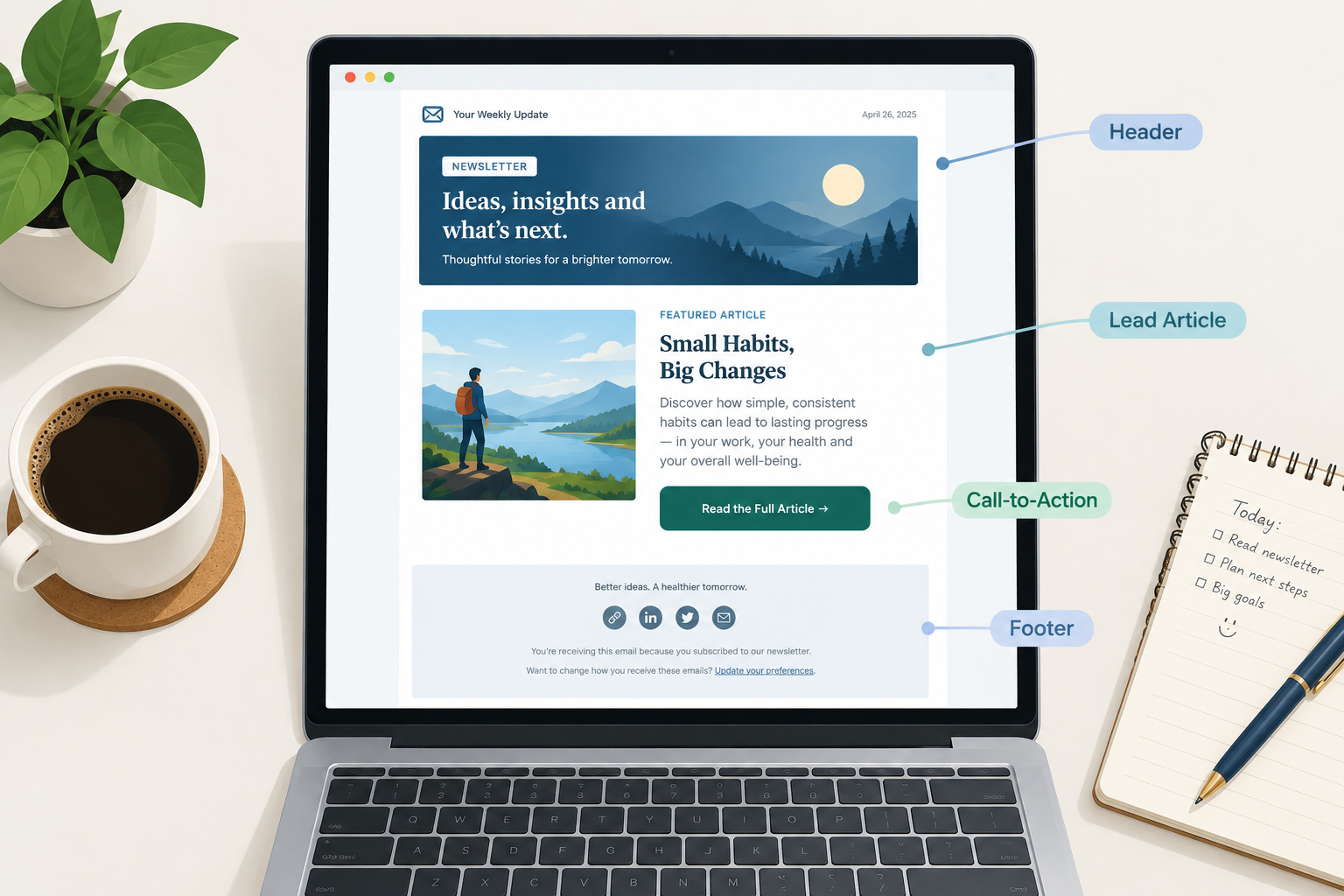
A newsletter is a repeating format, and a good format is mostly decided before you write a word. This guide covers which newsletter items belong in every issue, how to write newsletter updates people actually read, and how to build a rotation of regular features you can fill every week without staring at a blank draft.
What you need before you choose your newsletter items
Planning sections without a few basics in place means rebuilding your template within a month. Have these ready first:
- A one-sentence reader promise. Example: “Every Thursday, three ways to cut your store’s shipping costs.” If you can’t write this sentence, your items will drift.
- A defined audience segment. “Customers” is too broad. “Customers who bought in the last 90 days” is something you can write for.
- An email service provider with templates, link tracking and list management. Click data per link is what tells you which items earn their place.
- A cadence you can sustain. Weekly is the common default. Biweekly is fine. Picking a schedule you will break is worse than either.
- Your legal footer details. You need a physical postal address and a working unsubscribe method for commercial email under the US CAN-SPAM Act. If you mail people in the EU or UK, you also need a lawful basis for sending, which for marketing is usually consent.
- A place to collect ideas. Use a doc, a Notion board or a spreadsheet. Anything works as long as you add to it between issues.
If you are newer to the channel overall, it helps to understand how email marketing works end to end before you obsess over sections. Newsletter content sits on top of list building, permission and deliverability.
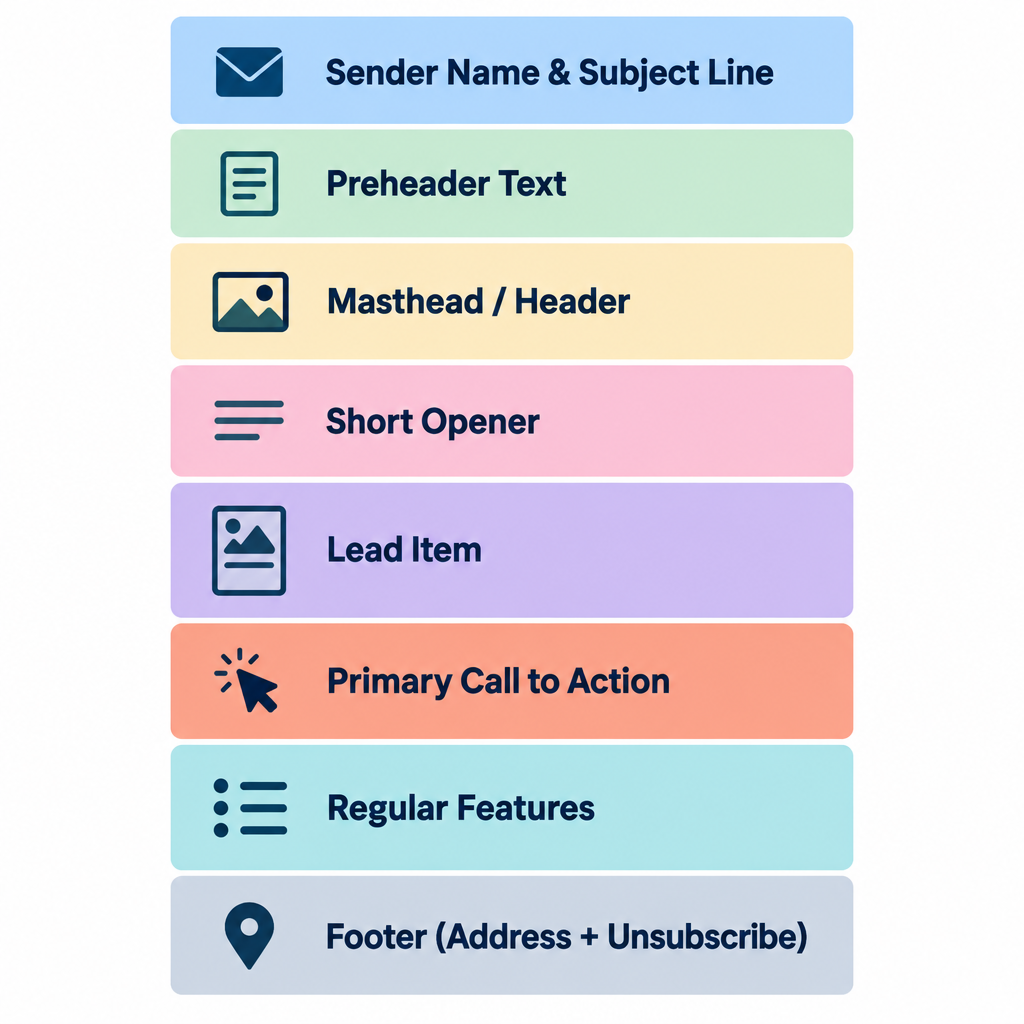
The fixed elements: items every issue needs
Some newsletter items rotate. These ones don’t. They show up in the same place every time, and readers learn where to look.
Sender name and subject line
The sender name is the first thing people use to decide whether to open. Use a name readers recognise, and keep it consistent. “Maya at Fieldnotes” usually beats “Fieldnotes Newsletter” for a creator. A company brand name works better for a store.
Your subject line should sell the lead item, not the issue number. “Issue #47” tells nobody anything. “The returns policy change that saved us 11 hours a week” gives people a reason to open.
Preheader text
The preheader is the preview snippet that shows after the subject in most inboxes. If you leave it blank, the inbox pulls the first text in your email, which is often “View in browser” or alt text. Write it on purpose and use it to back up the subject, never to repeat it.
Masthead or header
Keep it light: a logo or name, the date, and maybe a one-line tagline. Big hero images push your actual content below the fold on phones, and most newsletter opens happen on mobile.
A short opener
Two to four sentences from a human. Say what’s in this issue, or share one observation from the week. This is where personality lives, and it’s often the most-replied-to part of the email.
The lead item
One piece of content gets top billing. It’s the reason this issue exists. Every other section supports it or adds variety.
One primary call to action
Pick the single thing you most want readers to do this issue and make it obvious. A button or a bold text link both work. Secondary links are fine, but they shouldn’t compete visually with the main one.
The footer
This part is legal and practical at once. Include:
- Your physical mailing address (CAN-SPAM requirement for commercial email)
- A clear unsubscribe link
- A one-line reminder of why the reader is getting this (“You’re receiving this because you signed up at…”)
- An option to update preferences or change frequency, so people can downgrade instead of leaving
Deliverability risk
Since February 2024, Gmail and Yahoo require bulk senders (roughly 5,000+ messages a day to their users) to support one-click unsubscribe and keep spam complaint rates below 0.3%. A buried or broken unsubscribe link pushes people to hit “Report spam” instead.
How to write newsletter updates readers actually read
Newsletter updates are the section most brands get wrong. A product change, a new hire, an office move or a policy update matters to you. Readers only care if it changes something for them.
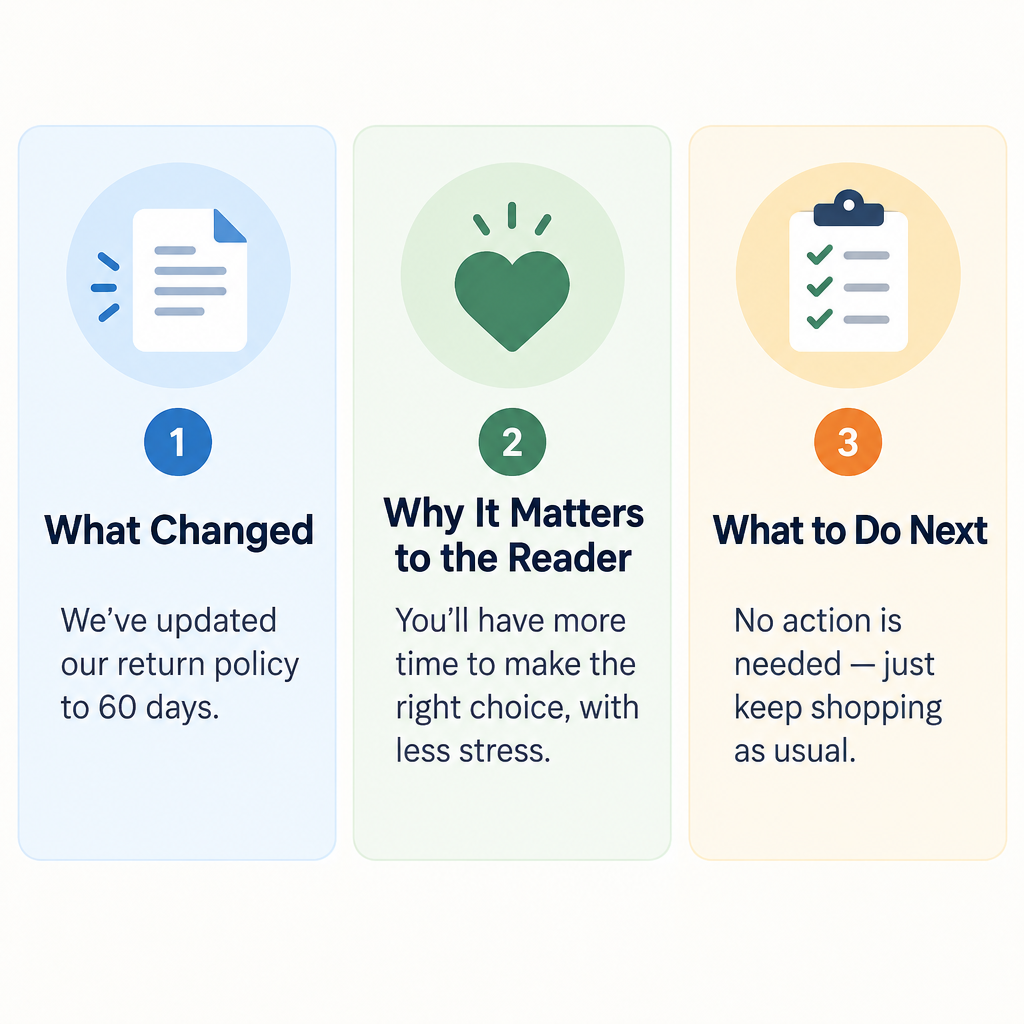
Use this three-part structure for every update:
- What changed. One plain sentence. “Orders over $50 now ship free in the US.”
- Why it matters to the reader. “If you’ve been splitting orders to save on shipping, you can stop.”
- What to do next. “Nothing to set up. It applies at checkout from today.”
Compare that with the typical version: “We’re thrilled to announce an exciting new shipping initiative!” That sentence takes up space and says nothing.
A few more rules for updates:
- Group small updates. Five minor changes become one “What’s new” block with a bullet each. Don’t give each its own section.
- Lead with the reader-facing change. Internal milestones like funding, awards or headcount go at the bottom, if they go anywhere.
- Date anything time-sensitive. “Price changes on March 1” beats “soon.”
- Link to detail rather than pasting it. A changelog or blog post can hold the full explanation.
If your updates are mainly for staff rather than customers, the rules shift a little. An internal newsletter can carry more company news and recognition, because employees do care about headcount, new hires and team wins.
17 newsletter items worth rotating in
These are the regular features that fill the space between your fixed elements. Don’t use all 17. Pick three to five that fit your reader promise, run them consistently, and swap one out if its clicks stay flat for a couple of months.
Items that teach
1. The how-to or tutorial. One specific task, solved in steps. “How to set up a returns label in Shopify in four clicks” works. “Tips for better returns” is too vague.
2. The quick tip. A single trick that fits in two or three sentences. It’s low effort to write and easy to read, and it makes a reliable recurring slot.
3. The explainer. Take one term or concept your readers half-understand and explain it plainly. B2B newsletters live on these.
4. The myth or mistake. “Most people think X. Here’s what actually happens.” Correcting a common belief builds trust quickly.
Items that curate
5. The link roundup. Three to five links worth the reader’s time, each with one sentence on why. The commentary is the value. A bare list of links is a bookmark folder, not a newsletter.
6. The industry news digest. Summarise what changed in your niche this week and what it means for your reader. For an email newsletter, that might be a new mailbox provider rule, or a Gmail feature that changes how people see your emails.
7. The tool or resource pick. One tool, template or book, with a sentence on who it’s for. Disclose clearly if it’s an affiliate link.
Items that build community
8. The reader question. Answer one question a subscriber sent in. It shows people you read replies and it gives you endless material.
9. The customer or member spotlight. A short profile or success story, with permission. Readers love seeing people like them.
10. User-generated content. Photos, reviews or projects from your audience. Stores and hobby brands get strong engagement from this.
11. The poll or quick survey. One question, one click. Results feed future issues (“62% of you said…”), and the clicks help engagement signals.
Items that sell (carefully)
12. Product or service feature. Show one product in use, solving one problem. Skip the catalogue grid.
13. The offer or promotion. A discount, bundle or early access window. Put a deadline on it, and keep it to one per issue.
14. Events and dates. Webinars, launches, sales, workshops. Put the date and time zone in the first line.
Items that add personality
15. Behind the scenes. How something gets made, packed, designed or decided. It’s cheap to produce and very effective for small brands.
16. The personal note or story. A short anecdote that ties to your topic. Creators often build their entire newsletter around this.
17. The “one more thing” sign-off. A recommendation, a fun stat, a photo or a joke at the bottom. It rewards people who scroll and gives the issue a recognisable ending.
Inbox tip
Ask a simple question in your opener and invite replies. Replies are one of the strongest positive signals a mailbox provider can see, and they hand you item #8 for next week.
How to choose your newsletter items: step by step
A pile of good items doesn’t make a good newsletter. A repeatable mix does. Here’s how to build one.
Build your newsletter format
- Write your one-sentence reader promise.
- List what your readers are trying to get done.
- Pick one lead item type and two to four supporting features.
- Set a value-to-promotion ratio and stick to it.
- Build a reusable template with fixed section slots.
- Stock a content bank four issues deep.
- Review clicks per section every month and swap the weakest.
Step 1: Write the reader promise
Everything else filters through this sentence. If an item doesn’t serve the promise, it doesn’t make the issue, however interesting it is.
Step 2: List the reader’s jobs
What are subscribers trying to do? A store’s readers want to find products, get deals and use what they bought. A SaaS company’s readers want to get more out of the tool and keep up with changes. A consultant’s readers want to make better decisions and look good to their boss.
Each job points to items. “Use what they bought” points to tutorials and customer spotlights. “Keep up with changes” points to newsletter updates and news digests.
Step 3: Pick your lead and supporting items
Choose one item type that leads most issues, then two to four features that rotate around it. A simple, durable shape:
- Opener (2 to 4 sentences)
- Lead item (tutorial, story or main update)
- One curated or community item
- One commercial item, if this issue has one
- Sign-off feature
Step 4: Set a value-to-promotion ratio
A common rule of thumb is roughly 80% helpful content to 20% promotion. Treat that as a starting point rather than a law. Ecommerce newsletters can run more promotional because readers signed up for deals. B2B newsletters usually need to lean further toward education. What matters is that you pick a ratio deliberately and watch unsubscribes when you push it.
Step 5: Build a template with fixed slots
Create a saved template in your email platform with each section as a labelled block. This cuts production time sharply and keeps the layout familiar. A plain skeleton looks like this:
[Preheader: supports the subject line]
[Header: logo, date]
[Opener: 2-4 sentences, ends with a question]
[Lead item: headline, 100-250 words, one link or button]
[Feature 2: e.g. Link roundup, 3-5 links with one line each]
[Feature 3: e.g. Product spotlight or Reader question]
[Sign-off: "One more thing" + name]
[Footer: why you're getting this, preferences, unsubscribe, postal address]
Step 6: Stock a content bank
Keep at least four issues’ worth of ideas sitting in your idea doc. Tag each idea by item type (“tutorial,” “spotlight,” “update”) so you can fill gaps quickly. When a deadline lands on a busy week, you pull from the bank instead of panicking.
Step 7: Review and swap monthly
Look at clicks per section, not just per email. If the link roundup gets a third of all clicks and the behind-the-scenes block gets almost none after several issues, you have your answer. Replace the weakest feature with something from the list above and test it for a month.
Where to find newsletter ideas when you’re stuck
The ranking advice on this topic tends to come back to the same handful of methods. They work, so here’s how to use them in practice.
Learn what your audience already likes
Your data is the best idea generator you have:
- Click reports. Which links got clicked most in the last ten issues? Write more about those topics.
- Replies and support tickets. The questions people ask your support team are newsletter items waiting to happen.
- Site analytics. Your top blog posts and most-viewed product pages show demand.
- A one-question survey. “What’s the one thing you wish we’d cover?” Send it once a quarter.
Repurpose what you’ve already made
Most teams sit on far more material than they use. A webinar becomes a three-tip summary. A long blog post becomes a tutorial plus a quick tip plus a myth-buster spread over three issues. A customer review becomes a spotlight. Social posts that did well become an expanded newsletter section with more depth.
Repurposing is efficient, and it also isn’t lazy. Most of your subscribers never saw the original.
Write for motivations, not just demographics
Psychographic thinking means planning around what readers value and worry about, rather than only their age, job title or location. Two subscribers with the same job title can want completely different things. One wants to save time. The other wants to look competent in front of their manager.
Write down two or three core motivations for your audience. Then check each issue: does at least one item speak directly to one of them?
Use a calendar
Seasonal hooks never run out. Plan around holidays, your industry’s busy periods, product launch dates, tax deadlines, back-to-school, year-end reviews and your own company anniversaries. Map out a rough 12-month calendar once, then fill in details a month ahead.
Keep writing, even when it’s bad
When you’re blocked, write the ugly version anyway. Draft the opener as if you were texting a friend about your week. Write three bullet points of things you learned. Answer one question from your inbox. First drafts are for finding the idea, and editing makes them publishable. The worst outcome is skipping an issue, because inconsistency costs you more than one average email.
Example newsletter item mixes by type
Here’s how the fixed and rotating items combine for different senders. Use these as starting templates.
| Newsletter type | Lead item | Supporting items | Commercial slot |
|---|---|---|---|
| Ecommerce store | New arrival or how-to-use guide | Customer photos, quick tip | One offer with deadline |
| SaaS product | Feature tutorial | Newsletter updates block, reader question | Upgrade or webinar invite |
| B2B service firm | Explainer or industry analysis | News digest, case study | Consultation or event |
| Creator or writer | Personal essay or story | Link roundup, recommendation | Paid tier or product, occasional |
| Nonprofit | Impact story | Volunteer spotlight, events | Donation ask |
| Internal company | Leadership or company update | Team spotlight, new hires, dates | None |
Common mistakes and how to fix them
Most newsletter problems come from a handful of repeat issues.
Too many items. Ten sections means nobody reads past the third. Cut to three to five and move the rest to next week. A shorter issue usually gets more clicks per item.
Everything is promotional. If every section asks for money, readers stop opening. Rebalance toward teaching and curating items, then watch unsubscribes and complaints.
Your email gets clipped in Gmail. Gmail clips messages whose HTML is larger than about 102KB and hides the rest behind a “View entire message” link. That often hides your footer and unsubscribe link too. Trim sections, compress code and avoid pasting in bloated HTML from word processors.
The email is one big image. Image-only emails look blank when images are blocked, they’re inaccessible to screen readers and they can look spammy to filters. Use live text for headlines and body copy, and add alt text to every image.
No clear main action. Five equally weighted buttons means none of them win. Pick one primary call to action per issue.
Updates written for you, not the reader. Rewrite any update that doesn’t answer “what does this change for me?”
Inconsistent sending. Going silent for two months and then mailing everyone tends to spike complaints, because people forget they signed up. If you have to pause, send a short note first, and expect to rebuild engagement gradually.
Typos and broken links. Send a test to yourself and one colleague every time, and click every link. If a mistake does slip out, only send a correction when the error changes meaning, such as a wrong price, date or broken offer link. Small typos are better left alone.
Deliverability risk
Mailing old, unengaged contacts is the fastest way to hurt inbox placement. Suppress people who haven’t opened or clicked in six to twelve months, or run a re-engagement email first.
Metrics to watch for each newsletter item
Judge sections individually. Whole-email averages hide which items are pulling their weight.
- Clicks per section. Most platforms show a click map or link report. Tag links by section if you can.
- Click-to-open rate. It shows how compelling the content was among people who opened.
- Replies. Count them, especially after opener questions and reader-question features.
- Unsubscribes per issue. Spikes usually trace back to a promotional push, a frequency change or an off-topic item.
- Spam complaint rate. Keep it well below Google’s 0.3% ceiling. Many senders aim for under 0.1%.
Treat open rates with caution. Apple Mail Privacy Protection, introduced with iOS 15 in 2021, preloads images for many Apple Mail users, which inflates opens. Clicks and replies are far more trustworthy signals for deciding which newsletter items stay.
What a good result looks like
After two or three months with a fixed format and a monthly review, you should see:
- Production time per issue drop, because you’re filling slots instead of inventing layouts
- Clicks concentrating in two or three sections, which tells you what readers came for
- A steady trickle of replies and reader questions feeding future issues
- Stable or falling unsubscribe rates as off-target items get cut
- A content bank that stays three or four issues ahead of your send date
If you’re not there yet, the fix is almost always fewer items, a clearer reader promise or a better balance between teaching and selling.
FAQ
How many items should a newsletter have?
Three to five sections, plus the fixed opener and footer, works for most senders. A daily or very short newsletter can run one or two. Beyond five, attention drops off sharply and later items rarely get clicked.
What should newsletter updates include?
Each update should say what changed, why it matters to the reader and what they need to do, if anything. Group minor updates into one bulleted block and save company milestones for the bottom of the email.
What’s legally required in a marketing newsletter?
In the US, CAN-SPAM requires a valid physical postal address, a clear way to opt out, accurate sender information and non-deceptive subject lines. Opt-outs must be honoured within 10 business days. In the EU and UK, GDPR and related rules also require a lawful basis for sending, usually consent. Large senders to Gmail, Yahoo and Outlook also need authentication and one-click unsubscribe.
Should every newsletter include a promotion?
No. Many strong newsletters skip the commercial slot in some issues entirely. Decide on a ratio that fits your audience, keep it consistent and let your unsubscribe and click data tell you if you’ve pushed too far.
How often should I change my newsletter items?
Keep your fixed elements permanent. Review rotating features monthly and replace one if it has underperformed for several issues in a row. Changing everything at once makes it impossible to tell what worked.