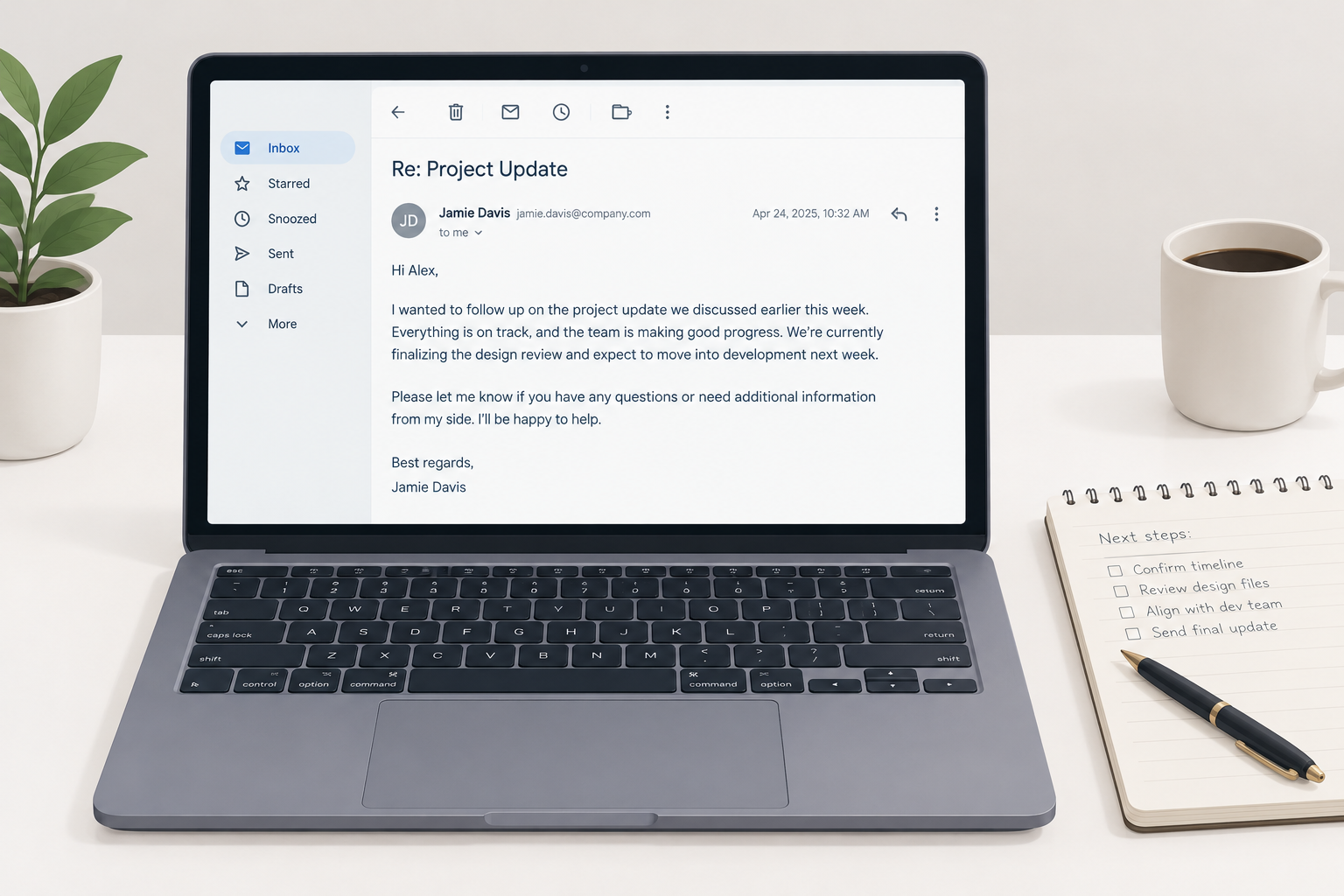
How you end an email decides whether the reader knows what to do next and how they feel about doing it. This guide covers the four parts of a professional email ending, a six-step process, and more than 30 sign-offs sorted by situation, with full examples you can adapt.
Why email closings matter more than you think
The ending is the last thing your reader sees before they decide whether to reply. A vague ending leaves them guessing. A clear one tells them exactly what you need and by when.
There is also data behind word choice. In a widely cited 2017 analysis of more than 350,000 email threads, Boomerang found that closings built around gratitude got noticeably more replies. “Thanks in advance” came out on top at roughly 66%, with “Thanks” close behind at about 63%. “Best” landed near 51%, against a baseline of about 47.5% across all threads.
Treat that as a signal, not a law. The study measured correlation in mostly everyday messages, and it is several years old. Still, the pattern matches what most people who send a lot of email see: thanking someone for an action you want them to take makes the action more likely.
What you need before you write the ending
You will end emails faster and better if you settle a few things first. Here is the short list:
- Your relationship with the reader. Stranger, client, manager, close colleague? This sets the tone.
- The one action you want. A reply, a decision, a meeting, a file, or nothing at all.
- Any deadline. A date makes the request concrete.
- Your saved signature. Name, title, company, and the contact details people actually use.
- The thread context. Is this the first message or the eighth reply of the day?
If you cannot name the action you want, fix the body of the email before worrying about the sign-off.
The anatomy of a great email ending
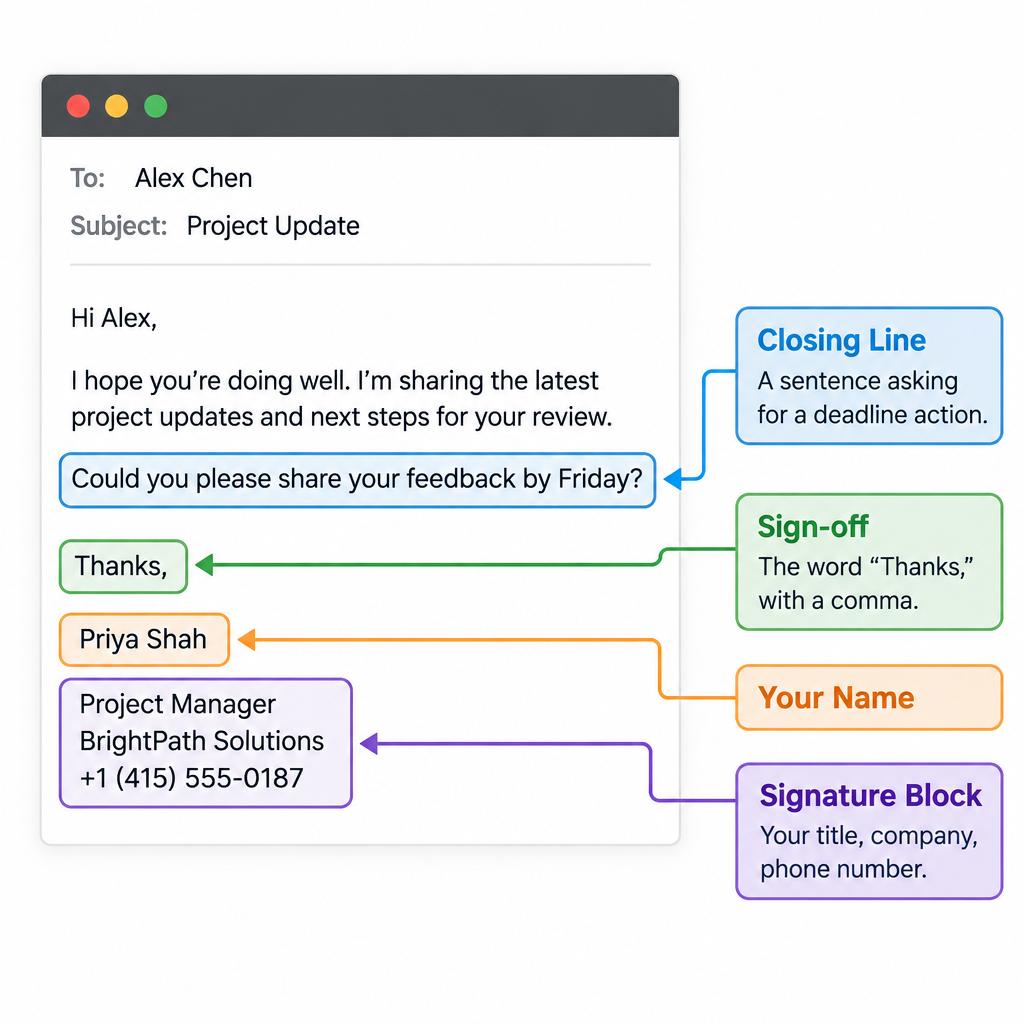
A professional email ending has four parts. Most weak endings skip the first one.
- The closing line. One or two sentences that state the next step or wrap up the message.
- The sign-off. “Best regards”, “Thanks”, “Cheers”, followed by a comma.
- Your name. First name for people you know, full name for first contact.
- The signature block. Title, company, phone, and anything else the reader needs to find you.
Here is what that looks like assembled:
Could you confirm the revised budget by Thursday so I can send the contract on Friday?
Thanks,
Priya Shah
Account Director, Northline Studio
+44 20 7946 0123
The closing line does most of the work. The sign-off sets the tone. The signature handles logistics. Keep each part doing its own job.
How to end an email professionally in 6 steps
Setup steps
- Write one closing line with the next step.
- Add a deadline if you need one.
- Pick a sign-off that matches the tone.
- Add your name and a comma before it.
- Check your signature block.
- Proofread the recipients and reread the ending.
Step 1: Write a closing line that states the next step
Look at what you want and say it plainly. “Let me know if you have any questions” is filler for most emails. “Can you send the signed form by noon Wednesday?” is a closing line.
If you need nothing, say so. “No need to reply, this is just for your records” saves your reader time and earns goodwill.
Step 2: Add a time frame where it helps
Requests without dates drift. “By Friday” or “before the 3pm call” gives the reader a reason to act now. Skip deadlines on purely friendly messages, where they read as pushy.
Step 3: Choose the sign-off by tone
Match the formality of the sign-off to the formality of the email. A message to a new client gets “Kind regards”. A quick note to your teammate gets “Thanks” or just your initial. The full list by situation is below.
Step 4: Format the sign-off and your name
Capitalise the first word only (“Best regards”, not “Best Regards”), add a comma, then put your name on the next line. Both capitalisations are common, but first-word-only is the standard in most style guides and looks cleaner.
Step 5: Check your signature block
Make sure the phone number works, the title is current, and the block is not longer than the email. More on setting this up later.
Step 6: Proofread recipients and the ending itself
Reread the last paragraph out loud in your head. Then check who is on the email. Using cc in email properly matters here: if your closing line asks one person to do something, name them, so the people copied in know it is not on them.
30+ ways to end an email, by situation
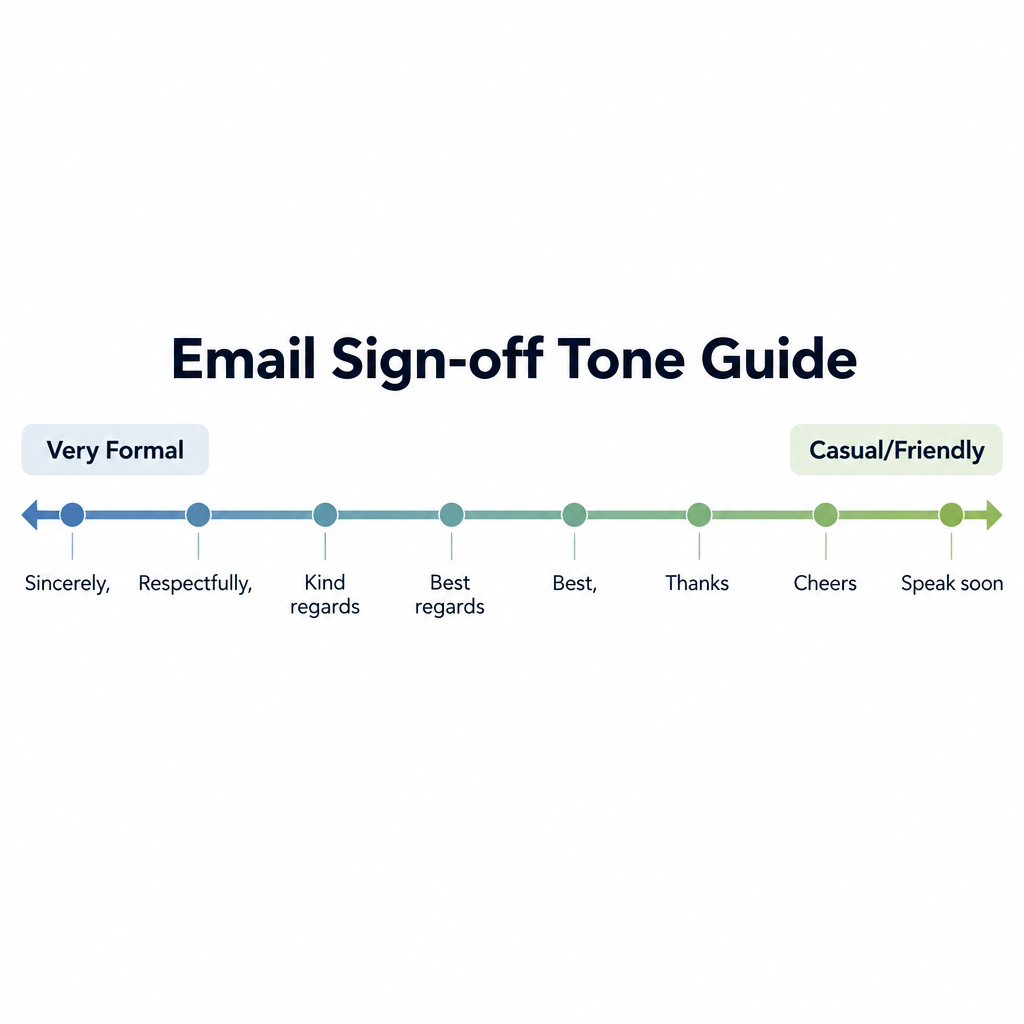
There are many ways to end an email. The right one depends on who is reading and what you just asked of them. Here they are grouped so you can find a fit quickly.
Formal and first-contact sign-offs
Use these for new clients, senior people you have not met, legal or financial matters, and anything that might get forwarded up a chain.
| Sign-off | Tone | Best use |
|---|---|---|
| Best regards | Formal, neutral | Default for almost any business email |
| Kind regards | Formal, a little warmer | Clients, partners, UK and Europe contacts |
| Regards | Formal, cool | Short transactional notes |
| Sincerely | Very formal | Cover letters, official letters |
| Respectfully | Very formal | Government, legal, senior leadership |
| With appreciation | Formal, grateful | After someone has gone out of their way |
| Yours faithfully | Very formal, British | Letters opened with “Dear Sir or Madam” |
“Regards” on its own can read as curt, especially after a tense exchange. Add “Kind” or “Best” if you want to sound neutral rather than cold.
Everyday professional sign-offs
These cover most internal email and ongoing client work.
| Sign-off | Tone | Best use |
|---|---|---|
| Best | Neutral, efficient | Almost anything once you have met |
| All the best | Warm, neutral | Wrapping up a project or long thread |
| Thanks | Friendly, direct | Any email with a request |
| Thank you | Slightly more formal | Requests to clients or managers |
| Many thanks | Warm, British-leaning | After someone has helped a lot |
| Thanks again | Friendly | Second thank-you after a favour |
| Speak soon | Friendly | When a call or meeting is booked |
Sign-offs for requests and action items
When you need something, pair a specific closing line with a thankful sign-off.
- Thanks in advance. Effective, but some readers find it presumptuous. Use it for routine asks, not big favours.
- Thanks for your help with this. Better when the request takes real effort.
- Appreciate your support. Good for asks to other departments.
- Looking forward to your thoughts. Use when you want an opinion rather than a task.
- Looking forward to hearing from you. Classic, slightly formal, works for clients and recruiters.
Friendly and casual sign-offs
Save these for colleagues you know well and contacts who write casually to you first.
- Cheers. Everyday in the UK and Australia. In the US it can feel a bit chummy with strangers.
- Have a great weekend. Friday emails only.
- Talk soon. Relaxed and forward-looking.
- Take care. Warm, good for people you have not spoken to in a while.
- Your initial or first name only. Fine in fast internal threads.
Job applications, networking and LinkedIn
- Sincerely. Still the safest for cover letters.
- Best regards. Fine for recruiter follow-ups.
- Thank you for your time and consideration. Use after an interview.
- Grateful for your time. Good for informational interview requests.
Apologies, bad news and sensitive topics
- With apologies. When you are owning a mistake.
- Thank you for your patience. After a delay or a service problem.
- Warm regards. For condolences or difficult personal news.
- Thinking of you. Only for people you genuinely know.
That is over 30 options. In practice, most people need about five: Best regards, Kind regards, Best, Thanks, and one casual choice.
Closing lines that do the real work
The sign-off gets all the attention, but the line above it decides whether you get a reply. Here are closing lines by purpose.
To get a decision: “Which option works better for you, A or B? I’ll book whichever you pick.”
To schedule something: “I’m free Tuesday 10am to noon or Wednesday after 2pm. Does either suit?”
To confirm receipt: “Just reply ‘got it’ so I know this reached you before the deadline.”
To close a loop: “That wraps up the onboarding. No action needed from you.”
To offer support without filler: “If the import fails again, send me a screenshot of the error and I’ll take a look today.”
To follow up gently: “Bumping this up in case it got buried. Is the 14th still realistic?”
Notice what is missing: “Hope this helps”, “Let me know if you have any questions”, “Feel free to reach out”. They are not wrong, but they add nothing when the reader already knows they can reply.
How to end an email professionally: examples by audience
Tone shifts with the person reading. Here are full endings you can adapt.
To your manager
I’ve attached the draft. Could you flag anything that needs changing by end of day Thursday? I’ll send it to the client Friday morning.
Thanks,
Daniel
To a new client
I’ll send the kickoff agenda by Monday. In the meantime, the best number to reach me is below.
Kind regards,
Daniel Ortiz
Project Lead, Ortiz & Wren
+1 312 555 0187
To a recruiter after an interview
Thank you for walking me through the team’s roadmap today. I’m very interested in the role and happy to provide references whenever useful.
Best regards,
Daniel Ortiz
To a close colleague
Pushed the fix to staging. Shout if it breaks anything.
D
To a cold prospect
Would a 15-minute call next week be worth it to see if this fits? If not, no hard feelings, and I won’t follow up more than once.
Best,
Daniel
That last line about following up only once builds trust with people who get a lot of sales email.
Signing off on replies, LinkedIn and your phone
Long reply chains
You do not need a full sign-off on every reply. After the first two or three exchanges in a thread, most people drop to just a name or nothing at all. Mirror the other person. If they keep signing “Best, Sam”, keep your sign-off too.
LinkedIn messages
LinkedIn messages read more like chat than email. A first-name sign-off is plenty, and many people skip it entirely. For a first connection request or a job inquiry, a short “Thanks, Daniel” is the safest middle ground.
Sending from your phone
“Sent from my iPhone” was once an excuse for brevity. Today it mostly looks like you never opened your settings. Replace it with your name and title, or a short line like “Replying from mobile, full details to follow”. On iPhone, go to Settings > Apps > Mail > Signature (on versions before iOS 18, Settings > Mail > Signature).
Regional and cultural differences
Sign-offs travel badly. A few patterns worth knowing:
- UK, Ireland, Australia: “Cheers” is normal at work. “Kind regards” is the default formal choice. “Many thanks” is common.
- United States: “Best” and “Thanks” dominate. “Cheers” can read as casual or affected depending on the reader.
- Germany: “Mit freundlichen Grüßen” is standard in formal email, with “Viele Grüße” or “Beste Grüße” for warmer contacts. If you write in English, “Best regards” maps well.
- France: “Cordialement” is the everyday professional sign-off. “Bien cordialement” is a touch warmer.
- Japan: Business emails often close with “Yoroshiku onegaishimasu”, a phrase that roughly asks for continued goodwill and has no neat English equivalent.
When you write to someone in another country, copy the formality level they use with you. That is a safer guide than any rulebook.
Ending marketing and bulk emails
Newsletters and promotional campaigns follow different rules. The ending of an email marketing message is mostly the footer, and parts of it are legally required.
Under the US CAN-SPAM Act, commercial emails must include a valid physical postal address and a clear way to opt out. The opt-out has to be honoured within 10 business days. Under GDPR in Europe, you also need a lawful basis for sending in the first place, usually consent.
Mailbox providers add their own requirements. Since February 2024, Gmail requires senders of roughly 5,000 or more messages a day to Gmail addresses to support one-click unsubscribe, with full enforcement of one-click rolling out by June 2024. Yahoo applies a similar one-click unsubscribe requirement to bulk senders, without publishing a fixed volume threshold. In May 2025, Microsoft began enforcing SPF, DKIM and DMARC authentication for senders pushing more than 5,000 messages a day to its consumer addresses.
Deliverability risk
Hiding or removing the unsubscribe link pushes people to hit “Report spam” instead, which damages your sender reputation far more than an unsubscribe.
Beyond the legal minimum, a good campaign ending has one clear call to action, a human sign-off from a named person, and a reason to stay subscribed. If you want proof of what works for your list, A/B testing a personal sign-off against a brand sign-off is a cheap experiment.
Set up a signature so the ending writes itself
A saved signature means you only make the sign-off decision, not the logistics one, on every email.
Gmail (web): Settings (gear icon) > See all settings > General > Signature > Create new. Then set “Signature defaults” for new emails and replies, and click Save changes at the bottom of the page.
Outlook (new Outlook and Outlook on the web): Settings > Account > Signatures. Create the signature, then choose defaults for new messages and replies.
Apple Mail (Mac): Mail > Settings > Signatures. On older macOS versions the menu says Preferences instead of Settings.
What to include:
- Full name
- Job title and company
- One phone number you actually answer
- Optional: pronouns, booking link, LinkedIn profile
A domain email address in your signature looks far more credible to clients than a free webmail one, so set that up first if you are still sending business email from a personal account.
Inbox tip
Keep your signature mostly text. Large logo images and stacks of social icons add weight, show as attachments in some clients, and can count against you in e-mail spam filtering.
If you write plain-text email, the traditional signature separator is two dashes and a space on a line by themselves. Many mail clients use it to recognise and trim signatures in replies:
--
Daniel Ortiz
Project Lead, Ortiz & Wren
Common email sign-off mistakes to avoid
These are the problems that come up again and again.
- No closing line. The email just stops, and the reader has to work out what you want.
- A sign-off that clashes with the content. “Cheers!” under a complaint or a layoff notice reads as tone-deaf.
- “Thanks!” after asking for something huge. Match the gratitude to the size of the ask.
- Overly cute sign-offs with strangers. “Stay awesome” is fine for friends, risky with a new client.
- “Love” or “xx” at work. Unless that is genuinely your workplace culture, leave it out.
- Double sign-offs. “Thanks, Best regards, Daniel” looks like you could not decide. Pick one.
- A signature longer than the email. Disclaimers, quotes and six icons under a two-line message bury the point.
- Typos in your own name or title. It happens with new signatures. Send yourself a test first.
- Outdated details. Old job title, old phone number, last year’s booking link.
If you have already sent a typo email to someone important, a short, plain correction is usually better than a long apology.
Following up after sending an email
The ending sets up the follow-up. If your closing line had a deadline, you know exactly when to nudge.
A reasonable rhythm for business email:
- Internal request: follow up after 1 to 2 working days.
- Client or partner: after 3 to 5 working days.
- Cold outreach: wait about a week, and follow up once or twice at most.
Make the follow-up shorter than the original. Reply in the same thread so the context sits underneath, restate the one thing you need, and end with an easy way to say yes or no. “Still keen on Tuesday, or should we push to next week?” works better than “Just checking in”.
What a good ending gets you
When you follow these steps, you should notice a few concrete changes. Replies come faster because the reader knows what you need. Fewer clarifying emails bounce back. Threads close sooner because you state when nothing more is needed. And your tone lands as intended, since the sign-off matches the content above it.
Track it for a couple of weeks. Count how many requests get answered without a nudge before and after you start writing specific closing lines. For most people, that number moves more than any change to the sign-off itself.
FAQ
What is the best way to end a professional email?
End with a closing line that states the next step, then “Best regards” or “Kind regards”, your name and a signature. If the email contains a request, “Thanks” or “Thank you” is a strong alternative.
Is “Best” too casual for work email?
No. “Best” is neutral and widely used in business. For a first email to a senior person or a formal matter, “Best regards” is a safer step up.
Should I put a comma after my sign-off?
Yes. Standard format is the sign-off, a comma, then your name on the next line, as in “Kind regards,” followed by your name.
Is “Thanks in advance” rude?
It is not rude, and it performs well for replies, but some readers feel it assumes they will say yes. Use it for small routine requests. For bigger favours, thank them properly after they help.
Do I need a sign-off in every reply?
No. After the first few messages in a thread, it is normal to drop the sign-off or use just your first name. Follow the other person’s lead.
What sign-offs should I avoid at work?
Avoid “Love”, “xx”, sarcastic closings, and anything overly cute with people you do not know. Also avoid ending without any closing line, which leaves the reader unsure what you need.