Category: Newsletters

  • What Is a Newsletter and What Is It Meant to Do

    What Is a Newsletter and What Is It Meant to Do

    A newsletter is a regularly published message, usually sent by email, that delivers news, useful information or curated content to a list of people who asked to receive it. Its job is to keep an audience informed and engaged over time, so that when you do ask for something (a purchase, a donation, a click), the people reading already know and trust you.

    FormatRecurring email or print
    Sent toOpted-in subscribers
    Main goalOngoing audience relationship
    Key metricClicks, not opens

    The definition of a newsletter

    To define newsletter in one line: a newsletter is a recurring publication sent to a subscriber list, built around news and content rather than a single sales offer.

    Each part of that definition matters:

    • Recurring. A newsletter arrives on a schedule: weekly, monthly, every Tuesday morning. A one-off announcement is an email, not a newsletter.
    • Sent to a list. Subscribers opted in. They gave you their address because they wanted what you publish.
    • News and content. The core is articles, updates, tips, links or stories. Offers can appear, but they are not the whole point.

    Dictionaries describe it in similar terms. Merriam-Webster and Cambridge both frame a newsletter as a printed or digital report of news sent regularly to members of a group, such as a club, company or organisation. That captures the classic version. Today, when people ask “what is a newsletter?”, they almost always mean the email kind.

    News letter meaning vs newsletter meaning

    Some people search “news letter” as two words. The meaning is the same. The two words fused into one compound noun long ago, and “newsletter” is the standard spelling in every major dictionary. “Newsletters” simply means more than one issue or more than one publication.

    What does newsletter mean in everyday use?

    In casual speech, “the newsletter” usually refers to a specific one you already know. Your gym’s monthly email is “the newsletter”. So is the Friday roundup from your favourite writer. When someone asks what the newsletter is, they typically mean “which recurring email are we talking about, and what’s in it?”

    Where the word comes from

    The format is far older than email. In the late 1500s, the Fugger banking family of Augsburg collected handwritten news reports from agents across Europe, circulated among merchants who needed to know about wars, shipping and prices. In 17th-century England, professional writers produced handwritten “news-letters” for paying subscribers who wanted information from London.

    The Boston News-Letter, first issued in 1704, is widely credited as the first continuously published newspaper in British North America. It kept “News-Letter” in its name even as it took on the shape of a newspaper.

    The pattern has barely changed in 400 years. Someone with access to useful information packages it on a schedule and sends it to people who want it. Email just removed the printing and postage costs.

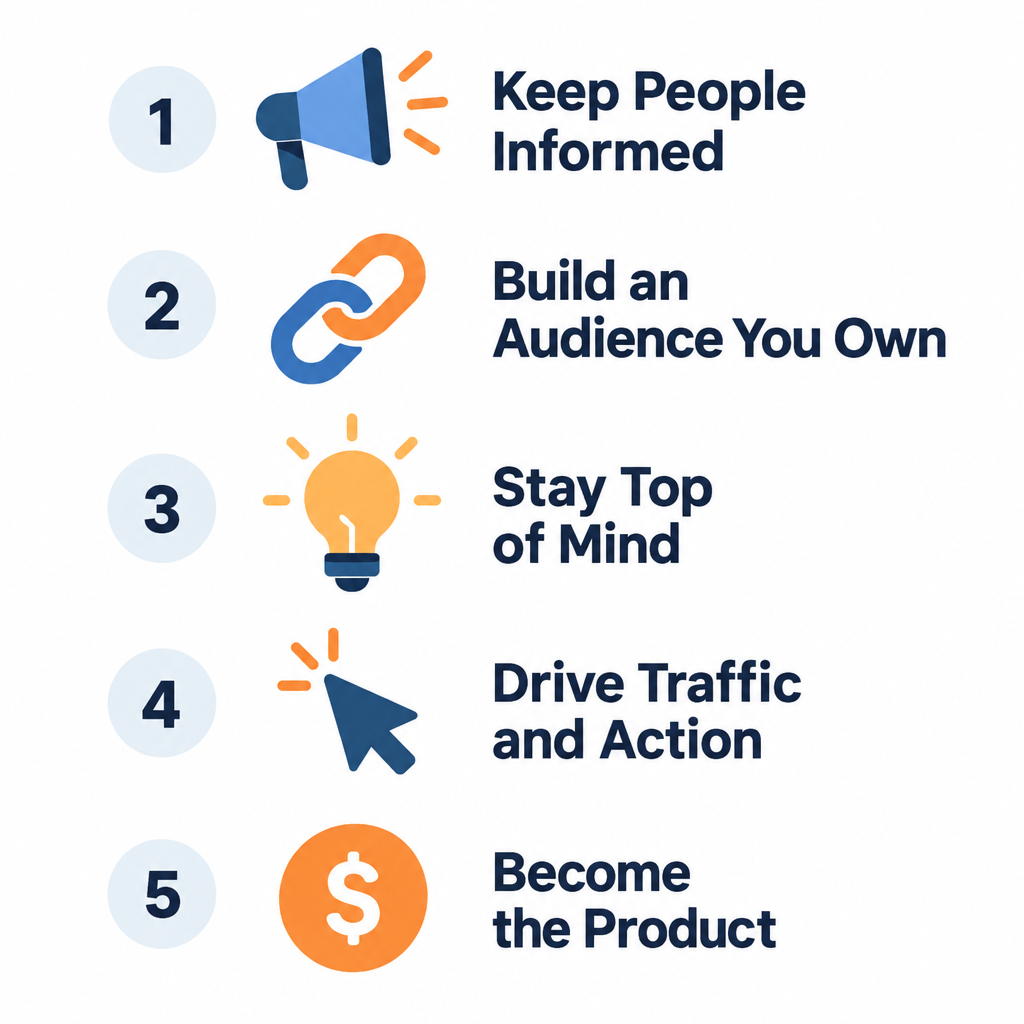
    What a newsletter is meant to do: 5 jobs
    Newsletter vs Other Email Types

    A newsletter that tries to do everything does nothing well. The best ones pick one or two of these jobs and design every issue around them.

    1. Keep people informed

    This is the original purpose. A school tells parents about term dates. A software company explains this month’s new features. A city council lists road closures. The reader gets information they need without having to go looking for it.

    2. Build a relationship you own

    Social media reach depends on algorithms you don’t control. An email list is an audience you hold directly. If a platform changes its rules tomorrow, your subscribers still get your newsletter. That ownership is the main reason businesses invest in email marketing alongside their social channels.

    3. Stay top of mind between purchases

    Most customers don’t need you every week. A furniture store might sell to someone once every few years. A good newsletter keeps the brand familiar in the meantime, so the store is the first name that comes to mind when the next sofa is needed.

    4. Drive traffic and action

    Many newsletters exist to send readers somewhere: a blog post, a product page, an event registration, a podcast episode. Each issue gives subscribers a reason to click.

    5. Become the product itself

    For writers and media companies, the newsletter is the business. Paid newsletters on platforms like Substack, Beehiiv and Ghost earn money directly through subscriptions or sponsorships. Here, the content has to be good enough that people will pay for it.

    How a newsletter differs from other emails

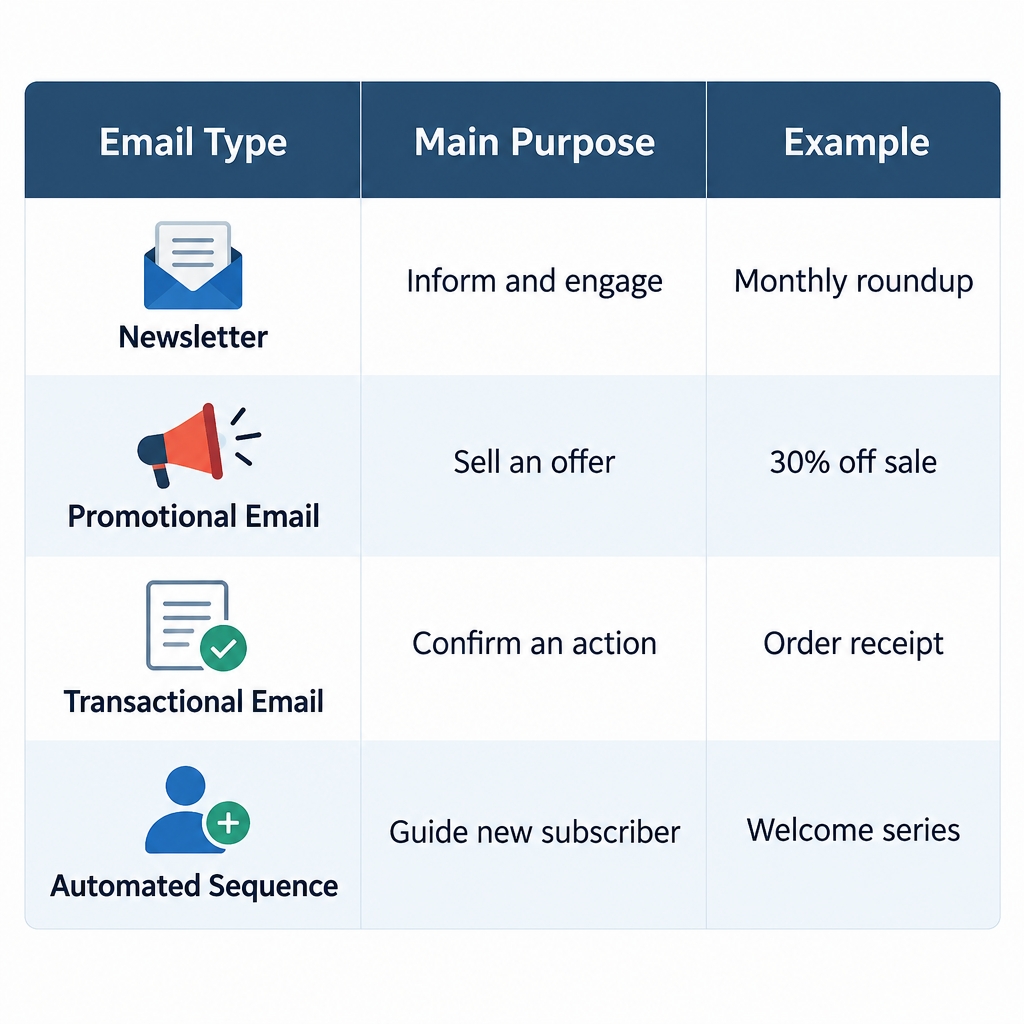
    People often lump every marketing email together. Mailbox providers don’t, and neither should you. Here’s how a newsletter compares with the other common types.

    Email type Main purpose Timing Example
    Newsletter Inform and engage Regular schedule Monthly product and industry roundup
    Promotional email Sell a specific offer Campaign-driven 30% off weekend sale
    Transactional email Confirm an action Triggered by the user Order receipt, password reset
    Automated sequence Guide a new subscriber Triggered, then timed Five-part welcome series
    Digest or RSS email Republish recent posts Automatic “New on the blog this week”

    The line between newsletter and promotional email is the one that blurs most. A useful rule: if you deleted the sales pitch and the email still had value, it’s a newsletter. If nothing would be left, it’s a promotion wearing a newsletter costume, and subscribers notice.

    4 types of newsletters (with real use cases)
    5 Jobs of a Newsletter

    Customer newsletters

    Sent by businesses to customers and prospects. A coffee roaster might share brewing guides, a new single-origin release and a short story from a farm it buys from. The content earns attention; the product mention comes naturally.

    Internal newsletters

    Sent inside an organisation to employees. An internal newsletter might cover leadership updates, new hires, policy changes and team wins. These matter most in large or remote companies where people can’t pick up news in the corridor.

    Creator and publisher newsletters

    Written by journalists, analysts and specialists for a reader base. Some are free and funded by sponsors; others charge a subscription. The writer’s voice and expertise are the main draw.

    Community and nonprofit newsletters

    Sent by charities, clubs, schools, churches and local groups. They report on impact, promote events and ask for support. A food bank’s newsletter might show how many families it served last month, then ask for volunteers for the holiday drive.

    How enterprise brands use newsletters

    Large organisations use the same format, usually split into many targeted versions.

    • Hospitality. Hotel groups send loyalty members points balances, seasonal packages and destination guides, often segmented by home city or past stays.
    • Franchises. Head office runs brand-level newsletters while individual locations send local versions with their own events and offers. The challenge is keeping the logo, tone and legal footer consistent across hundreds of senders.
    • Financial services. Banks and investment firms send market commentary, product updates and financial education. Every issue typically passes compliance review, so the schedule has to allow time for approval.
    • Casinos and resorts. Players’ club newsletters promote shows, dining and loyalty rewards. Gambling marketing is tightly regulated in most markets, so these programmes have to respect self-exclusion lists and responsible gambling rules.

    The common thread is segmentation. One big list gets broken into specific audiences so each reader sees content that fits them.

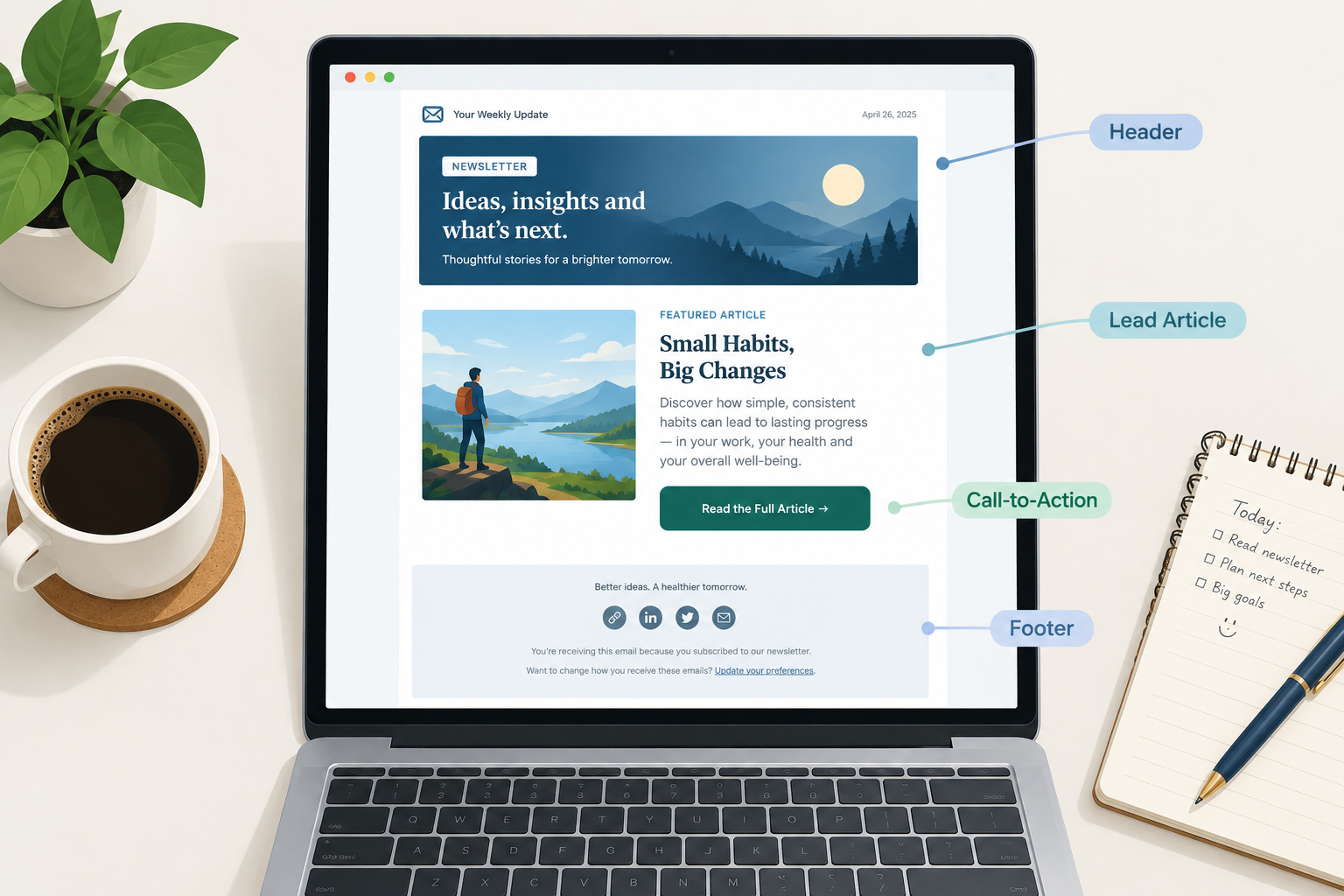
    The anatomy of an email newsletter

    Most newsletters share the same building blocks:

    1. Sender name and subject line. What readers see in the inbox. A recognisable sender name matters as much as a clever subject.
    2. Preheader. The short preview text after the subject. Write it on purpose, or the inbox will pull in something random like “View in browser”.
    3. Header. Your logo and the issue name or date, so readers know instantly who it’s from.
    4. Main story. The single most important piece of content, placed first.
    5. Supporting sections. Shorter items, links, tips or regular features. Our guide to newsletter items covers what to put here.
    6. Call to action. One clear next step. Too many buttons split attention.
    7. Footer. Your postal address, why the reader is getting this, and a working unsubscribe link. In many countries these are legal requirements.

    Inbox tip

    Ask new subscribers to reply to your welcome email with one question. Replies signal to mailbox providers that people want your mail, which helps future newsletters land in the inbox.

    How to build a newsletter strategy

    A newsletter without a plan tends to fizzle out by issue four. Answer these questions before you design anything.

    Newsletter strategy steps

    1. Pick one primary goal from the five jobs above.
    2. Define your reader in one sentence.
    3. Choose a schedule you can realistically sustain.
    4. Decide on a repeatable format for each issue.
    5. Set up an email service provider with a signup form.
    6. Authenticate your sending domain before the first send.
    7. Write a welcome email that sets expectations.
    8. Review clicks and unsubscribes after every issue.

    A few points from experience:

    • Consistency beats frequency. A monthly newsletter that always arrives on the first Thursday outperforms a “weekly” one that shows up whenever someone remembers.
    • Use a proper platform. Never send a newsletter from your personal inbox by pasting addresses into the CC field. Using cc in email this way exposes every subscriber’s address to everyone else, which is a privacy breach, and it gets flagged as spam fast. An email service provider handles list management, unsubscribes and authentication for you.
    • Proofread, then test. Send a test to yourself on mobile and desktop. Mistakes still happen to everyone, and one typo email to the whole list is survivable, but checking links and the subject line catches most problems first.

    The rules every newsletter has to follow

    This is where many beginners trip up. A newsletter counts as commercial or bulk email in most legal frameworks and under every major mailbox provider’s rules.

    Consent and the law

    • CAN-SPAM (US) requires a valid physical postal address, a clear way to opt out, and honouring opt-out requests within 10 business days. It also bans deceptive subject lines and sender information.
    • GDPR (EU and UK) generally requires clear, freely given consent before you send marketing email, and you need to be able to prove when and how each person signed up.

    Build your list only from people who chose to join. Buying lists or scraping addresses will damage your sender reputation and can break the law.

    Gmail, Yahoo and Microsoft sender requirements

    Starting February 2024, Google and Yahoo began enforcing stricter rules for bulk senders (Google defines these as anyone sending more than 5,000 messages a day to Gmail addresses). Requirements include:

    • SPF and DKIM authentication on your sending domain
    • A published DMARC record, with at least p=none
    • One-click unsubscribe in marketing messages (required from June 2024)
    • A spam complaint rate kept below 0.3%, with Google recommending under 0.1%

    Microsoft announced similar requirements for Outlook.com, Hotmail and Live addresses, applying to senders above 5,000 messages a day, with enforcement beginning in May 2025.

    Even if you’re nowhere near 5,000 a day, follow these rules. Smaller senders who authenticate properly simply reach the inbox more often.

    A basic DMARC record looks like this, published as a TXT record at _dmarc.yourdomain.com:

    v=DMARC1; p=none; rua=mailto:[email protected]
    

    Your SPF record lives as a TXT record on your root domain and lists who may send for you. The include value comes from your provider:

    v=spf1 include:_spf.yourprovider.com ~all
    

    DKIM is usually set up by adding one or more CNAME or TXT records your provider gives you. Copy them exactly.

    Deliverability risk

    Sending to old, unconfirmed or purchased addresses pushes your complaint rate past Gmail’s 0.3% threshold quickly. Once that happens, even your engaged subscribers stop seeing your newsletter.

    Newsletter analytics: what to measure

    Your analytics dashboard will show plenty of numbers. Focus on the ones that reflect real reader behaviour.

    • Click rate. The clearest signal that content was worth reading. Track which links get clicked to learn what your audience wants more of.
    • Unsubscribe rate. A spike after a particular issue tells you something missed the mark.
    • Spam complaint rate. The number mailbox providers care about most. Keep it far below 0.3%.
    • List growth. New subscribers minus unsubscribes and bounces.
    • Replies and forwards. Hard to automate, but they’re the strongest sign of loyalty.

    Treat open rates with caution. Since Apple introduced Mail Privacy Protection with iOS 15 in 2021, Apple Mail preloads images for many users, which registers as an open whether or not anyone read the email. Opens are now inflated and unreliable as a main metric. Use them for rough trends, and use A/B testing on subject lines and content with clicks as the deciding measure.

    Example sentences using “newsletter”

    If you came here for usage, here’s how the word works in context:

    • “Sign up for our newsletter to get new recipes every Friday.”
    • “The company newsletter announced three new managers this month.”
    • “She turned her free newsletter into a paid publication with 2,000 subscribers.”
    • “Please add our address to your contacts so the newsletter doesn’t land in spam.”
    • “Back issues of the newsletter are archived on the website.”

    FAQ

    What is a newsletter in simple terms?

    It’s a regular email (or printed sheet) that a person or organisation sends to people who signed up, sharing news, updates or useful content. Think of it as a small, recurring publication that arrives in your inbox.

    Is a newsletter the same as email marketing?

    A newsletter is one type of email marketing. Email marketing also includes promotional campaigns, automated welcome sequences, abandoned-cart reminders and more. The newsletter is the recurring, content-led part.

    How often should a newsletter be sent?

    As often as you can deliver something worth reading. Weekly and monthly are the most common schedules. Pick one you can keep up for a year, because breaking the rhythm costs more trust than sending less often.

    Do newsletters still work?

    Yes. Email gives you direct access to an audience you own, without relying on social media algorithms. The newsletters that struggle are usually the ones with no clear purpose or that are really just weekly sales flyers.

    Do I need permission to send a newsletter?

    You need people to have opted in. In the EU and UK, GDPR generally requires clear consent for marketing email. In the US, CAN-SPAM requires an unsubscribe option and a postal address. Either way, mailing people who never signed up will hurt your deliverability fast.

    What’s the difference between a newsletter and a blog?

    A blog lives on a website and readers have to visit it. A newsletter is delivered to readers’ inboxes on a schedule. Many publishers run both, using the newsletter to bring readers back to new blog posts.
  • What to Include in a Newsletter From Updates to Regular Features

    What to Include in a Newsletter From Updates to Regular Features

    A newsletter is a repeating format, and a good format is mostly decided before you write a word. This guide covers which newsletter items belong in every issue, how to write newsletter updates people actually read, and how to build a rotation of regular features you can fill every week without staring at a blank draft.

    Best forBrands, creators, small teams
    Core items per issue3 to 5
    Must-haveUnsubscribe link, postal address
    Key metricClicks per item

    What you need before you choose your newsletter items

    Planning sections without a few basics in place means rebuilding your template within a month. Have these ready first:

    • A one-sentence reader promise. Example: “Every Thursday, three ways to cut your store’s shipping costs.” If you can’t write this sentence, your items will drift.
    • A defined audience segment. “Customers” is too broad. “Customers who bought in the last 90 days” is something you can write for.
    • An email service provider with templates, link tracking and list management. Click data per link is what tells you which items earn their place.
    • A cadence you can sustain. Weekly is the common default. Biweekly is fine. Picking a schedule you will break is worse than either.
    • Your legal footer details. You need a physical postal address and a working unsubscribe method for commercial email under the US CAN-SPAM Act. If you mail people in the EU or UK, you also need a lawful basis for sending, which for marketing is usually consent.
    • A place to collect ideas. Use a doc, a Notion board or a spreadsheet. Anything works as long as you add to it between issues.

    If you are newer to the channel overall, it helps to understand how email marketing works end to end before you obsess over sections. Newsletter content sits on top of list building, permission and deliverability.

    The fixed elements: items every issue needs

    Some newsletter items rotate. These ones don’t. They show up in the same place every time, and readers learn where to look.

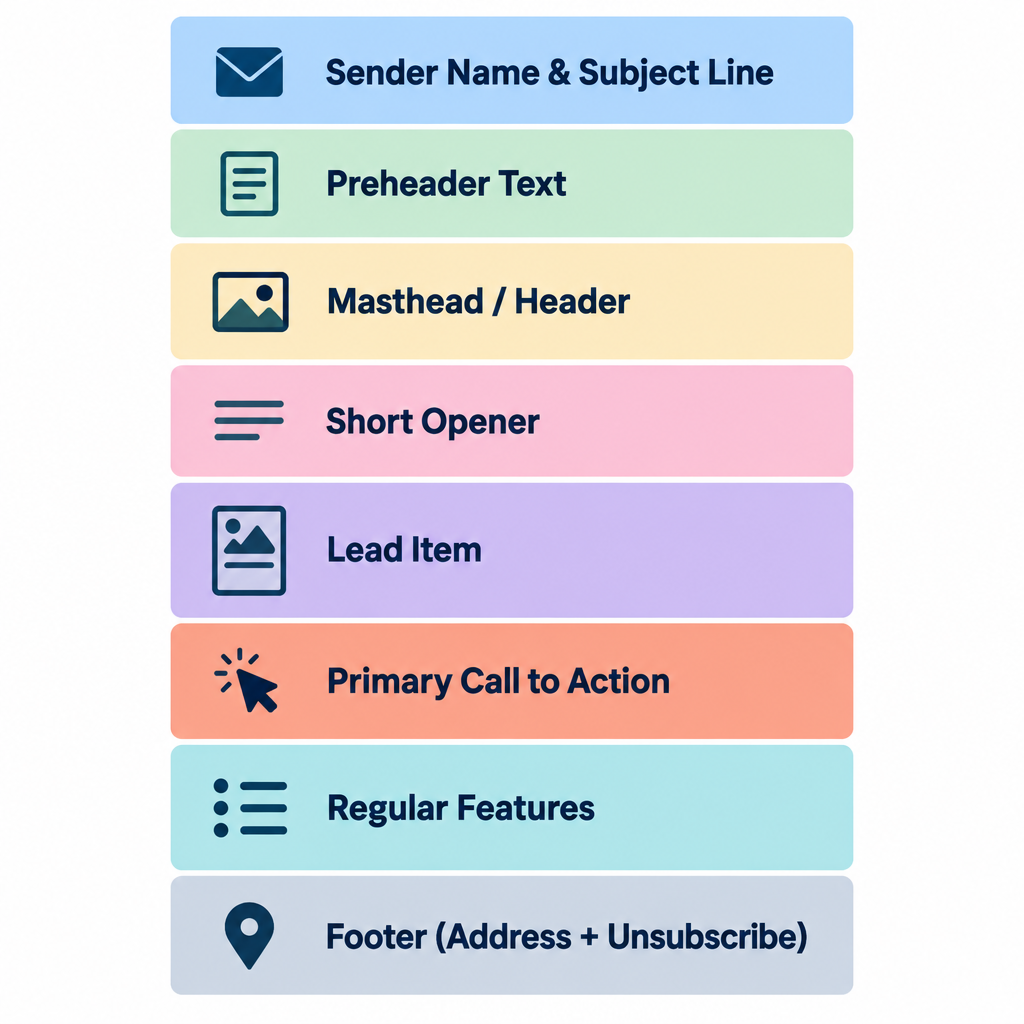
    Sender name and subject line

    The sender name is the first thing people use to decide whether to open. Use a name readers recognise, and keep it consistent. “Maya at Fieldnotes” usually beats “Fieldnotes Newsletter” for a creator. A company brand name works better for a store.

    Your subject line should sell the lead item, not the issue number. “Issue #47” tells nobody anything. “The returns policy change that saved us 11 hours a week” gives people a reason to open.

    Preheader text

    The preheader is the preview snippet that shows after the subject in most inboxes. If you leave it blank, the inbox pulls the first text in your email, which is often “View in browser” or alt text. Write it on purpose and use it to back up the subject, never to repeat it.

    Masthead or header

    Keep it light: a logo or name, the date, and maybe a one-line tagline. Big hero images push your actual content below the fold on phones, and most newsletter opens happen on mobile.

    A short opener

    Two to four sentences from a human. Say what’s in this issue, or share one observation from the week. This is where personality lives, and it’s often the most-replied-to part of the email.

    The lead item

    One piece of content gets top billing. It’s the reason this issue exists. Every other section supports it or adds variety.

    One primary call to action

    Pick the single thing you most want readers to do this issue and make it obvious. A button or a bold text link both work. Secondary links are fine, but they shouldn’t compete visually with the main one.

    The footer

    This part is legal and practical at once. Include:

    • Your physical mailing address (CAN-SPAM requirement for commercial email)
    • A clear unsubscribe link
    • A one-line reminder of why the reader is getting this (“You’re receiving this because you signed up at…”)
    • An option to update preferences or change frequency, so people can downgrade instead of leaving

    Deliverability risk

    Since February 2024, Gmail and Yahoo require bulk senders (roughly 5,000+ messages a day to their users) to support one-click unsubscribe and keep spam complaint rates below 0.3%. A buried or broken unsubscribe link pushes people to hit “Report spam” instead.

    How to write newsletter updates readers actually read

    Newsletter Anatomy Diagram

    Newsletter updates are the section most brands get wrong. A product change, a new hire, an office move or a policy update matters to you. Readers only care if it changes something for them.

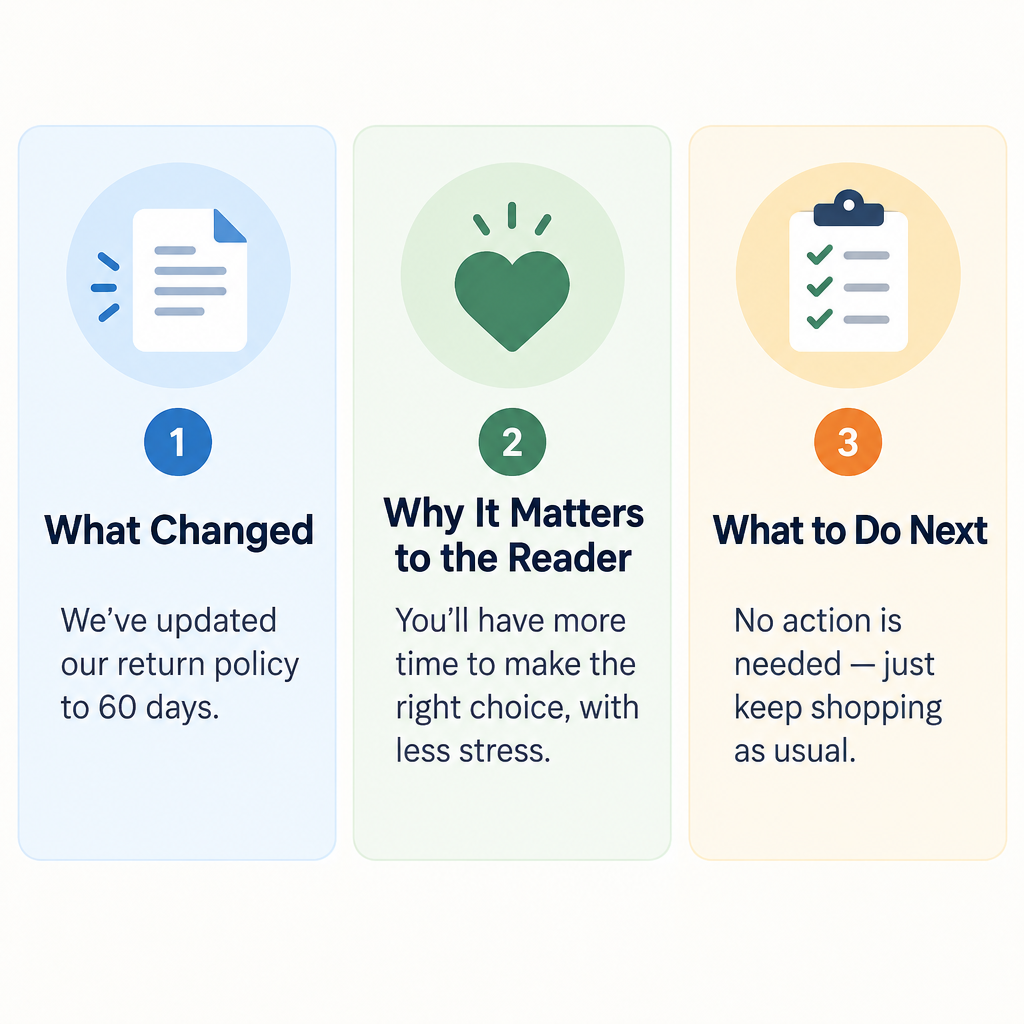
    Use this three-part structure for every update:

    1. What changed. One plain sentence. “Orders over $50 now ship free in the US.”
    2. Why it matters to the reader. “If you’ve been splitting orders to save on shipping, you can stop.”
    3. What to do next. “Nothing to set up. It applies at checkout from today.”

    Compare that with the typical version: “We’re thrilled to announce an exciting new shipping initiative!” That sentence takes up space and says nothing.

    A few more rules for updates:

    • Group small updates. Five minor changes become one “What’s new” block with a bullet each. Don’t give each its own section.
    • Lead with the reader-facing change. Internal milestones like funding, awards or headcount go at the bottom, if they go anywhere.
    • Date anything time-sensitive. “Price changes on March 1” beats “soon.”
    • Link to detail rather than pasting it. A changelog or blog post can hold the full explanation.

    If your updates are mainly for staff rather than customers, the rules shift a little. An internal newsletter can carry more company news and recognition, because employees do care about headcount, new hires and team wins.

    17 newsletter items worth rotating in

    These are the regular features that fill the space between your fixed elements. Don’t use all 17. Pick three to five that fit your reader promise, run them consistently, and swap one out if its clicks stay flat for a couple of months.

    Items that teach

    1. The how-to or tutorial. One specific task, solved in steps. “How to set up a returns label in Shopify in four clicks” works. “Tips for better returns” is too vague.

    2. The quick tip. A single trick that fits in two or three sentences. It’s low effort to write and easy to read, and it makes a reliable recurring slot.

    3. The explainer. Take one term or concept your readers half-understand and explain it plainly. B2B newsletters live on these.

    4. The myth or mistake. “Most people think X. Here’s what actually happens.” Correcting a common belief builds trust quickly.

    Items that curate

    5. The link roundup. Three to five links worth the reader’s time, each with one sentence on why. The commentary is the value. A bare list of links is a bookmark folder, not a newsletter.

    6. The industry news digest. Summarise what changed in your niche this week and what it means for your reader. For an email newsletter, that might be a new mailbox provider rule, or a Gmail feature that changes how people see your emails.

    7. The tool or resource pick. One tool, template or book, with a sentence on who it’s for. Disclose clearly if it’s an affiliate link.

    Items that build community

    8. The reader question. Answer one question a subscriber sent in. It shows people you read replies and it gives you endless material.

    9. The customer or member spotlight. A short profile or success story, with permission. Readers love seeing people like them.

    10. User-generated content. Photos, reviews or projects from your audience. Stores and hobby brands get strong engagement from this.

    11. The poll or quick survey. One question, one click. Results feed future issues (“62% of you said…”), and the clicks help engagement signals.

    Items that sell (carefully)

    12. Product or service feature. Show one product in use, solving one problem. Skip the catalogue grid.

    13. The offer or promotion. A discount, bundle or early access window. Put a deadline on it, and keep it to one per issue.

    14. Events and dates. Webinars, launches, sales, workshops. Put the date and time zone in the first line.

    Items that add personality

    15. Behind the scenes. How something gets made, packed, designed or decided. It’s cheap to produce and very effective for small brands.

    16. The personal note or story. A short anecdote that ties to your topic. Creators often build their entire newsletter around this.

    17. The “one more thing” sign-off. A recommendation, a fun stat, a photo or a joke at the bottom. It rewards people who scroll and gives the issue a recognisable ending.

    Inbox tip

    Ask a simple question in your opener and invite replies. Replies are one of the strongest positive signals a mailbox provider can see, and they hand you item #8 for next week.

    How to choose your newsletter items: step by step

    Update Writing Structure

    A pile of good items doesn’t make a good newsletter. A repeatable mix does. Here’s how to build one.

    Build your newsletter format

    1. Write your one-sentence reader promise.
    2. List what your readers are trying to get done.
    3. Pick one lead item type and two to four supporting features.
    4. Set a value-to-promotion ratio and stick to it.
    5. Build a reusable template with fixed section slots.
    6. Stock a content bank four issues deep.
    7. Review clicks per section every month and swap the weakest.

    Step 1: Write the reader promise

    Everything else filters through this sentence. If an item doesn’t serve the promise, it doesn’t make the issue, however interesting it is.

    Step 2: List the reader’s jobs

    What are subscribers trying to do? A store’s readers want to find products, get deals and use what they bought. A SaaS company’s readers want to get more out of the tool and keep up with changes. A consultant’s readers want to make better decisions and look good to their boss.

    Each job points to items. “Use what they bought” points to tutorials and customer spotlights. “Keep up with changes” points to newsletter updates and news digests.

    Step 3: Pick your lead and supporting items

    Choose one item type that leads most issues, then two to four features that rotate around it. A simple, durable shape:

    • Opener (2 to 4 sentences)
    • Lead item (tutorial, story or main update)
    • One curated or community item
    • One commercial item, if this issue has one
    • Sign-off feature

    Step 4: Set a value-to-promotion ratio

    A common rule of thumb is roughly 80% helpful content to 20% promotion. Treat that as a starting point rather than a law. Ecommerce newsletters can run more promotional because readers signed up for deals. B2B newsletters usually need to lean further toward education. What matters is that you pick a ratio deliberately and watch unsubscribes when you push it.

    Step 5: Build a template with fixed slots

    Create a saved template in your email platform with each section as a labelled block. This cuts production time sharply and keeps the layout familiar. A plain skeleton looks like this:

    [Preheader: supports the subject line]
    [Header: logo, date]
    [Opener: 2-4 sentences, ends with a question]
    [Lead item: headline, 100-250 words, one link or button]
    [Feature 2: e.g. Link roundup, 3-5 links with one line each]
    [Feature 3: e.g. Product spotlight or Reader question]
    [Sign-off: "One more thing" + name]
    [Footer: why you're getting this, preferences, unsubscribe, postal address]
    

    Step 6: Stock a content bank

    Keep at least four issues’ worth of ideas sitting in your idea doc. Tag each idea by item type (“tutorial,” “spotlight,” “update”) so you can fill gaps quickly. When a deadline lands on a busy week, you pull from the bank instead of panicking.

    Step 7: Review and swap monthly

    Look at clicks per section, not just per email. If the link roundup gets a third of all clicks and the behind-the-scenes block gets almost none after several issues, you have your answer. Replace the weakest feature with something from the list above and test it for a month.

    Where to find newsletter ideas when you’re stuck

    The ranking advice on this topic tends to come back to the same handful of methods. They work, so here’s how to use them in practice.

    Learn what your audience already likes

    Your data is the best idea generator you have:

    • Click reports. Which links got clicked most in the last ten issues? Write more about those topics.
    • Replies and support tickets. The questions people ask your support team are newsletter items waiting to happen.
    • Site analytics. Your top blog posts and most-viewed product pages show demand.
    • A one-question survey. “What’s the one thing you wish we’d cover?” Send it once a quarter.

    Repurpose what you’ve already made

    Most teams sit on far more material than they use. A webinar becomes a three-tip summary. A long blog post becomes a tutorial plus a quick tip plus a myth-buster spread over three issues. A customer review becomes a spotlight. Social posts that did well become an expanded newsletter section with more depth.

    Repurposing is efficient, and it also isn’t lazy. Most of your subscribers never saw the original.

    Write for motivations, not just demographics

    Psychographic thinking means planning around what readers value and worry about, rather than only their age, job title or location. Two subscribers with the same job title can want completely different things. One wants to save time. The other wants to look competent in front of their manager.

    Write down two or three core motivations for your audience. Then check each issue: does at least one item speak directly to one of them?

    Use a calendar

    Seasonal hooks never run out. Plan around holidays, your industry’s busy periods, product launch dates, tax deadlines, back-to-school, year-end reviews and your own company anniversaries. Map out a rough 12-month calendar once, then fill in details a month ahead.

    Keep writing, even when it’s bad

    When you’re blocked, write the ugly version anyway. Draft the opener as if you were texting a friend about your week. Write three bullet points of things you learned. Answer one question from your inbox. First drafts are for finding the idea, and editing makes them publishable. The worst outcome is skipping an issue, because inconsistency costs you more than one average email.

    Example newsletter item mixes by type

    Here’s how the fixed and rotating items combine for different senders. Use these as starting templates.

    Newsletter type Lead item Supporting items Commercial slot
    Ecommerce store New arrival or how-to-use guide Customer photos, quick tip One offer with deadline
    SaaS product Feature tutorial Newsletter updates block, reader question Upgrade or webinar invite
    B2B service firm Explainer or industry analysis News digest, case study Consultation or event
    Creator or writer Personal essay or story Link roundup, recommendation Paid tier or product, occasional
    Nonprofit Impact story Volunteer spotlight, events Donation ask
    Internal company Leadership or company update Team spotlight, new hires, dates None

    Common mistakes and how to fix them

    Most newsletter problems come from a handful of repeat issues.

    Too many items. Ten sections means nobody reads past the third. Cut to three to five and move the rest to next week. A shorter issue usually gets more clicks per item.

    Everything is promotional. If every section asks for money, readers stop opening. Rebalance toward teaching and curating items, then watch unsubscribes and complaints.

    Your email gets clipped in Gmail. Gmail clips messages whose HTML is larger than about 102KB and hides the rest behind a “View entire message” link. That often hides your footer and unsubscribe link too. Trim sections, compress code and avoid pasting in bloated HTML from word processors.

    The email is one big image. Image-only emails look blank when images are blocked, they’re inaccessible to screen readers and they can look spammy to filters. Use live text for headlines and body copy, and add alt text to every image.

    No clear main action. Five equally weighted buttons means none of them win. Pick one primary call to action per issue.

    Updates written for you, not the reader. Rewrite any update that doesn’t answer “what does this change for me?”

    Inconsistent sending. Going silent for two months and then mailing everyone tends to spike complaints, because people forget they signed up. If you have to pause, send a short note first, and expect to rebuild engagement gradually.

    Typos and broken links. Send a test to yourself and one colleague every time, and click every link. If a mistake does slip out, only send a correction when the error changes meaning, such as a wrong price, date or broken offer link. Small typos are better left alone.

    Deliverability risk

    Mailing old, unengaged contacts is the fastest way to hurt inbox placement. Suppress people who haven’t opened or clicked in six to twelve months, or run a re-engagement email first.

    Metrics to watch for each newsletter item

    Judge sections individually. Whole-email averages hide which items are pulling their weight.

    • Clicks per section. Most platforms show a click map or link report. Tag links by section if you can.
    • Click-to-open rate. It shows how compelling the content was among people who opened.
    • Replies. Count them, especially after opener questions and reader-question features.
    • Unsubscribes per issue. Spikes usually trace back to a promotional push, a frequency change or an off-topic item.
    • Spam complaint rate. Keep it well below Google’s 0.3% ceiling. Many senders aim for under 0.1%.

    Treat open rates with caution. Apple Mail Privacy Protection, introduced with iOS 15 in 2021, preloads images for many Apple Mail users, which inflates opens. Clicks and replies are far more trustworthy signals for deciding which newsletter items stay.

    What a good result looks like

    After two or three months with a fixed format and a monthly review, you should see:

    • Production time per issue drop, because you’re filling slots instead of inventing layouts
    • Clicks concentrating in two or three sections, which tells you what readers came for
    • A steady trickle of replies and reader questions feeding future issues
    • Stable or falling unsubscribe rates as off-target items get cut
    • A content bank that stays three or four issues ahead of your send date

    If you’re not there yet, the fix is almost always fewer items, a clearer reader promise or a better balance between teaching and selling.

    FAQ

    How many items should a newsletter have?

    Three to five sections, plus the fixed opener and footer, works for most senders. A daily or very short newsletter can run one or two. Beyond five, attention drops off sharply and later items rarely get clicked.

    What should newsletter updates include?

    Each update should say what changed, why it matters to the reader and what they need to do, if anything. Group minor updates into one bulleted block and save company milestones for the bottom of the email.

    What’s legally required in a marketing newsletter?

    In the US, CAN-SPAM requires a valid physical postal address, a clear way to opt out, accurate sender information and non-deceptive subject lines. Opt-outs must be honoured within 10 business days. In the EU and UK, GDPR and related rules also require a lawful basis for sending, usually consent. Large senders to Gmail, Yahoo and Outlook also need authentication and one-click unsubscribe.

    Should every newsletter include a promotion?

    No. Many strong newsletters skip the commercial slot in some issues entirely. Decide on a ratio that fits your audience, keep it consistent and let your unsubscribe and click data tell you if you’ve pushed too far.

    How often should I change my newsletter items?

    Keep your fixed elements permanent. Review rotating features monthly and replace one if it has underperformed for several issues in a row. Changing everything at once makes it impossible to tell what worked.

  • Internal Newsletter Ideas for Company and Employee Updates

    Internal Newsletter Ideas for Company and Employee Updates

    A good internal newsletter is the one company email people open on purpose. This guide gives you 40 section ideas, five proven formats, a month-by-month content calendar, and a step-by-step plan to build, send and measure your own. It also covers the deliverability work most internal comms guides skip.

    Best forHR and internal comms teams
    Ideal cadenceWeekly or fortnightly
    Ideal length5 to 7 items
    Key metricClicks per section

    What an internal newsletter is for

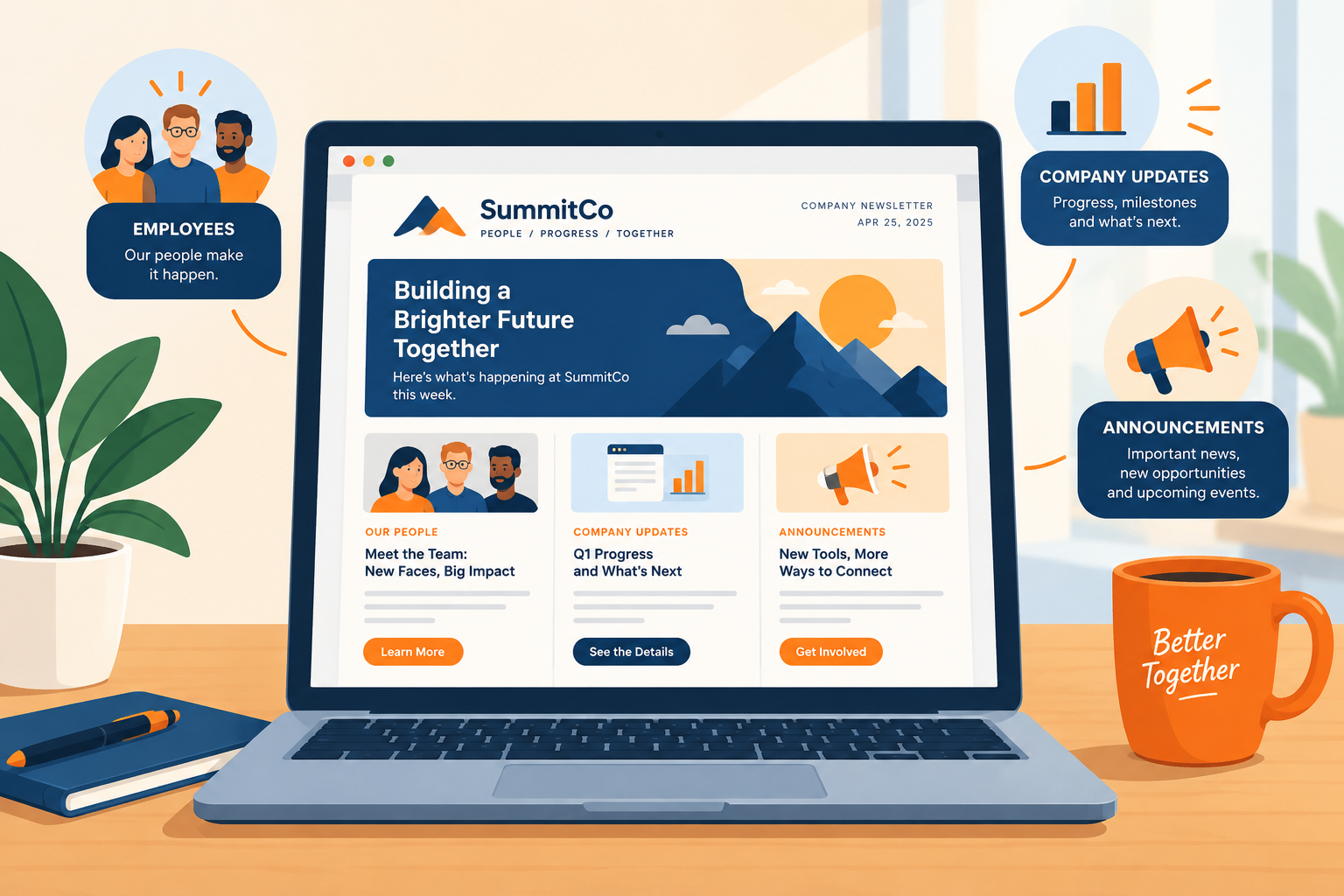
    An internal newsletter is a recurring email to your own employees. It collects company news, people updates and practical reminders in one predictable place.

    It does three jobs well:

    1. Cuts noise. One digest replaces a dozen scattered “FYI” emails.
    2. Gives context. Slack and Teams carry fast-moving chatter. The newsletter explains what it means.
    3. Builds connection. It shows colleagues in other teams, offices and time zones what everyone else is working on.

    It does a few jobs badly. It should not carry urgent safety alerts, anything needing a reply within hours, or sensitive news that deserves a face-to-face conversation. Layoffs, restructures and leadership exits belong in a meeting first. The newsletter can follow up with the written detail.

    Why it’s worth the effort: the data

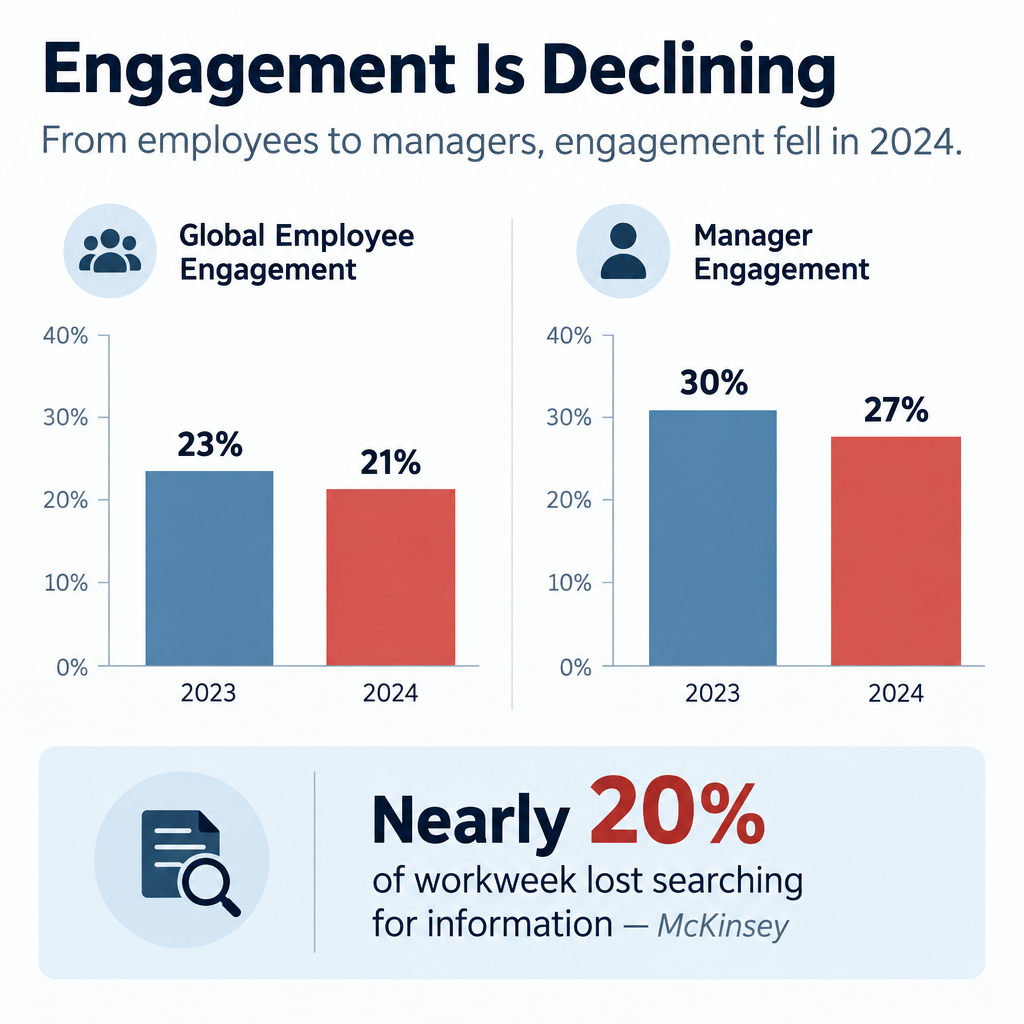
    Engagement is low and falling, and communication is part of the fix. Gallup’s State of the Global Workplace research is the most cited source here.

    Metric Figure Source
    Global employees engaged at work, 2023 23% Gallup, State of the Global Workplace 2024
    Global employees engaged at work, 2024 21% Gallup, State of the Global Workplace 2025
    Managers engaged, 2023 to 2024 Fell from 30% to 27% Gallup, State of the Global Workplace 2025
    Lost productivity from the 2024 engagement drop $438 billion Gallup, State of the Global Workplace 2025
    Share of team engagement variance tied to the manager 70% Gallup
    Workweek spent searching for internal info or tracking down colleagues Nearly 20% McKinsey Global Institute, The Social Economy (2012)

    Two numbers matter most for your newsletter.

    The first is the manager figure. Gallup attributes about 70% of the variance in team engagement to the manager. Managers are disengaging too. A newsletter that equips managers with talking points has more leverage than one written only for individual staff.

    The second is the McKinsey finding. Knowledge workers lose close to a fifth of their week hunting for information. A well-organised newsletter with a clear “where to find it” section gives some of that time back.

    A newsletter won’t fix a bad culture. It does make a good one visible, and it stops people from feeling like the last to know.

    What you need before you start

    Internal Newsletter Structure Template

    Get these in place before you write a word. Skipping them is how newsletters die by issue four.

    • A clear owner. One named person who edits, chases contributors and hits send.
    • An executive sponsor. Someone senior who will contribute and defend the newsletter’s time.
    • A distribution list. Synced to your HR system or directory, so joiners and leavers update automatically.
    • A sending tool. Outlook or Gmail for small teams. An email service provider (ESP) or internal comms platform for tracking and design.
    • A content pipeline. A simple form or shared channel where colleagues submit news.
    • A template. Fixed sections, in a fixed order, that you reuse every issue.
    • A goal. One or two outcomes you want, written down. “Fewer repeat HR questions” is a goal. “Better engagement” is not.
    • Brand basics. Logo, colours and a tone guide, even a one-page one.

    How to build your internal newsletter in 6 steps

    Setup steps

    1. Pick one or two concrete goals.
    2. Choose your audience and cadence.
    3. Design a fixed section template.
    4. Set up a contribution pipeline.
    5. Choose a sending tool and authenticate it.
    6. Launch, measure and cut what nobody reads.

    Step 1: Set focused goals

    Pick goals you can check. Good examples:

    • Reduce “where do I find X?” tickets to HR or IT by a set amount over a quarter.
    • Get a target share of staff to click the quarterly strategy update.
    • Raise employee referral applications.
    • Increase sign-ups for internal events or training.

    Each goal should map to at least one recurring section. If a section serves no goal, it’s filler.

    Step 2: Choose audience and cadence

    One newsletter for everyone works up to a few hundred people. Beyond that, you typically need layers: a company-wide edition plus team or region editions.

    For cadence, these rules hold up:

    • Weekly suits fast-moving companies with lots of operational change.
    • Fortnightly is the best default for most organisations of 50 to 500 people.
    • Monthly suits culture and story content, not deadlines.

    Pick a day and time and never move it. Tuesday or Wednesday morning in your main time zone avoids Monday inbox pile-ups and Friday drift.

    Step 3: Design a fixed template

    Readers learn where things live. Use the same order every issue so people can jump to what they care about. The structure section below gives you a template to copy.

    Step 4: Build the content pipeline

    The editor should not write everything. Set up:

    • A short form with three fields: what happened, who’s involved, why it matters.
    • A rota of department contributors, one per issue.
    • A standing deadline, such as noon two days before send.

    A shared Slack or Teams channel called something like #newsletter-tips works well for photos and quick wins.

    Step 5: Pick a tool and authenticate it

    Small teams can send from Outlook or Gmail. Once you want design, tracking and scheduling, move to an ESP or internal comms platform. If you send through an ESP, you must authenticate your domain. Internal mail from an outside service can land in junk just like marketing mail. The deliverability section covers this.

    Step 6: Launch, measure and prune

    Send the first issue with a one-line explanation of what it is and when it arrives. After four issues, look at which sections got clicks. Cut or rework the bottom one. Repeat every quarter.

    40 internal newsletter ideas, by section

    Employee Engagement Data Chart

    These are ideas for a company newsletter that hold up issue after issue. Most work as recurring sections, which saves you reinventing the wheel every time.

    Company news and strategy

    1. Leader’s note in 150 words. One topic, plain language, signed by a real person. Cap it hard.
    2. Decision log. “What we decided this month and why.” This kills more rumours than any FAQ.
    3. Goals scorecard. Progress on three to five company goals, shown as a simple green, amber or red status.
    4. Customer win of the week. Name the customer (if allowed), the team and the problem solved.
    5. Lost deal lesson. What we learned from a loss. It signals honesty and helps sales and product.
    6. Release notes for non-product people. What shipped, explained so finance and HR understand it.
    7. All-hands follow-up. Answers to questions that ran out of time in the meeting.
    8. Myth vs fact. Address one rumour directly. If people are talking about it, they’re already reading about it somewhere.

    People and culture

    1. New starters. Photo, role, team and one fun fact. Include who their manager is.
    2. Work anniversaries and milestones. Group them by month to save space.
    3. Internal moves and promotions. This shows career paths exist.
    4. Day in the life. One team per issue explains what they actually do.
    5. Workspace tour. Desk setups, home offices, or the warehouse floor.
    6. Employee resource group spotlight. Upcoming events and how to join.
    7. What we’re reading. Book, podcast or article picks from colleagues.
    8. Ten years in. Lessons from a long-tenure employee.

    Recognition

    1. Peer shout-outs. Submitted through a form, published with names.
    2. Values in action. A short story tied to one company value.
    3. Customer praise. Reviews or emails that mention staff by name.
    4. The small fix award. Recognise someone who removed an annoying process step.

    Learning and how-tos

    1. Tool tip of the week. One shortcut in Slack, Teams, Outlook or your CRM.
    2. Acronym decoder. Define three internal acronyms per issue. New starters love this.
    3. Phishing example of the week. A real (sanitised) phish someone reported, with the giveaways marked.
    4. Learning budget reminder. What courses staff can take and how to claim.
    5. Lunch-and-learn recap. Three takeaways and a recording location.
    6. Email signature rollout. When you standardise signatures, include email signature examples people can copy.

    Need-to-know operations

    1. Deadlines box. Expenses, timesheets, reviews, benefits enrollment. Dates in bold.
    2. Policy change in plain English. Lead with “What changes for you” before any legal detail.
    3. Facilities updates. Office closures, parking, building works.
    4. IT maintenance windows. What’s down, when, and the workaround.
    5. Open roles and referrals. Three roles and the referral bonus terms.
    6. Events calendar. Next four weeks only.

    Engagement and fun

    1. One-question poll. Publish last issue’s results alongside the new question.
    2. Photo of the week. Pets, team outings, views from the office.
    3. Caption contest. Winner gets a small prize and bragging rights.
    4. Company history trivia. Old logos, first office, first customer.
    5. Local tips from another office. Where colleagues in Berlin eat lunch.
    6. Volunteering and charity. Hours logged, causes supported, how to join.

    Employee-generated

    1. Guest editor rotation. A different team curates one issue per quarter.
    2. What I wish I knew in my first month. One tip from a recent hire.

    Inbox tip

    Rotate who appears in people sections. If the same five names show up every issue, everyone else stops reading.

    Internal newsletter examples by format

    Different formats serve different goals. Most companies end up with two: one operational, one cultural.

    Format Cadence Length Best for Core sections
    Need-to-know digest Weekly 3 to 5 items Deadlines and changes Deadlines, policy, IT, events
    Culture digest Monthly 6 to 8 items Connection and recognition People, shout-outs, stories
    Leader’s letter Monthly or quarterly One essay Strategy and context Note, scorecard, Q&A
    Frontline digest Weekly 3 items Deskless workers Shifts, safety, recognition
    Team newsletter Fortnightly 4 to 6 items Departments over 30 people Wins, priorities, who’s who

    Example 1: Weekly need-to-know all-company newsletter

    This is the workhorse format. It answers one question: what do I need to do or know this week?

    A typical issue:

    • Subject: “This week: expense deadline Friday, new VPN Monday”
    • Top block: three bullet points, each with an action and a date
    • Policy change: two sentences plus a “read the full policy” button
    • IT notice: maintenance window and workaround
    • Events: next seven days only
    • Footer: who to contact, how to submit news

    Keep it under 300 words. People read it in under a minute, and that is the point.

    Example 2: Monthly culture digest

    This format earns the “newsletter” name. It’s where stories, photos and recognition live.

    A typical issue opens with a short leadership note, then a team spotlight, new starters, anniversaries, peer shout-outs, a photo of the month and a poll. It can run longer because readers choose to spend time on it.

    Use visually rich layouts here. Photos of real colleagues outperform stock images every time.

    Example 3: The leader’s letter

    A CEO or division head writes one focused piece. It covers what’s going well, what isn’t, and what comes next.

    The best ones read like a person talking. They name specific numbers and admit specific problems. Add a goals scorecard and two or three answered questions from staff below the letter.

    Avoid having comms ghost-write it into corporate mush. Edit for clarity, not personality.

    Example 4: Frontline digest for deskless workers

    Retail, healthcare, logistics and manufacturing staff often don’t have a work email they check. Many don’t sit at a computer at all.

    For them, the content needs to shrink and the channel needs to change:

    • Print a one-page version for break rooms.
    • Send a three-item summary by SMS or through a staff app.
    • Ask shift leads to read the top item aloud in pre-shift huddles.
    • Lead with schedules, safety and pay dates, then one recognition story.

    If your organisation has frontline staff, check what share of them actually receive your email version. It is often far lower than leadership assumes.

    Example 5: Team or department newsletter

    Once a department passes about 30 people, it needs its own update. Engineering, sales and operations are the usual candidates.

    Keep it distinct from the company edition. Focus on team priorities, wins, who’s working on what, and decisions that affect the team. Don’t repeat company news. Link to the main edition instead.

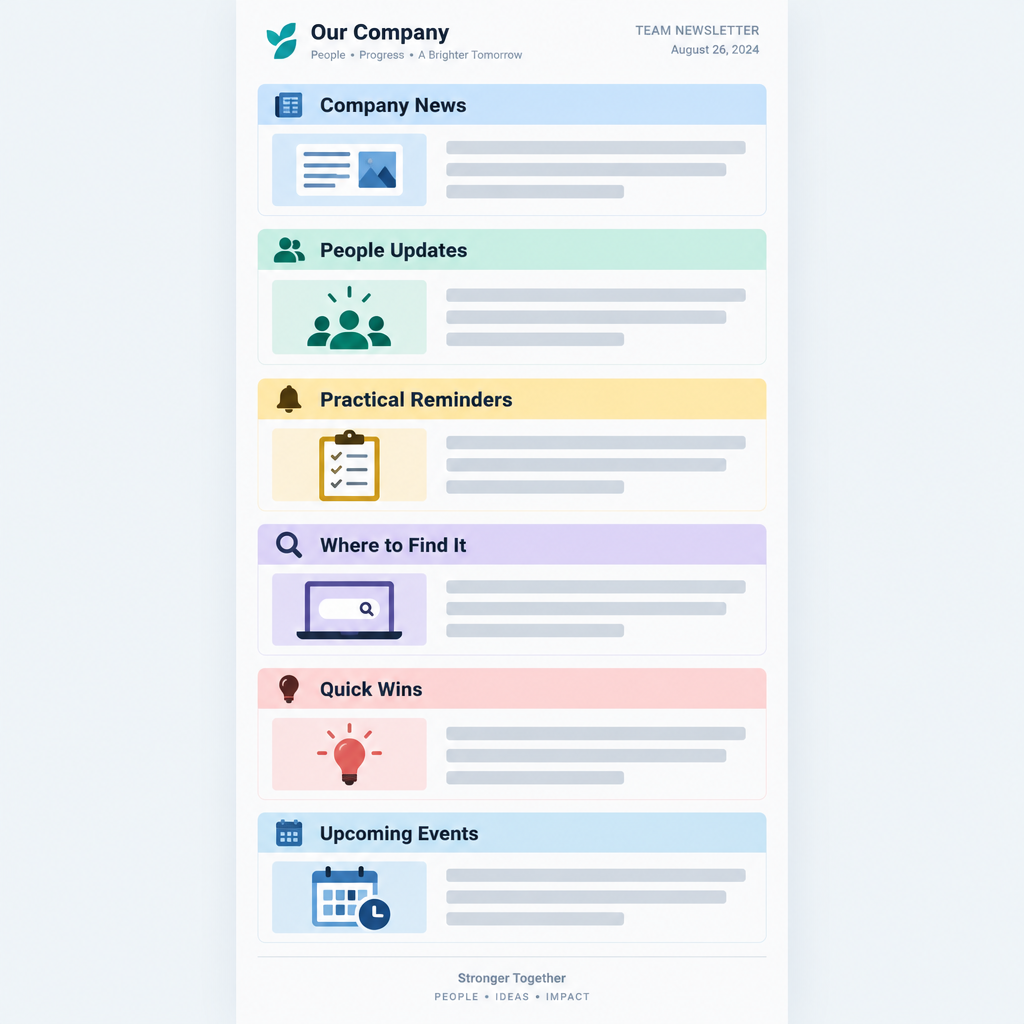
    How to structure an internal newsletter

    Use this order. It puts action first and stories second, which matches how people triage email.

    1. Subject line naming the one or two most useful items.
    2. Preheader with a third item or a teaser.
    3. Top three: short bullets with actions and dates.
    4. Lead story: one item with a headline, 80 to 120 words and a button.
    5. People: new starters, milestones, moves.
    6. Recognition: shout-outs and customer praise.
    7. Learn something: one tip.
    8. Coming up: the next two to four weeks.
    9. Fun: poll, photo or trivia.
    10. Footer: contacts, submission form, archive location.

    Rules that keep it scannable:

    • One idea per block.
    • Headlines that tell the story, such as “Benefits enrollment closes 14 November”, not “Benefits update”.
    • Buttons with specific labels, such as “Book your flu shot”, not “Learn more”.
    • Single-column layout so it reads well on phones.
    • Alt text on every image, and never put key information only inside an image.

    Tone: how internal newsletters should sound

    Write like a well-informed colleague, not a press office.

    Do:

    • Use “we” and “you”.
    • Name people and teams.
    • Use numbers. “We closed 42 support tickets faster than last quarter” beats “Support had a great quarter.”
    • Admit when things went wrong.

    Don’t:

    • Use jargon nobody outside the exec team understands.
    • Write “exciting news” or “we’re thrilled”. Let the news be exciting.
    • Hide bad news at the bottom.
    • Make jokes at anyone’s expense.

    A quick test: read a paragraph aloud. If you wouldn’t say it to a colleague over coffee, rewrite it.

    How to get employees to actually read it

    Open rates on internal email suffer from the same problem as any email. People have too much of it. These tactics move the numbers.

    Make subject lines specific. “Issue #47” tells people nothing. “Pay date moves to the 25th, plus a new parking app” gets opened.

    Keep it short. Five to seven items is the sweet spot for most digests. If you have more, you have two newsletters.

    Put people in it. Names and faces are the most reliable hook you have. People open emails that might mention them or someone they know.

    Make it useful every time. Include at least one thing per issue that saves time or prevents a mistake, like a deadline or a how-to.

    Close the loop on feedback. When a poll or suggestion leads to a change, say so. “You asked for later Friday lunches. Starting next week, the canteen stays open until 2:30.”

    Get leaders to reference it. When a manager says “it was in the newsletter” in a meeting, readership climbs.

    Pair it with chat. Post a one-line teaser and link in your main Slack or Teams channel on send day.

    Make it easy to contribute. Every issue should end with a one-click way to submit news.

    Inbox tip

    Send at the same time every issue. Predictability trains people to look for it, and it shows up in your open timing data within a few sends.

    Employee newsletter content calendar: ideas by month

    A content calendar stops the panic of a blank issue. Plan recurring themes a quarter ahead, then fill in news as it happens.

    Dates below are fixed observances. Check which ones fit your workforce and region. Some are US-specific.

    Month Observances and dates Newsletter ideas
    January Data Privacy Day (28 Jan) Goals for the year, privacy tips, benefits reminders
    February Black History Month (US, Canada) ERG spotlight, history stories, Q4 results recap
    March Employee Appreciation Day (first Friday), International Women’s Day (8 Mar) Recognition issue, women leaders’ stories
    April Earth Day (22 Apr) Sustainability wins, office recycling, Q1 scorecard
    May Mental Health Awareness Month (US) Wellbeing resources, EAP reminder, manager toolkit
    June Pride Month, National Safety Month (US), Juneteenth (19 Jun) Safety refresher, ERG events, mid-year check-in
    July Mid-year H1 scorecard, summer schedules, intern introductions
    August Summer wind-down Intern farewells, vacation coverage, back-to-school tips for parents
    September Hispanic Heritage Month begins (15 Sep, US) Q3 priorities, learning budget push
    October Cybersecurity Awareness Month, World Mental Health Day (10 Oct), Black History Month (UK) Phishing quiz, security tips, wellbeing
    November Benefits open enrollment (typical in US), Veterans Day and Remembrance Day (11 Nov) Enrollment deadlines, veteran colleague stories, gratitude
    December International Day of Persons with Disabilities (3 Dec) Year in review, milestones, holiday schedules

    Layer your own business calendar on top: fiscal year end, review cycles, product launches, peak seasons and company anniversaries.

    Tools for sending an internal newsletter

    You have three realistic options. The right one depends on headcount and how much tracking you need.

    Option Typical fit Tracking Design Main drawback
    Outlook or Gmail Under 50 people None built in Basic No metrics, inconsistent rendering
    ESP (Brevo, Mailchimp and similar) 50 to several hundred Opens, clicks, per-link data Drag-and-drop templates Needs domain authentication, unsubscribe link
    Internal comms platform (Staffbase, Poppulo, ContactMonkey and similar) Large or complex organisations Detailed, often by department Templates plus intranet and app Higher cost, longer setup

    ESPs built for marketing work fine for internal email if you configure them properly. Many teams start with one of the small business email platforms they already pay for.

    Internal comms platforms add features ESPs lack. These include directory sync, sending as an Outlook mailbox, and reporting by department or location. They earn their price once you have thousands of staff or multiple languages.

    Sending an employee newsletter with Brevo

    Brevo is a common pick for smaller companies. As of 2025, its free plan allows 300 emails per day, which covers a weekly send for a team of up to 300. Paid plans remove the daily cap. Check Brevo’s pricing page for current plan prices before you commit.

    Brevo setup for an internal newsletter

    1. Authenticate your sending domain under your account menu, then Senders, Domains & Dedicated IPs, then Domains.
    2. Go to Contacts, then Lists, and create a list named for your audience.
    3. Import employees from a CSV exported from your HR system.
    4. Go to Campaigns, then Email, then Create campaign.
    5. Build your template in the drag-and-drop editor and save it for reuse.
    6. Send a test to three colleagues on different devices.
    7. Schedule the send for your fixed day and time.

    A few practical notes:

    • Add custom fields for department, location and start date. You can then segment by office or send a “welcome” block only to people who joined recently.
    • Save the template after your first issue. Every later issue starts from it.
    • Keep the unsubscribe link. Brevo, like most ESPs, expects campaigns to carry one. Treat it as a signal. If people opt out of the culture digest, the content needs work. Truly mandatory notices should go out through a separate channel your IT team controls, such as a mailbox in your own tenant.
    • Pipe data into other systems if you need it. Brevo supports webhooks, which push events like clicks to another app automatically. For a quick webhook definition: it’s an automated message one system sends another when something happens.

    Employee data is personal data. Under GDPR and similar laws, your ESP acts as a data processor. Make sure a data processing agreement is in place and only upload the fields you need.

    Deliverability: yes, internal email can land in junk

    This is where many internal newsletters quietly fail. When you send from an ESP, your email comes from the ESP’s servers, not your company’s mail system. Your own mail filters treat it as external email claiming to come from your domain. That’s exactly what a phishing attack looks like.

    If authentication isn’t right, Microsoft 365 or Google Workspace may junk or quarantine your newsletter. Understanding how e-mail spam filtering works makes this obvious: filters check whether the sender is authorised to use your domain.

    The big consumer mailbox providers have also tightened the rules. These apply to personal accounts, not your company tenant, but they set the standard every filter now expects.

    Requirement Gmail (from Feb 2024) Yahoo (from Feb 2024) Outlook.com (from 5 May 2025)
    Applies to Senders of 5,000+ messages a day to personal Gmail Bulk senders Senders of 5,000+ messages a day to consumer Outlook domains
    SPF Required Required Required
    DKIM Required Required Required
    DMARC Required, p=none minimum Required, p=none minimum Required, p=none minimum, aligned with SPF or DKIM
    One-click unsubscribe Required for marketing mail (from June 2024) Required Expected as best practice
    Spam complaint rate Below 0.3%, ideally below 0.1% Below 0.3% Not stated as a hard number

    For your internal send, the practical steps are the same.

    SPF authorises the ESP to send for your domain. You add its include to your existing SPF record. Use the exact value your ESP gives you. The example below uses a placeholder.

    example.com.  TXT  "v=spf1 include:spf.protection.outlook.com include:_spf.your-esp.example ~all"
    

    DKIM signs your mail with a key published in DNS. Most ESPs give you CNAME or TXT records to copy.

    esp1._domainkey.example.com.  CNAME  esp1.domainkey.your-esp.example.
    

    DMARC tells receivers what to do when checks fail, and sends you reports.

    _dmarc.example.com.  TXT  "v=DMARC1; p=none; rua=mailto:[email protected]"
    

    Start with p=none while you confirm all your legitimate senders pass. Then move to quarantine and reject in stages.

    Better still, send from a subdomain such as news.example.com. It keeps the newsletter’s reputation separate from your main domain.

    Deliverability risk

    Don’t ask IT to allowlist your whole domain to rescue the newsletter. Allowing a sender domain without authentication checks lets spoofed phishing emails straight into every inbox.

    If your newsletter still lands in junk after authentication, ask your Microsoft 365 admin to check message headers in a test send. They can confirm SPF, DKIM and DMARC results and review any mail flow rules. Microsoft’s guidance is to avoid broad domain allow entries. A rule tied to authentication results or your ESP’s sending infrastructure is safer.

    How to measure your internal newsletter

    Measure against the goals you set in step one. Raw open rates are a weak signal on their own.

    Metric What it tells you Watch out for
    Open rate Whether subject lines and send timing work Apple Mail Privacy Protection (since iOS 15, 2021) preloads images and inflates opens
    Click-through rate Whether content drives action Low counts per section in small companies, so look at trends
    Clicks per section Which sections earn their space Position bias: top items always get more clicks
    Read time (comms platforms) Whether people scan or read Not available in most ESPs
    Replies and submissions Whether people feel ownership Hard to automate, so track manually
    Downstream actions Real outcomes such as event sign-ups or enrollment completions Needs tracking links or system data
    Survey feedback What people want more or less of Run it quarterly, keep it to three questions

    Track a few numbers consistently rather than everything once. A simple sheet with issue number, send date, open rate, click rate and top three sections is enough.

    The most useful tracking habit is per-section clicks over time. After eight issues, the pattern is clear. A section that never gets clicks either needs a rewrite or needs to go.

    For small teams, qualitative signals matter more than percentages. If people mention the newsletter in meetings, submit stories without being chased, and complain when it’s late, it’s working.

    Common mistakes and troubleshooting

    Nobody opens it

    Your subject lines are probably generic. Name specific, useful items. Check deliverability too. A test send to a few colleagues’ junk folders often reveals the real problem.

    Opens are fine, clicks are near zero

    Everything is in the email and there’s nothing to click, or the buttons are vague. Add one clear action per item. Move the most useful item to the top.

    The editor writes everything

    The pipeline is broken. Assign a contributor rota and set a deadline. Reduce the template if needed. A shorter issue with real contributions beats a long one written by one person.

    It’s become a leadership press release

    If every item is an announcement from the top, readers disengage. Aim for at least half the content to be about colleagues, not executives.

    It keeps getting longer

    Teams add sections and nobody removes them. Each quarter, cut the lowest-performing section. New sections must replace old ones, not stack on top.

    A mistake went out to everyone

    It happens. A wrong date or broken link in a typo email to 2,000 colleagues feels huge but rarely is. Send a correction only if the error changes meaning, such as a wrong deadline. Otherwise, fix it in the archive and note it in the next issue.

    Frontline staff never see it

    Email isn’t reaching them. Add print, SMS or app versions, and ask shift leads to share the top item in person.

    Mandatory messages get lost

    You’re mixing must-read notices with culture content. Separate them. Critical compliance or safety notices need their own direct email, with read tracking if required.

    Fixes at a glance

    Symptom Likely cause First fix
    Low opens Vague subject or junk folder Specific subject, check authentication
    Low clicks No clear action One button per item, specific labels
    Few submissions Hard to contribute One-click form in footer, contributor rota
    Unsubscribes rising Too long or irrelevant Cut sections, segment by team or location
    Complaints of missing info Wrong channel for urgent news Separate urgent notices from the digest

    What a good result looks like

    After about three months of consistent sends, a healthy internal newsletter typically shows:

    • A stable or rising open trend, issue to issue.
    • Clicks concentrated in three or four sections you can name.
    • Contributions arriving without chasing for at least half the content.
    • Fewer repeat questions to HR, IT and facilities about things you covered.
    • Leaders and managers referencing it in meetings.
    • Your send landing in the inbox, not junk, with SPF, DKIM and DMARC all passing.

    If you see most of those, keep going and refine. If you see few of them after six issues, go back to your goals and template, not just the subject lines.

    FAQ

    How often should you send an internal newsletter?

    Fortnightly is the best default for most companies. Go weekly if you have frequent operational changes and keep it short. Go monthly for culture-focused editions. Consistency matters more than frequency.

    How long should an internal newsletter be?

    Five to seven items, or roughly 300 to 600 words, for most digests. Weekly need-to-know editions should be shorter. If you regularly exceed that, split it into two newsletters.

    Who should write the internal newsletter?

    One editor owns it, usually in HR, internal comms or the CEO’s office. Content should come from across the business through a submission form and a contributor rota. The editor curates and polishes.

    Should employees be able to unsubscribe?

    From culture and engagement content, yes. ESPs generally require an unsubscribe link anyway, and opt-outs tell you something useful. Mandatory notices such as policy or compliance updates should go out through a separate channel that people can’t opt out of.

    What’s the difference between an internal newsletter and Slack or Teams updates?

    Chat handles quick, fast-moving conversation. The newsletter is a curated summary with context, people stories and deadlines. Most companies need both, and the best setups tease the newsletter in chat on send day.

    Can I send an internal newsletter from Outlook?

    Yes, and it’s fine for small teams. You won’t get click tracking or reliable design, and large distribution lists can trigger sending limits. Most organisations move to an ESP or internal comms platform past about 50 employees.

    What are good ideas for a company newsletter when there’s no big news?

    Lean on recurring people and learning sections: new starters, milestones, peer shout-outs, a tool tip, an acronym decoder, a poll with last issue’s results, and a team spotlight. A quiet month is the perfect time for a day-in-the-life feature.