An ESP (email service provider) is the software company that sends your marketing and transactional email at scale, on infrastructure built to reach the inbox. It stores your subscriber list, gives you tools to design and schedule messages, handles unsubscribes and authentication, and reports on what happened after you hit send. If you plan to email more than a few hundred people at once, you need one.
What is an ESP in email marketing?
In email marketing, an ESP is a platform that lets you build a list, write campaigns and deliver them to thousands or millions of inboxes. Mailchimp, Klaviyo, MailerLite, Brevo and Kit are ESPs. So are developer-focused services like SendGrid, Postmark and Amazon SES.
When people search “what is an ESP” or “ESP email,” this is almost always what they mean. The term sits at the centre of email marketing, because every newsletter, abandoned cart reminder and password reset you receive passed through one.
The “provider” part matters. You are renting sending infrastructure: mail servers, IP addresses, bounce processing and a team that negotiates with Gmail, Yahoo and Microsoft on behalf of thousands of customers. You could build that yourself. Almost nobody should.
Other things ESP stands for
The acronym collides with a few other fields, which is why the search results look strange:
- Education Support Professionals: the term the National Education Association uses for school staff such as paraprofessionals, bus drivers and food service workers.
- English for Specific Purposes: a branch of language teaching.
- Electronic Stability Program: a car safety system.
- Extrasensory perception: the psychic kind.
If you landed here looking for any of those, this article will not help. If you came for “ESP in marketing” or “ESP marketing,” you are in the right place. Marketers almost never use ESP to mean anything except email service provider.
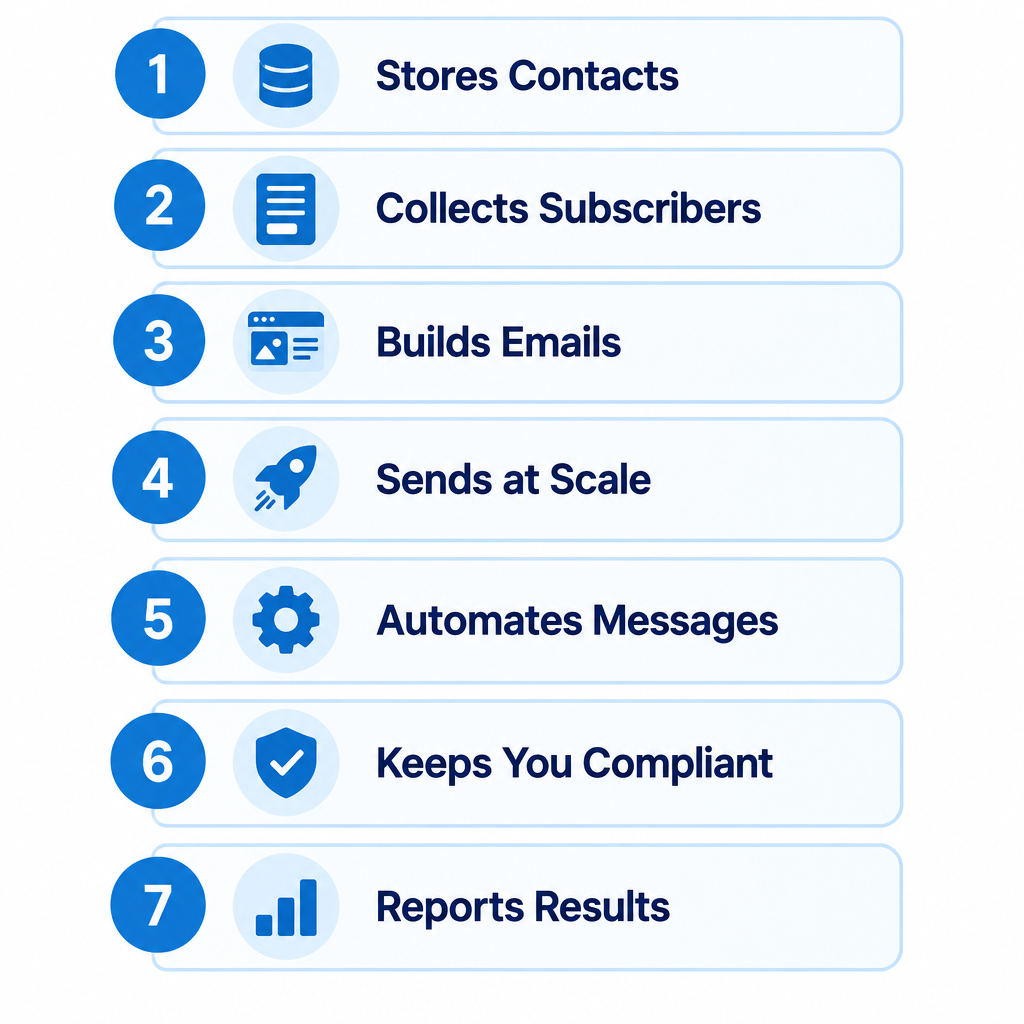
The 7 jobs an ESP does for you
1. Stores and manages your contacts
Your list lives in the ESP, along with each person’s sign-up date, source, consent record and any custom fields (first name, last purchase, plan type). Good list management means you can segment by behaviour, suppress people who bounced and prove consent if a regulator asks.
2. Collects new subscribers
Most ESPs give you sign-up forms, pop-ups and landing pages, plus double opt-in confirmation. That last feature is worth turning on. It keeps typos and fake addresses off your list from day one.
3. Builds the email itself
Drag-and-drop editors, templates, image hosting and HTML editing are standard. Better tools also preview how your content renders in different email clients and on mobile, which saves you from the broken layouts that kill click rates.
4. Sends at scale without getting blocked
Sending is the core job. An ESP throttles delivery so Gmail does not see 50,000 messages arrive in one second, retries soft bounces, and routes mail through IP addresses with an established reputation. It also processes feedback loops, so when someone hits “report spam” at a mailbox provider that offers one, that person stops getting your mail.
5. Automates messages
Welcome series, abandoned cart flows, birthday emails, re-engagement sequences. You build the logic once and the ESP triggers each message when a subscriber does (or fails to do) something. For ecommerce, automated flows often earn more revenue per send than one-off campaigns.
6. Keeps you compliant
The ESP adds an unsubscribe link, processes opt-outs automatically and inserts your physical mailing address, both of which CAN-SPAM requires. Under GDPR, it helps you store consent records and delete data on request. It cannot make an illegal list legal, but it removes most of the paperwork.
7. Reports on results
Delivered, bounced, opened, clicked, unsubscribed, complained, and on ecommerce platforms, revenue. Treat open rates with caution: Apple Mail Privacy Protection (launched in 2021) preloads images and inflates opens for anyone using Apple Mail. Clicks, conversions and complaint rates tell you far more.
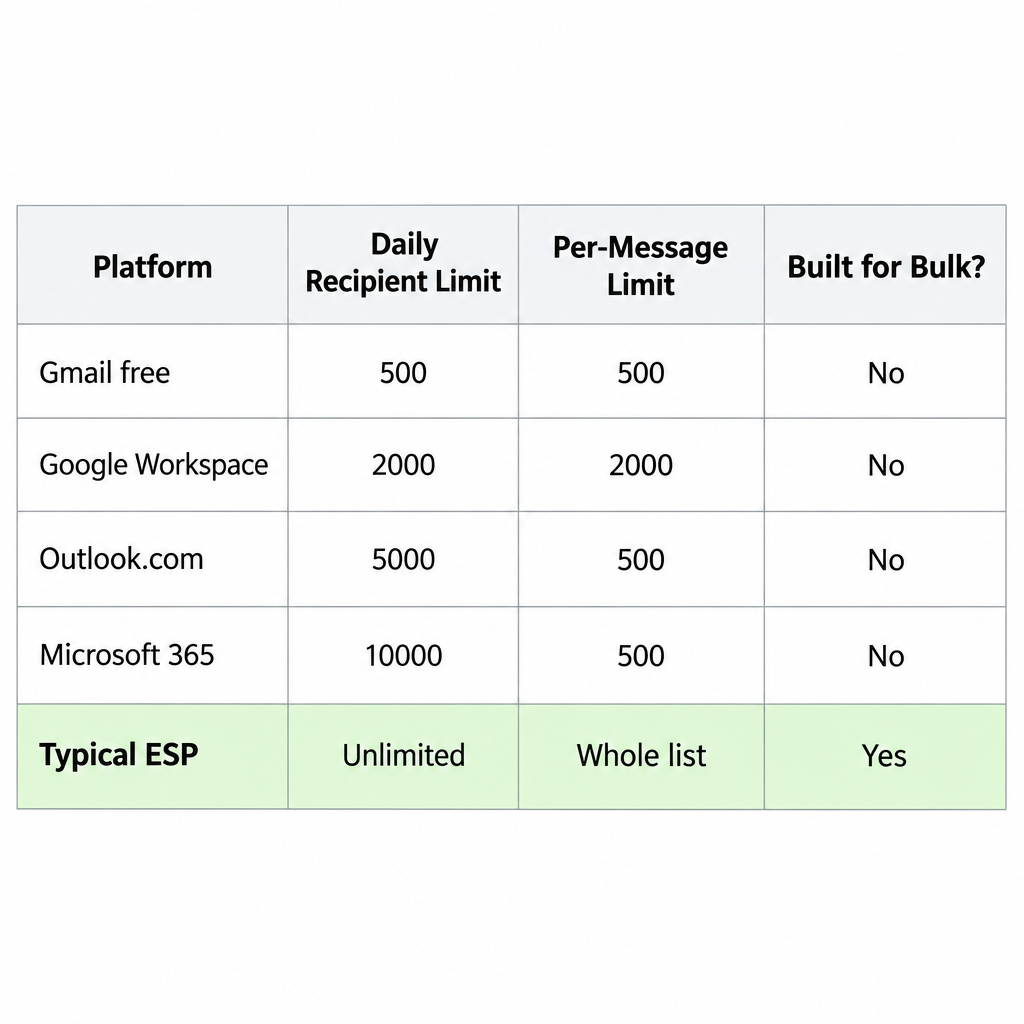
Why you can’t just use Gmail or Outlook
Personal and workplace mailboxes are built for one-to-one conversation. They have hard daily caps, and they will lock or suspend accounts that look like they are blasting a list.
| Service | Daily recipient limit | Per-message limit | Built for bulk? |
|---|---|---|---|
| Gmail (free account) | 500 recipients | 500 | No |
| Google Workspace | 2,000 recipients | 2,000 total (500 external) | No |
| Outlook.com | 5,000 recipients | 500 | No |
| Microsoft 365 (Exchange Online) | 10,000 recipients | 500 | No |
| A typical ESP | Set by your plan, often unlimited | Whole list | Yes |
Limits as published by Google and Microsoft in their help documentation; they can change, and new accounts may face lower caps.
Volume is only part of the problem. Paste 200 customer addresses into CC in email and you have just shared every address with every recipient, which is a privacy breach under GDPR. Using BCC hides the addresses, but you still have no unsubscribe handling, no bounce processing and no reporting. One bad send can also drag down the reputation of the domain your staff use for everyday mail.
The sender rules that made ESPs non-negotiable
In October 2023, Google and Yahoo announced new requirements for bulk senders, with enforcement starting in February 2024. Microsoft later introduced similar rules for Outlook.com, Hotmail and Live addresses. These rules are why “I’ll just send it myself” stopped being a realistic option.
| Requirement | Gmail | Yahoo | Microsoft (Outlook.com) |
|---|---|---|---|
| Applies to | 5,000+ messages/day to Gmail | Bulk senders | 5,000+ messages/day |
| SPF and DKIM | Required | Required | Required |
| DMARC | At least p=none, aligned | At least p=none | At least p=none, aligned |
| One-click unsubscribe | Required (RFC 8058), from June 2024 | Required | Functional unsubscribe expected |
| Honour opt-outs | Within 2 days | Within 2 days | Promptly |
| Spam complaint rate | Below 0.3% (aim for under 0.1%) | Below 0.3% | Not published as a number |
| Enforcement start | February 2024 | February 2024 | May 5, 2025 |
Any decent ESP handles one-click unsubscribe headers for you. Authentication is a shared job: the ESP gives you DNS records, and you publish them on your domain. Here is what that typically looks like.
An SPF record authorises your sending services (this example combines Google Workspace and SendGrid):
example.com. TXT "v=spf1 include:_spf.google.com include:sendgrid.net ~all"
DKIM is usually a CNAME pointing to a key the ESP hosts and rotates (selector and host vary by provider):
s1._domainkey.example.com. CNAME s1.domainkey.u1234567.wl.sendgrid.net.
A starter DMARC policy that monitors without blocking anything:
_dmarc.example.com. TXT "v=DMARC1; p=none; rua=mailto:[email protected]"
Once your reports show legitimate mail passing, move to p=quarantine and eventually p=reject.
Deliverability risk
Sending from a shared ESP domain or without your own DKIM gets you filtered fast. Authenticate your own domain before your first campaign.
These records feed directly into how e-mail spam filtering at the big mailbox providers decides whether you land in the inbox, the Promotions tab or spam.
ESP vs CRM vs CDP vs MTA
People mix these up constantly, partly because vendors keep bolting features onto each other.
| Tool | What it does | Examples | Sends email? |
|---|---|---|---|
| ESP | Stores subscribers, builds and sends campaigns and automations | Mailchimp, Klaviyo, Brevo | Yes, its main job |
| CRM | Tracks customer relationships, sales pipeline and deals | Salesforce Sales Cloud, HubSpot CRM, Pipedrive | Usually one-to-one only, or via a connected ESP |
| CDP | Unifies customer data from every source into one profile | Segment, Bloomreach, Klaviyo’s CDP | No, it feeds the ESP |
| MTA | The server software that actually relays mail | Postfix, PowerMTA | Yes, but with no marketing tools |
The lines blur. HubSpot sells marketing email inside its platform. Klaviyo now markets itself as a CDP with email and SMS on top. The question to ask is simple: which tool actually sends your mail and owns your sending reputation? That is your ESP.
Types of ESPs
Not every provider targets the same customer. Picking from the wrong category is the most common mistake I see.
| Category | Best for | Examples | Typical pricing model |
|---|---|---|---|
| Small business and creator | Newsletters, simple automations | Mailchimp, MailerLite, Kit, Brevo | By contacts, free tiers common |
| Ecommerce | Shopify and WooCommerce stores | Klaviyo, Omnisend | By contacts, revenue reporting built in |
| Enterprise marketing clouds | Large brands, multiple channels | Salesforce Marketing Cloud, Braze, Bloomreach | Annual contracts, custom quotes |
| Transactional and API | Receipts, password resets, app notifications | Postmark, SendGrid, Mailgun, Amazon SES | By volume sent |
Amazon SES shows how cheap raw sending can be: $0.10 per 1,000 emails at its standard published rate. You pay for that low price with zero templates, list management or friendly interface. Developers wire it up using APIs and webhooks, which let the ESP push bounce, open and click events back to your own application in real time.
For a closer look at the first category, our roundup of small business email platforms compares the main options side by side.
How to choose the right ESP for your business
Start from what you send, not from feature lists. A store owner needs product feeds and cart flows. A writer needs a clean editor and paid subscription support. A SaaS company needs a fast transactional API and probably a separate marketing tool.
Choosing an ESP
- List every email type you send: newsletters, promotions, receipts, onboarding.
- Count your contacts and expected monthly sends for the next 12 months.
- Shortlist providers in the right category for your business model.
- Check native integrations with your store, CRM or sign-up forms.
- Confirm custom domain authentication with your own DKIM.
- Price each option at your projected list size, not today’s.
- Run a real campaign on a free tier or trial before committing.
A few things matter more than people expect:
- Pricing curves. Contact-based pricing feels cheap at 500 subscribers and can climb steeply at 50,000. Some ESPs also bill for unsubscribed contacts you keep on file.
- Data export. You should be able to download your full list, tags and engagement history at any time.
- Support. Free plans often get email support only. If a deliverability problem hits during a launch, that matters.
- Dedicated vs shared IPs. Shared IPs suit most senders under roughly 100,000 emails a month. Dedicated IPs only help if you send enough volume to build their reputation.
Inbox tip
Send your first campaigns only to people who opened or clicked in the last 90 days. Strong early engagement builds reputation on a new ESP far faster than blasting the full list.
When to switch ESPs
Switching is a real project, so do it for a real reason. Good reasons include outgrowing the automation tools, pricing that has jumped past what the platform earns you, missing integrations your business now depends on, or persistent deliverability problems that support cannot explain.
A bad reason is a single disappointing campaign. Deliverability is mostly about your list quality and engagement, and those problems follow you to any platform.
If you do move, plan for these steps:
- Export everything, including suppression lists (unsubscribes, bounces, complaints). Importing those people into the new tool as active contacts is a fast route to complaints.
- Rebuild automations before you switch off the old ones, so nobody falls into a gap.
- Publish the new provider’s SPF and DKIM records before your first send, and remove the old ones once you have fully cut over.
- Warm up gradually. Start with your most engaged segment and increase volume step by step; a new dedicated IP typically needs four to eight weeks.
- Watch Google Postmaster Tools and your complaint rate daily for the first month.
FAQ
What are ESPs in simple terms?
ESPs are companies that send email on your behalf to large lists. They give you the tools to collect subscribers, design emails, automate sends and track results, plus the infrastructure to get those emails delivered.
Is Gmail an ESP?
No. Gmail is a mailbox provider, the service where people receive and read email. ESPs send into Gmail. Google’s own bulk sending rules are aimed at ESPs and the businesses using them.
Do I need an ESP for a small list?
If you are emailing a list of subscribers rather than individual contacts, yes. Even at 100 people, you need unsubscribe handling and consent records to stay within CAN-SPAM and GDPR, and many ESPs offer free plans for small lists.
Can I use more than one ESP?
Yes, and many businesses do. A common setup pairs a marketing ESP for newsletters and promotions with a transactional service for receipts and password resets, often on separate subdomains so one stream cannot hurt the other’s reputation.
What does an ESP cost?
It ranges from free tiers for small lists to six-figure annual contracts for enterprise platforms. Most small business tools charge monthly based on contact count, while transactional services usually charge per thousand emails sent.