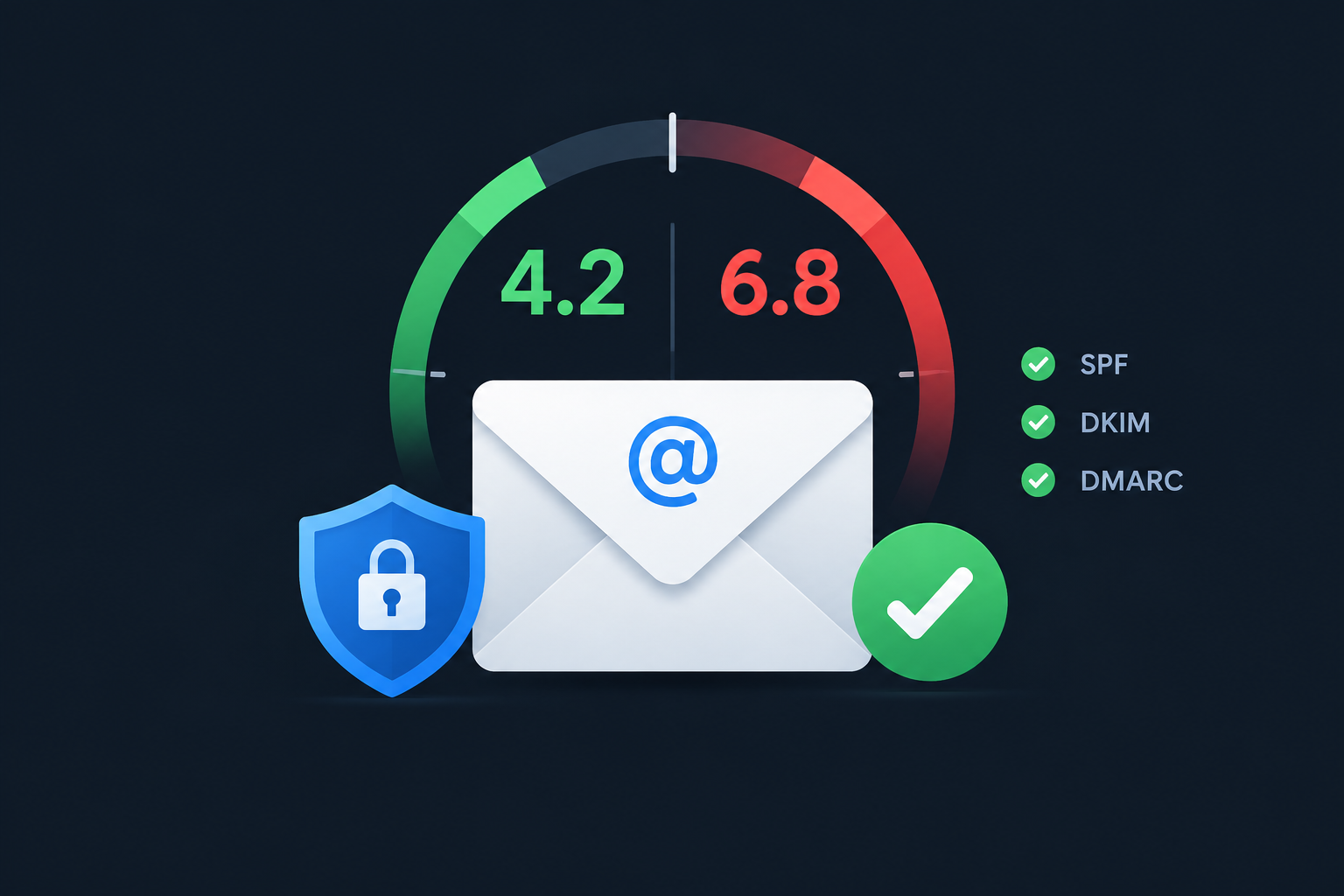
A SpamAssassin score is the total of points a message collects from hundreds of spam tests. Positive points look spammy, negative points look legitimate, and on a default install anything scoring 5.0 or higher gets flagged as spam. You lower your score by fixing the specific rules your message triggers, and those rules are listed in the message headers.
What a SpamAssassin Score Actually Is
Apache SpamAssassin is an open-source spam filter maintained by the Apache Software Foundation. It has been around since the early 2000s, and the current major release is the 4.0 branch, first shipped in December 2022. You rarely interact with it directly. It runs behind the scenes on web hosting servers, cPanel accounts, university mail systems, corporate gateways and plenty of self-hosted mail setups.
SpamAssassin does not give a message a yes-or-no verdict straight away. It runs the message through a large set of rules, and each rule that matches adds or subtracts a fixed number of points. Then it compares the total against a threshold called required_score.
How the points add up
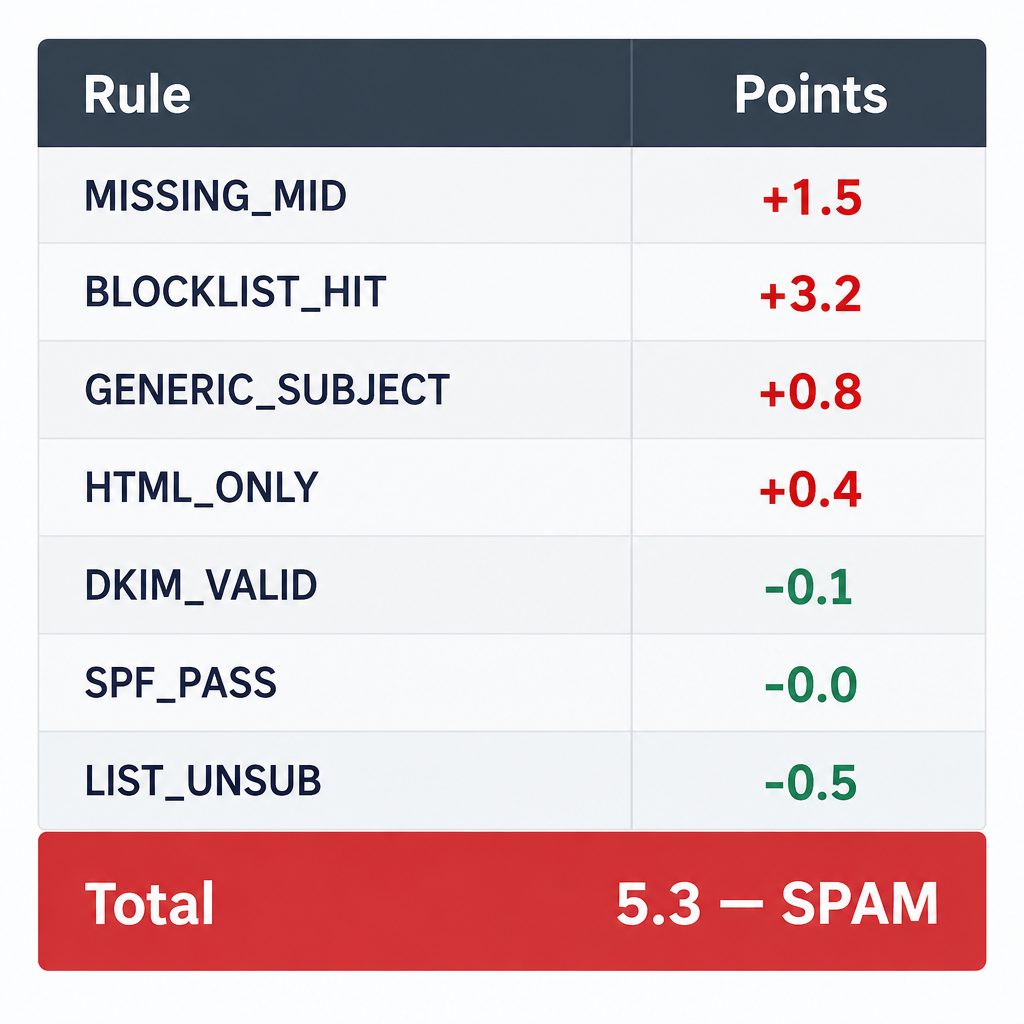
Think of it as a ledger. A missing Message-ID header might add some points. A link to a domain on a spam blocklist adds a lot. A valid DKIM signature from the sending domain subtracts a fraction of a point. The final number is just the sum.
A few properties of this system matter when you try to lower a score:
- Most rules are worth less than one point. A message usually crosses 5.0 because it trips several medium rules together, not because of one catastrophic error.
- A handful of rules carry heavy weight. Blocklist hits on your sending IP or your linked domains can push you near the threshold on their own.
- Negative rules are small. Passing SPF or DKIM earns almost nothing. The real value of authentication is avoiding the failure rules, which cost far more.
- Scores change over time. Rule scores are regenerated from large mail corpora and distributed through
sa-update, so the same message can score differently six months later.
SpamAssassin also uses four “score sets,” depending on whether Bayesian filtering and network tests are enabled on that server. The same rule can carry a different weight on a host with network checks turned on than on one running offline. This is one reason your score on a testing tool rarely matches your score on a recipient’s server exactly.
Reading the X-Spam headers
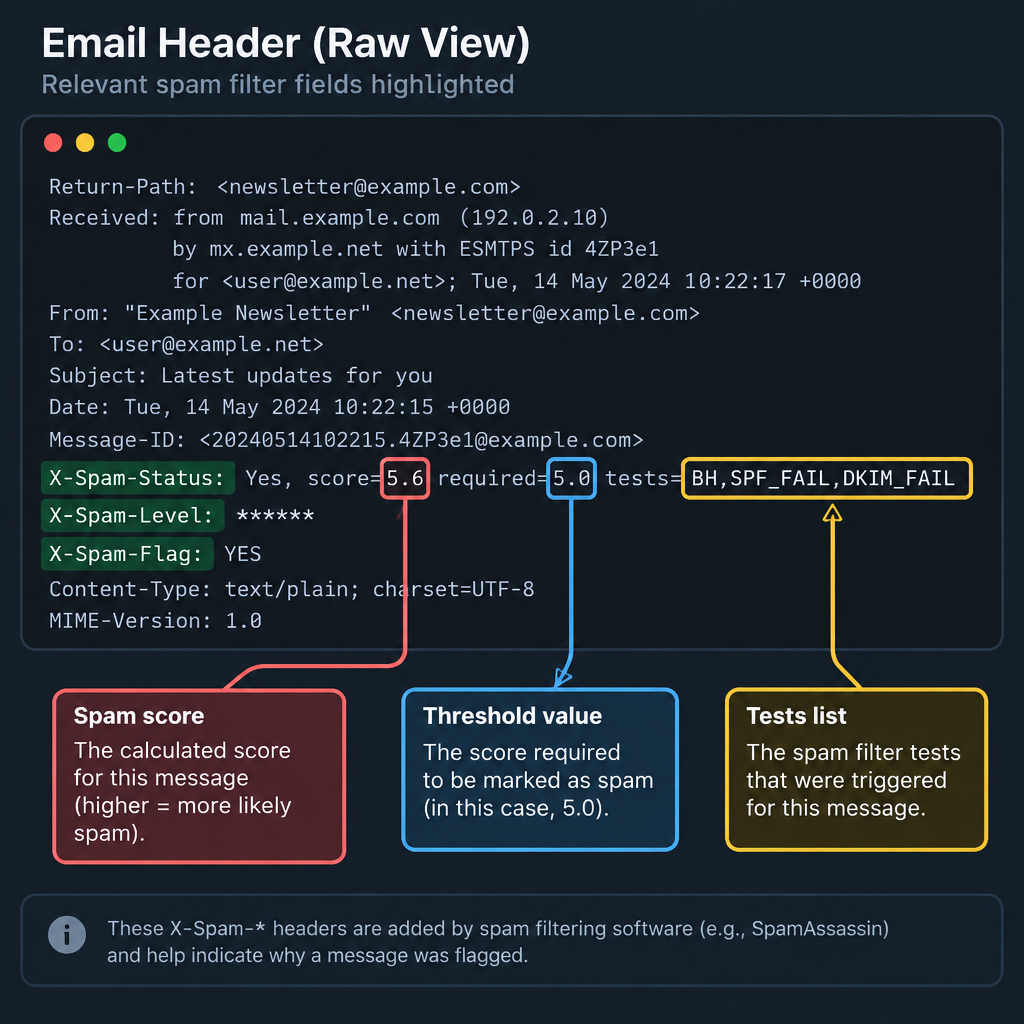
When SpamAssassin scans a message, it adds headers you can see by viewing the raw source (in most clients, “Show original,” “View source” or “Message details”). A typical result looks like this:
X-Spam-Checker-Version: SpamAssassin 4.0.0 on mail.example.com
X-Spam-Level: *
X-Spam-Status: No, score=1.3 required=5.0 tests=DKIM_SIGNED,DKIM_VALID,
    DKIM_VALID_AU,HTML_MESSAGE,MIME_HTML_ONLY,SPF_HELO_NONE,SPF_PASS
    autolearn=no autolearn_force=no version=4.0.0
Here is what each part tells you:
| Header | What it means |
|---|---|
X-Spam-Status |
Yes or No verdict, the score, the threshold and every rule that matched |
X-Spam-Level |
One asterisk per whole point, handy for simple folder filters |
X-Spam-Flag: YES |
Added only when the message crossed the threshold |
X-Spam-Report |
Optional detailed breakdown with points per rule, if the admin enabled it |
X-Spam-Checker-Version |
SpamAssassin version and the server that scanned it |
The tests= list is your to-do list. Every rule name in it is documented, and each one points to something specific about your sending setup or content.
How the SpamAssassin Spam Filter Processes a Message
People often treat SpamAssassin as the thing that deletes their mail. It is better to think of processing as two separate stages, because the second stage is usually configured by someone else.
Stage one: scoring
The mail server hands the incoming message to SpamAssassin, commonly through the spamd daemon and its spamc client, or through a wrapper like amavisd-new or MIMEDefang. SpamAssassin runs its header, body, URI, network and Bayesian tests, adds up the points and writes the headers shown above.
At this point nothing has been blocked. The message has simply been labelled. Depending on configuration, SpamAssassin may also rewrite the subject line (for example adding *****SPAM*****) using the rewrite_header Subject setting.
Stage two: acting on the score
Something else decides what happens next. That might be:
- The mail server rejecting messages above a very high score during the SMTP conversation
- A hosting panel moving flagged mail into a spam folder
- A Sieve or procmail rule filing anything with
X-Spam-Flag: YES - An auto-delete rule that silently discards mail above a chosen score
That last option is where legitimate mail disappears without a trace. If your recipients’ host auto-deletes at a low score, your message never even reaches a junk folder. If you want the bigger picture of how these layers interact with other filters, our guide on how email spam filters work and why messages get caught covers the full chain.
What mail gets checked for spam
Not every message gets scanned, and that surprises a lot of admins.
- Size limits.
spamcskips messages larger than its size cap, which defaults to 500 KB. Big attachments often pass through unscored. - Trusted and internal networks. Mail from IPs listed in
trusted_networksorinternal_networksis treated differently, and many setups skip scanning for authenticated users sending outbound. - Per-account toggles. On shared hosting, spam filtering is often off until the account owner turns it on.
- Outbound mail. Some providers scan outgoing mail too, to catch compromised accounts before they damage the server’s reputation.
So if you see no X-Spam headers at all, the message may simply never have been checked.
The Rules That Decide Your Score
SpamAssassin ships with several rule types. Knowing which family a rule belongs to tells you where to look for the fix.
Header tests
Header rules inspect the envelope and message headers. These are the ones senders trip most often through misconfiguration rather than spammy intent.
From: header. Rules look at whether the From address uses a free webmail domain, whether the display name contains an address that differs from the real one, and whether the header is oddly encoded. FREEMAIL_FROM fires when bulk mail comes from addresses like gmail.com or yahoo.com, and FROM_EXCESS_BASE64 catches unnecessarily encoded From lines.
To: header. A missing To header, an “undisclosed recipients” placeholder, or a To address that does not match the actual recipient can all add points. Mail that looks like one copy blasted to everyone is a classic spam signal.
Cc: header. Long Cc lists full of addresses from the same domain look like address harvesting. Legitimate bulk email marketing sends one message per recipient, which keeps Cc empty.
Subject: header. All-caps subjects (SUBJ_ALL_CAPS), heavy punctuation, empty subjects and known spam phrases trigger rules here. One shouted word rarely hurts. A subject like “FREE!!! ACT NOW” stacks several small penalties.
Date: header. MISSING_DATE and the DATE_IN_FUTURE_* and DATE_IN_PAST_* family catch messages with no date or a date far from when the message was received. A server with a broken clock or a script building messages by hand is the usual cause.
Other header rules worth knowing: MISSING_MID (no Message-ID), RDNS_NONE (the connecting IP has no reverse DNS), and FREEMAIL_FORGED_REPLYTO (a free webmail Reply-To that differs from the From address, a common scam pattern).
Body and URI tests
Body rules scan the decoded text. They look for spam phrasing, hidden text such as HTML_FONT_LOW_CONTRAST, and structure problems. MIME_HTML_ONLY fires when there is no plain-text version. The HTML_IMAGE_RATIO_* and HTML_IMAGE_ONLY_* rules catch emails that are mostly one big image with little text.
URI rules extract every link and check the domains. Linking to a domain on a URI blocklist is one of the fastest ways to gain points, and it does not matter that your own domain is clean. Public link shorteners and cheap tracking domains shared with spammers are frequent offenders.
Network tests
These rules query outside services in real time:
- DNS blocklists such as Spamhaus check the sending IP. Rule names start with
RCVD_IN_. - URI blocklists such as SURBL, URIBL and Spamhaus DBL check linked domains. Rule names start with
URIBL_. - Collaborative checksum networks (Razor, Pyzor and DCC) compare a fingerprint of your message against messages other users reported as spam or seen in huge volume.
A note for admins: if you see URIBL_BLOCKED in your headers, the blocklist refused your server’s DNS queries. This usually happens when a server uses a large public resolver such as 8.8.8.8, which the blocklists throttle. The rule itself scores almost nothing, but it means your URI checks are silently not working. Running a local recursive resolver fixes it.
Bayesian filtering
Bayesian filtering is the part of SpamAssassin that learns. It breaks messages into tokens (words, header fragments, URL pieces) and estimates how likely each token is to appear in spam versus legitimate mail on that specific server. The result lands in one of the BAYES_00 to BAYES_99 rules, where BAYES_00 means almost certainly ham and BAYES_99 means almost certainly spam.
Some details that make Bayes behave the way it does:
- It stays switched off until it has learned at least 200 spam and 200 ham messages, the defaults for
bayes_min_spam_numandbayes_min_ham_num. - It can auto-learn. By default, messages scoring below 0.1 are learned as ham and messages scoring 12.0 or higher are learned as spam.
- It is personal to the server or user. A message that hits
BAYES_00at one company can hitBAYES_80at another whose users report similar newsletters as junk.
For senders, Bayes is the hardest factor to control directly. Consistent sending and content people actually want to open keep you out of the high Bayes bands over time.
How to Check Your SpamAssassin Score
You have three practical ways to see your score before real recipients do.
Send to a seed address and read the headers. If you have an account on a host running SpamAssassin (most cPanel hosts do), send your campaign there and open the raw source. This shows you exactly how that server scored you.
Use a testing service. Mail-tester gives you a temporary address, scores the message with SpamAssassin and presents the result as a grade out of 10 alongside the rules that fired. Postmark runs a free Spamcheck API that accepts a raw message and returns a SpamAssassin score and rule breakdown as JSON, which is useful if you want to check templates automatically from a build pipeline or a webhook-driven workflow.
Run it yourself. If you have SpamAssassin installed, save a raw message as a .eml file and run:
spamassassin -t < message.eml
The -t flag prints a report with points per rule. Add -D for verbose debug output when you need to see why a network test failed, and run spamassassin --lint after editing configuration to catch syntax errors.
Inbox tip
Test the exact message you plan to send, from the exact platform and domain you will send it from. A draft pasted into a test tool from your personal mail account will score completely differently.
How to Lower Your SpamAssassin Score as a Sender
Work from the tests= list, biggest offenders first. In practice, the fixes fall into a predictable order.
Lower your score in order
- Send a test and copy the full rule list from X-Spam-Status.
- Fix any authentication failures: SPF, DKIM, DMARC.
- Confirm your sending IP has matching reverse DNS.
- Check your IP and linked domains against blocklists.
- Add a plain-text part and balance images with text.
- Clean up subject lines and From details.
- Retest and compare the rule list.
Fix authentication first
Failure rules such as SPF_FAIL, SPF_SOFTFAIL and DKIM_INVALID cost real points, and they also hurt you with Gmail, Yahoo and Microsoft. SpamAssassin 4.0 also added a DMARC plugin, so failing DMARC can now show up in your score on updated servers.
A basic SPF record for a domain that sends through Google Workspace and one email platform looks like this:
example.com. IN TXT "v=spf1 include:_spf.google.com include:sendgrid.net ~all"
Swap the includes for the services you actually use, and keep it to one SPF record per domain. Multiple SPF records cause a permanent error, which counts as a failure.
DKIM is published by your sending platform as a TXT or CNAME record at a selector it gives you:
s1._domainkey.example.com. IN TXT "v=DKIM1; k=rsa; p=MIIBIjANBgkqh...IDAQAB"
A starter DMARC record that monitors without blocking:
_dmarc.example.com. IN TXT "v=DMARC1; p=none; rua=mailto:[email protected]"
Since February 2024, Gmail and Yahoo require SPF, DKIM and at least a p=none DMARC policy from anyone sending more than 5,000 messages a day, and Microsoft began enforcing similar rules for Outlook.com in May 2025. Fixing these for SpamAssassin fixes them for the big providers too.
Fix the server-level signals
If you run your own mail server, make sure the sending IP has a PTR record that resolves back to the same hostname your server announces in HELO. RDNS_NONE and RDNS_DYNAMIC are common on cheap VPS setups. Also confirm the server clock syncs with NTP, which kills the date rules, and that your MTA generates a Message-ID. If you send from an application, route it through a proper relay on an authenticated SMTP port instead of having the app speak directly to recipient servers.
Fix the content signals
Content rules are usually the cheapest to fix and the most often ignored.
- Always send multipart messages with both HTML and plain-text versions. Every serious sending platform does this automatically if you let it.
- Avoid single-image emails. Put real text in the message and keep images supporting it.
- Use your own domain for links and tracking where your platform supports it, and skip public link shorteners.
- Drop hidden text, tiny fonts and white-on-white tricks. They trip specific rules.
- Write subject lines in normal case with one exclamation mark at most.
Common rules and how to fix them
| Rule | What triggers it | Fix |
|---|---|---|
MISSING_MID |
No Message-ID header | Let your MTA or platform generate one |
MISSING_DATE, DATE_IN_FUTURE_* |
No date or a wrong clock | Sync the server with NTP |
MIME_HTML_ONLY |
No plain-text part | Send multipart/alternative |
HTML_IMAGE_RATIO_* |
Too many images, too little text | Add real copy |
FREEMAIL_FROM |
Bulk mail from a webmail address | Send from your own domain |
FREEMAIL_FORGED_REPLYTO |
Webmail Reply-To differs from From | Use a Reply-To on your domain |
RDNS_NONE |
Sending IP has no PTR record | Ask your host to set reverse DNS |
SPF_SOFTFAIL, SPF_FAIL |
Sender not in SPF record | Add the service’s include |
DKIM_INVALID |
Signature broken in transit | Check footers or relays modifying mail |
RCVD_IN_* |
Sending IP on a DNS blocklist | Find the cause, then request delisting |
URIBL_* |
Linked domain on a URI blocklist | Remove or replace the link |
SUBJ_ALL_CAPS |
Subject entirely in capitals | Use normal casing |
Rules starting with T_ are testing rules with near-zero scores. You can ignore them unless they later get promoted.
Deliverability risk
Blocklist hits on your IP or links outweigh everything else. Purchased or scraped lists are the fastest way onto them, and no amount of content tweaking will rescue mail sent to addresses that never opted in.
If you send through a shared platform and keep landing on IP blocklists, the problem may be your provider’s pool rather than you. Our roundup of the best email marketing platforms for small businesses compares providers on exactly that kind of infrastructure.
Tuning SpamAssassin as an Admin or Mailbox Owner
The other half of the search intent comes from people on the receiving end: either too much spam is getting through or legitimate mail is getting flagged. Here is how to adjust it.
The customization form in your hosting panel
On cPanel hosting, SpamAssassin settings live under cPanel » Email » Spam Filters. The interface typically offers:
- A master toggle to process new emails and mark them as spam
- An option to move new spam to a separate folder (the “Spam Box”)
- An option to auto-delete spam above a score you choose
- A spam threshold score setting
- Additional configuration for allowed senders, blocked senders and custom rule scores
Other panels such as Plesk and DirectAdmin offer similar forms with different labels. Under the hood, they all write the same SpamAssassin settings.
Reducing the “required hits” needed to mark a message as spam
Older versions and some hosting panels still call the threshold required_hits. Modern SpamAssassin uses required_score. Either way, it is the number that separates spam from ham, and the default is 5.0.
Lowering it to 4 or 4.5 catches more spam but flags more legitimate mail. Raising it to 6 or 7 does the opposite. In local.cf (usually /etc/mail/spamassassin/local.cf, or /etc/spamassassin/local.cf on Debian and Ubuntu):
required_score 4.5
Change it in half-point steps and watch your spam folder for a week before going further. Never set auto-delete at the same score as your threshold. A safer pattern is to file anything at 5.0 or above into a spam folder and only auto-delete above 10 or 15, where false positives are rare.
Welcomelisting senders
SpamAssassin 4.0 renamed whitelists and blacklists to welcomelists and blocklists. The old option names still work for backward compatibility, but use the new ones for new configs.
welcomelist_from [email protected]
welcomelist_from *@trustedvendor.com
A welcomelist hit triggers USER_IN_WELCOMELIST (formerly USER_IN_WHITELIST), which carries a large negative score and effectively guarantees delivery. That is also the danger. Spammers forge From addresses constantly, so a plain welcomelist_from on a big brand’s domain can wave through phishing. The safer option checks authentication first:
welcomelist_auth *@trustedvendor.com
This only applies when SPF or DKIM confirms the sender really is that domain. Use it for anything important. It is particularly useful for an internal newsletter or HR announcement that keeps getting flagged by your company’s own gateway because it is image-heavy and goes to everyone at once.
Blocklisting senders
blocklist_from *@spammydomain.example
This triggers USER_IN_BLOCKLIST at +100 points. It works well for persistent senders who ignore unsubscribes. It works poorly against real spam campaigns, which rotate domains daily.
Blocklisting recipients
This one confuses people. blocklist_to matches the recipient address, not the sender:
blocklist_to [email protected]
It is useful for retired addresses or catch-all aliases that now receive nothing but spam. Any message sent to that address picks up a big penalty. There is also welcomelist_to for addresses such as abuse@ or postmaster@ that must receive spam samples without filtering.
Overriding individual rule scores
If one rule keeps hurting legitimate mail on your server, adjust it rather than changing the global threshold:
score FREEMAIL_FROM 0.5
score HTML_IMAGE_RATIO_02 0
Setting a score to 0 disables the rule. Individual users can place the same settings in ~/.spamassassin/user_prefs if the admin allows user preferences. Keep a comment next to each override explaining why, because six months later nobody will remember.
You can also write custom rules. A simple header rule looks like this:
header   LOCAL_FAKE_INVOICE  Subject =~ /binvoices+overdueb/i
score    LOCAL_FAKE_INVOICE  2.0
describe LOCAL_FAKE_INVOICE  Subject claims an overdue invoice
Prefix local rules with something like LOCAL_ so they never collide with official rule names.
Keep rules updated and train Bayes
Run sa-update on a schedule (daily is common) and restart spamd afterwards so new rules load. A server running rules from years ago misses current spam patterns and may score modern legitimate mail badly.
Train Bayes with real mail from your own users:
sa-learn --spam /path/to/spam-folder
sa-learn --ham /path/to/inbox-folder
Feed it balanced samples. Training only on spam skews the model and pushes legitimate mail into higher Bayes bands. Clear out a bloated spam folder first if you need to; the same approach you would use to bulk delete Gmail emails applies, keep a recent clean sample and remove the rest.
Inbox tip
Before training Bayes, check that your “ham” folder really is clean. A few misfiled spam messages in a small training set do more damage than having no Bayes at all.
Why a Low Score Doesn’t Guarantee the Inbox
This is the part most score checkers skip. Gmail, Yahoo and Microsoft do not run SpamAssassin on consumer mailboxes. They use their own machine-learning filters, sender reputation data and engagement signals. A message scoring -0.5 on mail-tester can still land in Gmail’s spam folder, and a message scoring 4 can land in the primary tab.
Treat your SpamAssassin score as a technical health check. It reliably catches broken authentication, missing headers, blocklisted links and sloppy HTML. It cannot measure whether your recipients want your mail. For Gmail and Yahoo, the numbers that matter most are your spam complaint rate (keep it under 0.3%, and ideally under 0.1%), one-click unsubscribe support, and consistent sending from an authenticated domain.
SpamAssassin still matters a great deal for B2B senders. Many business, university and hosting-provider inboxes sit behind SpamAssassin or gateways that borrow its rules. If your list is full of company domains, a clean score is close to essential.
FAQ
What is a good SpamAssassin score?
Anything below 5.0 passes a default install, but aim for under 2.0 to leave room for servers with stricter thresholds or different score sets. A score at or below zero is excellent and usually means you are authenticated and triggering no meaningful content rules.
Is a negative SpamAssassin score possible?
Yes. Rules like DKIM_VALID_AU and SPF_PASS subtract small amounts, BAYES_00 subtracts more, and a welcomelist entry subtracts 100. Most well-configured legitimate mail scores close to zero or slightly negative.
What is the difference between required_hits and required_score?
They are the same threshold. required_hits is the older name, and required_score is the current one. Both default to 5.0, and hosting panels sometimes still show the older label.
Why is my score different on mail-tester than on my client’s server?
Each server uses its own SpamAssassin version, rule updates, score set, network tests, Bayes database and local overrides. Testing tools give you a useful baseline, not the exact score every recipient will calculate.
Does SpamAssassin check attachments?
It scans the message structure and can flag suspicious attachment types, but it is not an antivirus scanner. Many setups also skip messages above a size limit entirely, with spamc defaulting to 500 KB, so large attachments often bypass scoring altogether.
Should I lower my spam threshold below 5?
Only if spam is clearly getting through and you have checked that Bayes and network tests are working. Fixing URIBL_BLOCKED, updating rules and training Bayes usually do more than moving the threshold, and they carry far less risk of losing legitimate mail.